
Product
Profiles Top Functions
Rank the functions in a service by self and total CPU samples with the Last9 Profiles top functions table.
The Top functions tab shows the same profile data as the flamegraph, as a sortable table. Open a service from the services view and switch to Top functions.
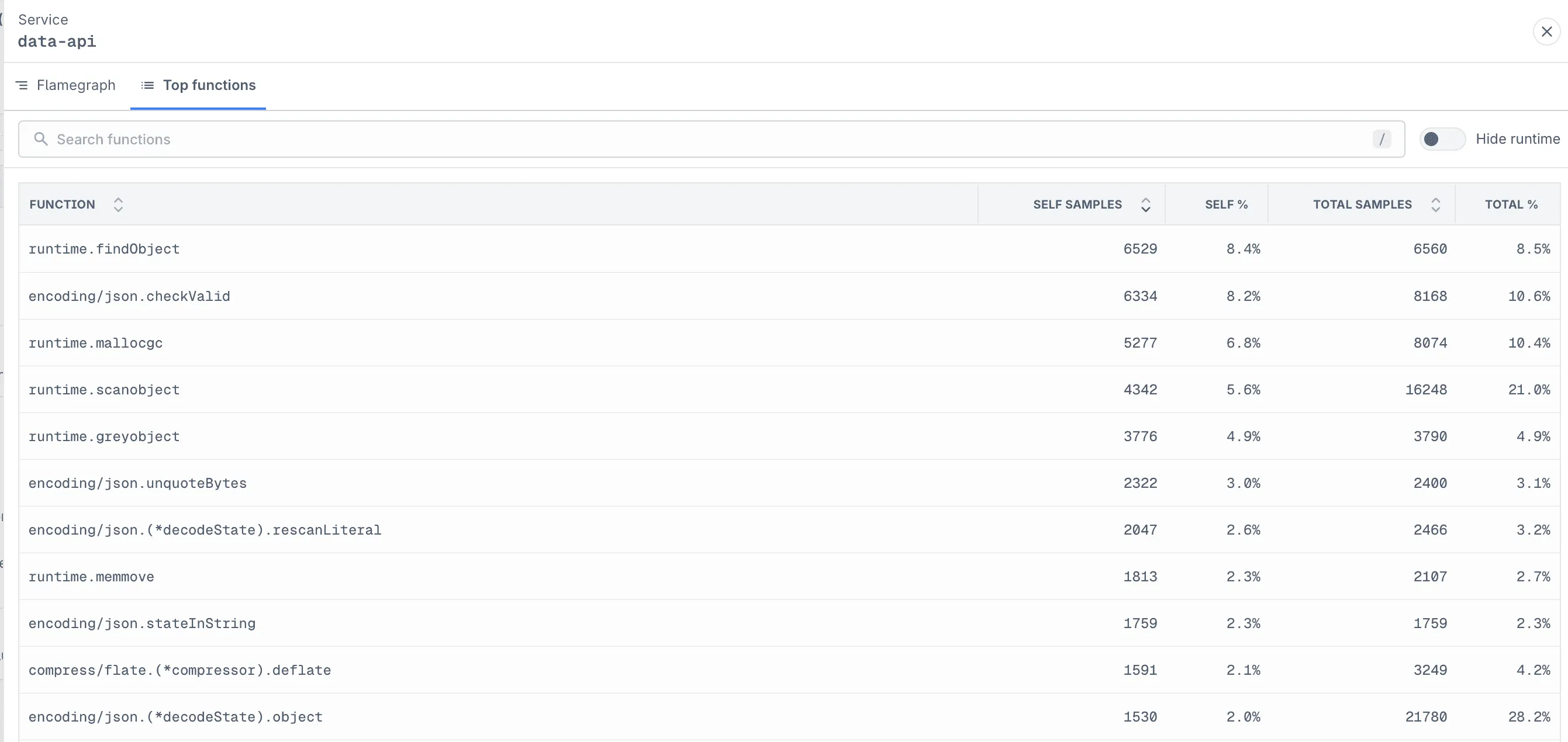
Columns
| Column | Description |
|---|---|
| Function | Function name. |
| Self samples | Samples where the function itself was executing. |
| Self % | Self samples as a share of all samples for the service. |
| Total samples | Samples where the function was anywhere on the stack. |
| Total % | Total samples as a share of all samples for the service. |
Choosing a Sort Order
- Sort by Self samples to find the functions doing the most work directly. These are usually the best optimization targets.
- Sort by Total samples to find the entry points and handlers that lead to the most expensive work.
Unlike the flamegraph, the table merges a function across every call path it appears in. A function that shows up as many thin slivers in the flamegraph can still rank near the top here.
Search functions filters the table to matching rows. For example, searching for encoding/json removes unrelated runtime entries from the table; in the flamegraph, matching frames are highlighted and non-matching frames remain visible but dimmed. Self % and Total % still use all samples for the service as their denominator, so searching does not change their values.
Hide runtime removes runtime and system functions, as in the flamegraph view.
Troubleshooting
Please get in touch with us on Discord or Email if you have any questions.