
Product
Change Events
Track deployment and configuration change events in Last9 to correlate them with service performance, error rates, and reliability metrics.
Why Change Events Matter?
Deployments, config tweaks, and third-party changes move your system in ways telemetry alone can’t explain. Change events record those moments so you can line a latency spike or error burst up against what changed.
Sending Change Events
Send an event to Last9’s HTTP API with a start or stop state. Last9 converts it into a metric named last9_change_events that you can query with PromQL, alert on, and see as markers on charts.
curl -XPUT https://app.last9.io/api/v4/organizations/{org_slug}/change_events \--header 'Content-Type: application/json' \--header 'X-LAST9-API-TOKEN: Bearer <LAST9_API_WRITE_TOKEN>' \--data-raw '{ "timestamp": "2024-01-15T17:57:22+05:30", "event_name": "new_deployment", "event_state": "start", "data_source_name": "{your_cluster_name}", "attributes": { "service_name": "frontend", "deployment_environment": "production", "version": "v2.1.4", "team": "platform", "change_type": "hotfix" }}'API Parameters
| Field | Description | Required |
|---|---|---|
timestamp | ISO8601 formatted timestamp of the event. Defaults to current time if not provided | No |
event_name | Custom event identifier. Added as a label to the resulting time series | Yes |
event_state | start or stop — marks when deployments/changes begin and complete. Defaults to start if not provided | No |
attributes | Key-value pairs used as labels while converting the change event to a metric | No |
value | Sample value for the datapoint. Defaults to 1 for a start event and 2 for a stop event | No |
data_source_name | Last9 cluster to store the events in. Defaults to the cluster designated for change events | No |
Only attributes becomes labels. The API adds event_name and event_state itself, so every other label on a last9_change_events series came from what you sent in attributes.
Where Change Events Appear
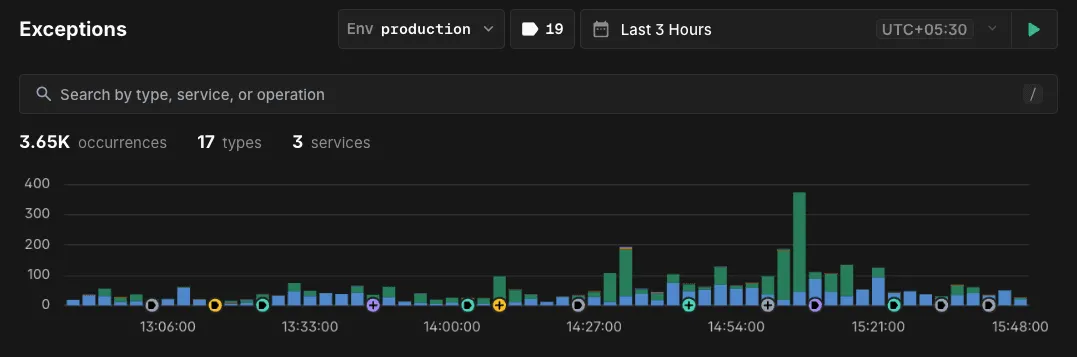
Events render as markers along the bottom of every timeseries chart on these surfaces:
| Surface | Scoped by service | Scoped by environment |
|---|---|---|
| Discover → Services | The service you are viewing | The Env selector |
| Discover → Exceptions | No — every service | The Env selector |
| Dashboards | The dashboard’s service variable | No |
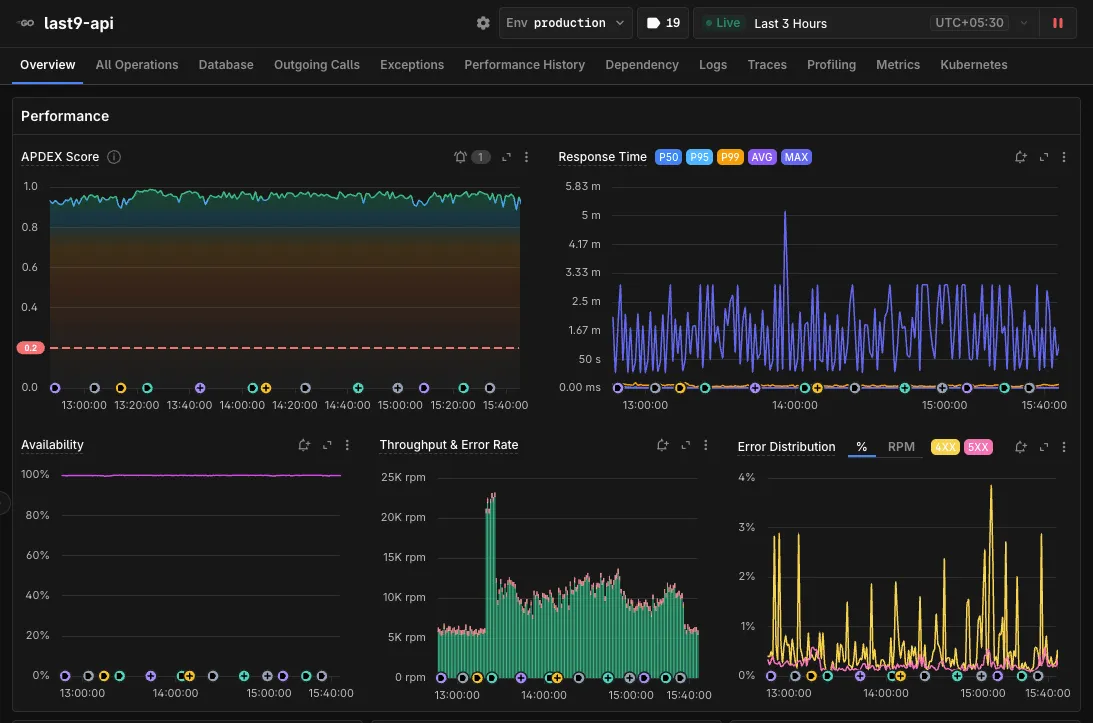
Scoping by Environment
On both Discover surfaces the Env selector filters the markers as well as the charts, so a production screen never shows an alpha deploy:
| Env selector | Markers shown |
|---|---|
| A named env | Only events carrying that environment |
| All | Every event, whatever environment it carries |
| Not Set | Only events where neither attribute is set |
Dashboards have no Env selector, so dashboard panels are not scoped by environment. They scope by the service variable only.
On Exceptions the service stays unscoped on purpose — a spike in exceptions is often caused by a deploy to a different service — so you see every service’s events for the selected environment.
Reading the Markers
Each marker is a coloured circle at the event’s timestamp, coloured by what Last9 infers from event_name:
| Order | Marker | Matched in event_name |
|---|---|---|
| 1 | Amber — feature flag | flag, launchdarkly, toggle, experiment |
| 2 | Violet — deploy | deploy, release, rollout, rollback, build, version |
| 3 | Teal — infrastructure | scal, restart, reboot, config, terraform, migration, maintenance, infra, node, cluster |
| — | Slate — other | Anything else |
Three rules decide the colour:
- Each term is a substring, not a whole word.
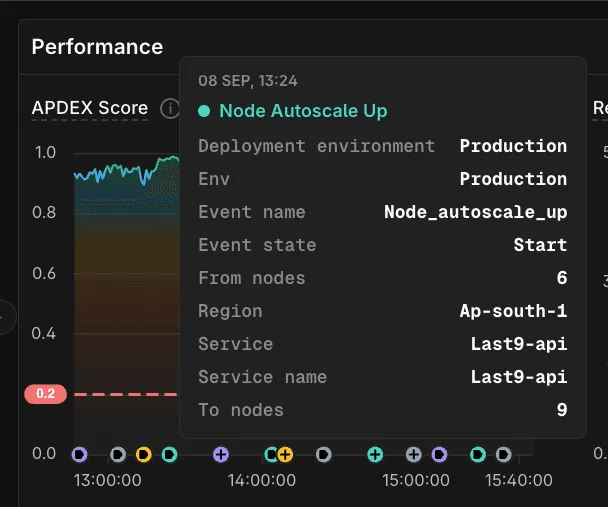
redeployis violet andreconfigureis teal. The teal term is the stemscal, soautoscale,downscale, andnode_autoscale_upall match it. - Matching ignores case.
Deploy_Startanddeploy_startget the same colour. - The first row that matches wins, in the order above.
flag_rollout_deployis amber, not violet, because the feature flag row is checked first.
Hover a marker for the event name, its timestamp, and every attribute you sent. Attribute values print exactly as you sent them, so case-sensitive identifiers like INC-2291, v2.15.0-rc3, and last9-api read back unchanged.
Markers too close together to draw apart collapse into one carrying a plus icon; zoom in to split them. A collapsed marker whose events do not all share one colour renders slate.
Showing and Hiding Markers
The change events toggle sits next to the time picker in the page header.
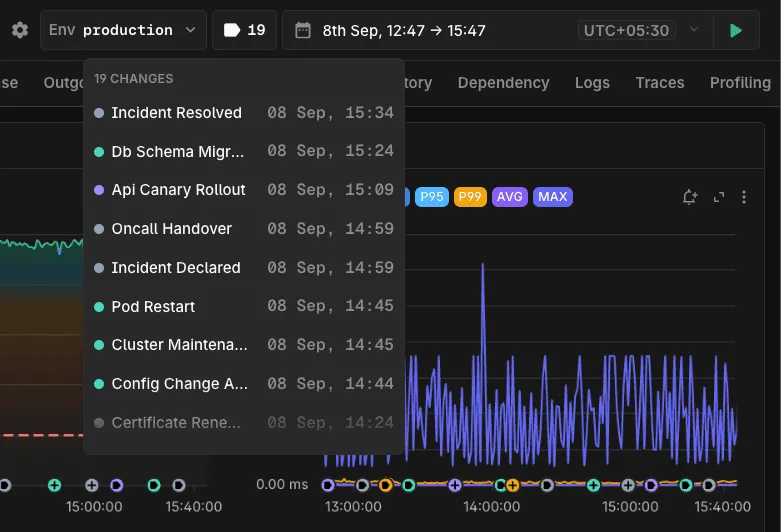
- Click it to show or hide markers on every chart at once. The state persists in the page URL, including on shared links.
- The count is events in the current range. Read it rather than counting markers — grouped markers hide their own number.
- Hover it for the full list, most recent first.
Change Events on Dashboards
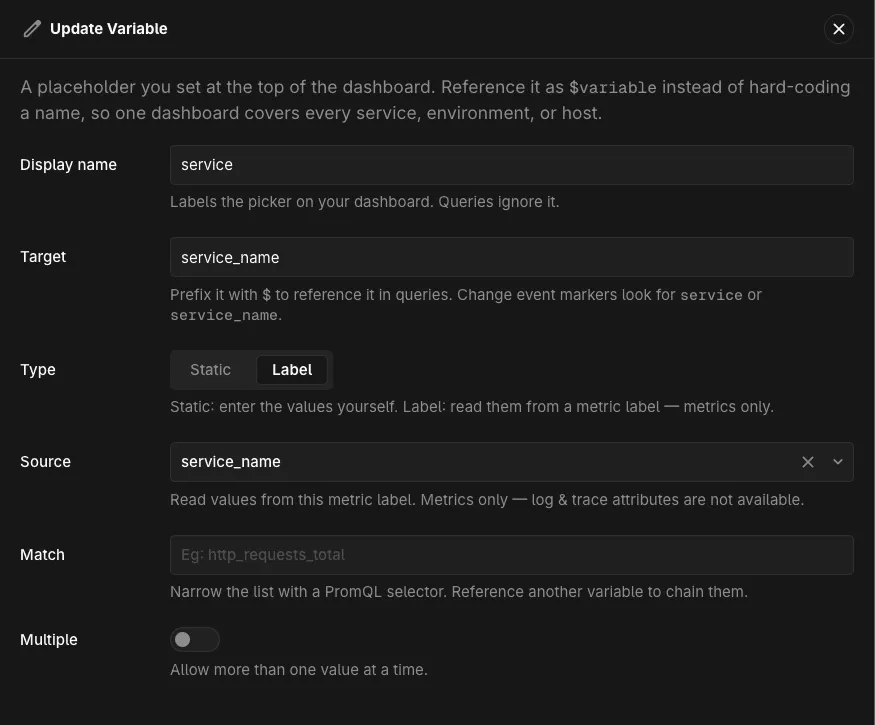
A dashboard takes its service from a variable. Markers appear only when the dashboard has a variable with Type set to Label and Target set to service or service_name. Static variables do not work — their values never resolve against your metrics.
See Use Dashboards for how to add one.
Querying Change Events
last9_change_events is a metric like any other, so you can chart and slice it in Metrics Explorer:
last9_change_events{event_name="new_deployment", deployment_environment="production"}Event Naming Best Practices
Use consistent, descriptive names for your events:
deployment_start/deployment_complete— for application deploymentsconfig_update_redis— for configuration changesfeature_flag_toggle— for feature flag changesdb_migration_start/db_migration_complete— for database migrations
Add meaningful context through attributes:
{ "service": "frontend", "service_name": "frontend", "deployment_environment": "production", "version": "v2.1.4", "team": "platform", "change_type": "hotfix"}Migrating to Last9 Change Events
If you’re already tracking deployments with another observability tool, the table below maps common concepts to their Last9 equivalents. This makes it straightforward to replace your existing deployment event calls with the Last9 API.
Concept Mapping
| Concept in other tools | Last9 equivalent |
|---|---|
| Events API / Custom Events / DORA Deployment API | PUT /api/v4/organizations/{org_slug}/change_events |
| Deployment markers / Annotations / Markers | Change Events with event_state: start and event_state: stop |
version / commit / build_id tag | attributes.version |
service / entityGuid / dataset slug | attributes.service_name |
env / environment tag | attributes.deployment_environment |
| Event tags / dimensions / properties | attributes (any key-value pairs) |
| GraphQL mutations / typed deployment fields | Single REST PUT with flexible JSON body |
| Visual-only annotations on dashboards | PromQL-queryable metric (last9_change_events) with automatic chart markers |
| Region annotations / time-range markers | Separate start and stop events for the same event_name |
What’s Different in Last9
-
Events become metrics. Unlike visual-only annotations or markers, Last9 converts every change event into a Prometheus metric (
last9_change_events). This means you can query, alert, and build recording rules on deployment events using PromQL — not just view them on a chart. -
No entity pre-registration required. Some tools require the target service to already exist before you can record a deployment against it. Last9 accepts events for any
service_nameimmediately. -
No timestamp restrictions. Some tools limit event timestamps to 18–24 hours in the past. Last9 accepts any valid ISO8601 timestamp.
-
Automatic chart correlation. When
service_namematches your APM service, change events appear as markers on every chart for that service, with no manual dashboard configuration. -
Flexible attributes instead of rigid schemas. Instead of fixed fields like
deploymentTypeorentityGuid, Last9 uses open-endedattributes. Add any key-value pairs relevant to your workflow (team,change_type,rollback,ticket_id, etc.).
Example: Replacing an Existing Integration
If you’re currently sending deployment events via a POST to another provider’s API, the migration is typically a one-line change in your CI/CD pipeline. If you’re using GitHub Actions, the Last9 Deployment Marker action handles this for you without any custom curl steps.
# Replace your existing deployment event call with:curl -XPUT https://app.last9.io/api/v4/organizations/{org_slug}/change_events \--header 'Content-Type: application/json' \--header 'X-LAST9-API-TOKEN: Bearer <LAST9_API_WRITE_TOKEN>' \--data-raw '{ "event_name": "deployment", "event_state": "start", "attributes": { "service_name": "'"$SERVICE_NAME"'", "deployment_environment": "'"$DEPLOY_ENV"'", "version": "'"$GIT_SHA"'", "team": "'"$TEAM"'" }}'Native Integrations for Change Events
Troubleshooting
-
The toggle shows
0. On a dashboard, check for a Label variable targetingserviceorservice_name— Static variables do not work. Otherwise widen the time range, or confirm the events landed in the cluster your charts query. -
Events are queryable in PromQL but no markers appear. The
service_nameon the event must equal your APM service name exactly, including case. Confirm what your event carries:last9_change_events{event_name="your_event_name"}If the name is right, check the toggle — the hidden state persists in the URL, including on shared links.
-
Alerting when an entity is stuck in a state. Send a
startevent when an entity enters the state and astopevent when it leaves, then alert on how long it has been since thestart. The expression returns nothing once thestopevent arrives, so the alert resolves itself, per entity.(time() - timestamp(last9_change_events{event_name="<name>", state="<state>", event_state="start"}[<lookback>]))unless on(<entity_id_label>)last_over_time(last9_change_events{event_name="<name>", state="<state>", event_state="stop"}[<lookback>])Set the alert threshold in seconds —
greater than 14400for 4 hours.-
Size the lookback larger than the longest stuck time you want to catch. Each event is a single sample with no refresh, so it ages out of a short window: the series vanishes from the result and the alert silently stops firing while the entity is still stuck. A job stuck for 20 hours is invisible to
[12h]and caught by[48h]. Roughly 3–4× the threshold works:Alert threshold Minimum lookback 1h 6h 4h 12h 12h 48h 24h 72h -
Push the start event exactly once, in real time.
last_over_timereturns the most recent sample, so a re-pushed start event resets the elapsed time to near zero — the usual cause of an alert reading0or a small constant. Backdated timestamps past the database’s backfill limit are also rewritten to the ingestion time. -
Use
count_over_timefor heartbeat-style start events. If your system re-pushes the start event periodically rather than once on entry, count the 1-minute windows the entity spent stuck instead. Set the threshold in minutes —greater than or equal to 240with a[4h:1m]subquery for 4 hours.count_over_time((last_over_time(last9_change_events{event_name="<name>", state="<state>", event_state="start"}[5m])unless on(<entity_id_label>)last_over_time(last9_change_events{event_name="<name>", state="<state>", event_state="stop"}[5m]))[<threshold_duration>:1m]) -
Keep Group Timeseries Notifications disabled (the default) so each entity fires and resolves on its own. With it enabled, the resolved notification waits for every entity to clear, so one long-stuck job suppresses it for all the others.
If a
stopevent never arrives — a job crashes without cleanup — the alert keeps firing until one is pushed. -
Please get in touch with us on Discord or Email if you have any questions.