
Product
Flutter RUM SDK
Install and configure the Last9 Flutter RUM SDK. Dart plugin over native Android and iOS SDKs, CDN-hosted tar.gz, auto-instruments HttpClient, NavigatorObserver, errors, ANRs.
Real User Monitoring for Flutter apps. Automatic instrumentation for sessions, views, network requests, errors, and resource metrics via OpenTelemetry. ANR detection is available on Android only.
The Flutter SDK is a Dart plugin over the Android and iOS native SDKs. Both platform CDN repos must be configured so native dependencies resolve.
Prerequisites
- Flutter >= 3.10.0
- Dart SDK >= 3.0.0
- iOS 15.1+
- Android minSdk 21 (Android 5.0+)
- Native dependencies:
- Android:
io.last9:rum-android:1.8.0(resolved from CDN Maven) - iOS:
Last9RUM 1.8.0(resolved from CDN podspec)
- Android:
Create Client Monitoring Tokens
Create one Client token per platform — do not combine Android and iOS origins on a single token. Each build uses the native SDK for that platform, so separate tokens keep origin scoping, rotation, and access control aligned with Android and iOS setup.
- Open Last9 → Settings → Ingestion Tokens
- Click Create Token → choose type Client → create an Android token with allowed origin
android://com.yourcompany.yourapp(your app’s exact package name). Copy the token. - Create a second Client token for iOS with allowed origin
ios://com.yourcompany.yourapp(your app’s exact bundle ID). Copy the token. - Copy the OTLP endpoint URL (the same URL is used for both platforms)
CDN artifacts
| Artifact | Stable URL | Versioned URL |
|---|---|---|
| Tarball | https://cdn.last9.io/rum-sdk/flutter/builds/stable/v1/last9_rum_flutter.tar.gz | https://cdn.last9.io/rum-sdk/flutter/builds/1.8.0/last9_rum_flutter-1.8.0.tar.gz |
| Checksum | https://cdn.last9.io/rum-sdk/flutter/builds/stable/v1/last9_rum_flutter.tar.gz.sha256 | https://cdn.last9.io/rum-sdk/flutter/builds/1.8.0/last9_rum_flutter-1.8.0.tar.gz.sha256 |
The major-pinned stable/v1 channel currently serves Flutter RUM SDK 1.8.0.
The latest versioned release is 1.8.0; staging builds use the
-alpha.<run_number> suffix and explicit versioned URLs.
Installation
-
Download, verify, and extract the SDK
curl -L -o last9_rum_flutter.tar.gz \"https://cdn.last9.io/rum-sdk/flutter/builds/1.8.0/last9_rum_flutter-1.8.0.tar.gz"# Verify checksumEXPECTED=$(curl -sL "https://cdn.last9.io/rum-sdk/flutter/builds/1.8.0/last9_rum_flutter-1.8.0.tar.gz.sha256")ACTUAL=$(shasum -a 256 last9_rum_flutter.tar.gz | awk '{print $1}')[ "$EXPECTED" = "$ACTUAL" ] && echo "OK" || echo "CHECKSUM MISMATCH"# Extract into vendor/mkdir -p vendortar xzf last9_rum_flutter.tar.gz -C vendor/rm last9_rum_flutter.tar.gz -
Add as a path dependency
In
pubspec.yaml:dependencies:last9_rum_flutter:path: vendor/flutterThen:
flutter pub get -
Android — add the CDN Maven repository
Gradle repositories are not transitive — the Flutter plugin cannot inject this repo into your app. Your consumer app must declare it so
io.last9:rum-androidresolves on the app’s classpath.dependencyResolutionManagement {repositories {google()mavenCentral()maven { url = uri("https://cdn.last9.io/rum-sdk/android/maven/") }}}dependencyResolutionManagement {repositories {google()mavenCentral()maven { url uri("https://cdn.last9.io/rum-sdk/android/maven/") }}} -
iOS — add the Last9RUM podspec
In
ios/Podfile, inside thetarget 'Runner'block:target 'Runner' douse_frameworks!pod 'Last9RUM', :podspec => 'https://cdn.last9.io/rum-sdk/ios/builds/1.8.0/Last9RUM.podspec'flutter_install_all_ios_pods File.dirname(File.realpath(__FILE__))endThen:
cd ios && pod install -
Initialize the SDK
import 'dart:io' show Platform;import 'package:flutter/widgets.dart';import 'package:last9_rum_flutter/last9_rum_flutter.dart';void main() async {WidgetsFlutterBinding.ensureInitialized();final isIos = Platform.isIOS;await L9Rum.initialize(L9RumConfig(baseUrl: 'https://otlp-ext-aps1.last9.io/v1/otlp/organizations/<org>',// Use the platform-matching token and origin pair — see// "Create Client Monitoring Tokens" above.origin: isIos? 'ios://com.yourcompany.yourapp': 'android://com.yourcompany.yourapp',clientToken: isIos ? 'your-ios-client-token' : 'your-android-client-token',serviceName: 'my-flutter-app',serviceVersion: '1.0.0',deploymentEnvironment: 'production',));runApp(const MyApp());}
Configuration
final L9RumConfig config = L9RumConfig(  // --- Required ---------------------------------------------------------  baseUrl: 'https://otlp-ext-aps1.last9.io/v1/otlp/organizations/<org>',  clientToken: Platform.isIOS      ? 'your-ios-client-token'      : 'your-android-client-token',  serviceName: 'my-flutter-app',  serviceVersion: '1.0.0',  deploymentEnvironment: 'production',
  // --- Optional ---------------------------------------------------------
  // Origin sent as X-LAST9-ORIGIN header. Required for client_monitoring  // tokens. Must match the origin on the platform's Client token —  // android://<package> on Android, ios://<bundle-id> on iOS. Pass the  // matching clientToken for the same platform. Needs `import 'dart:io' show  // Platform` as shown in the Installation section above.  origin: Platform.isIOS      ? 'ios://com.yourcompany.yourapp'      : 'android://com.yourcompany.yourapp',
  // Specific build identifier (maps to app.build_id)  appBuildId: '1.0.0-build-42',
  // Optional override for the app.installation.id resource attribute.  // The Client-ID header always uses the native SDK-generated per-install UUID.  appInstallationId: null,
  // Session sampling rate: 0-100 (percentage). 100 = sample everything.  sampleRate: 100,
  // Print debug logs to native console  debugLogs: false,
  // Automatically instrument HTTP requests  networkInstrumentation: true,
  // Automatically capture unhandled Dart errors  errorInstrumentation: true,
  // Max spans per export batch  maxExportBatchSize: 100,
  // How long native batch processors wait before flushing queued spans/logs (ms).  // Omit: 5000 in production, 1000 when debugLogs is true (`v1.4.0+`).  scheduleDelayMs: null,
  // When false, native Activity/ViewController auto-tracking no longer opens  // or closes view spans — the app owns view names (`v1.5.0+`).  autoViewTrackingEnabled: true,
  // Export timeout in milliseconds  exportTimeoutMs: 30000,
  // ANR detection (Android only)  anrDetectionEnabled: true,  anrThresholdMs: 5000,
  // Periodically sample memory and CPU  resourceMonitoringEnabled: true,  resourceSamplingIntervalMs: 30000,
  // Setting this to true will hide network requests (and their  // DNS/TCP/TLS/TTFB phase child spans) from the Last9 dashboard's  // Sessions → APIs tab. Each request would get its own traceId  // instead of sharing the current view's traceId, and that tab  // only fetches spans that share the View's traceId. Keep this  // false unless you specifically need per-request trace isolation.  isolateTracePerRequest: false,
  // Custom resource attributes added to every span  resourceAttributes: <String, String>{    'app.platform': 'flutter',  },
  // Fine-grained network ignore rules. contains() uses substring matching;  // regex() uses regex search semantics. Matched URLs are dropped before  // span creation.  ignorePatterns: L9NetworkIgnorePatterns(    fullUrl: <L9UrlPattern>[      L9UrlPattern.contains('https://cdn.example.com'),      L9UrlPattern.regex(RegExp(r'^https://.*\.example\.com', caseSensitive: false)),    ],    pathname: <L9UrlPattern>[      L9UrlPattern.contains('.pdf'),      L9UrlPattern.contains('.jpg'),      L9UrlPattern.regex(RegExp(r'^/internal/metrics')),    ],    hostname: <L9UrlPattern>[      L9UrlPattern.contains('cdn.example.com'),      L9UrlPattern.regex(RegExp(r'(^|\.)assets\.example\.com$', caseSensitive: false)),    ],  ),
  // 'preserve' (default): keep traceparent on ignored requests.  // 'strip': remove traceparent from ignored requests.  propagationMode: L9PropagationMode.preserve,
// W3C Baggage propagation on outgoing requests baggage: L9BaggageConfig( enabled: false, allowedKeys: <String>['session.id', 'user.id'], maxTotalBytes: 8192, warnAtPercentage: 80, ),);The native layers send an SDK-generated per-install UUID as the ingestion Client-ID header, not serviceName, so devices do not share one rate-limit bucket. appInstallationId only overrides the app.installation.id resource attribute. It does not override the Client-ID header, so the header and the resource attribute can differ when you set appInstallationId manually.
Per-view performance vitals (v1.7.0+)
When resourceMonitoringEnabled is on (the default), the native SDKs add per-view frame and memory vitals to each View span. Flutter inherits them with no Dart changes, so you can find which screens janked or ran hot without extra instrumentation.
| Attribute | Type | Description |
|---|---|---|
view.refresh_rate_average | float | Average refresh rate over the view, normalized to 0–60 Hz so 60 Hz and 120 Hz devices compare directly |
view.refresh_rate_min | float | Lowest refresh rate seen during the view (the worst dip) |
view.frame.slow | int | Slow frames — inter-tick interval above 1.5× the display refresh period |
view.frame.frozen | int | Frozen frames — longer than 700 ms |
view.memory_average | int | Average resident memory bytes over the view |
view.memory_max | int | Peak resident memory bytes during the view |
process.cpu.usage | float | Process CPU usage averaged over the view |
- Frame timing and memory are sampled by the native Android and iOS SDKs. Frame tracking pauses while the app is backgrounded, so a background gap is never counted as a frozen frame.
- No Dart API change: the vitals ride on the existing
resourceMonitoringEnabledflag. Set it tofalseto turn off resource sampling and these vitals together.
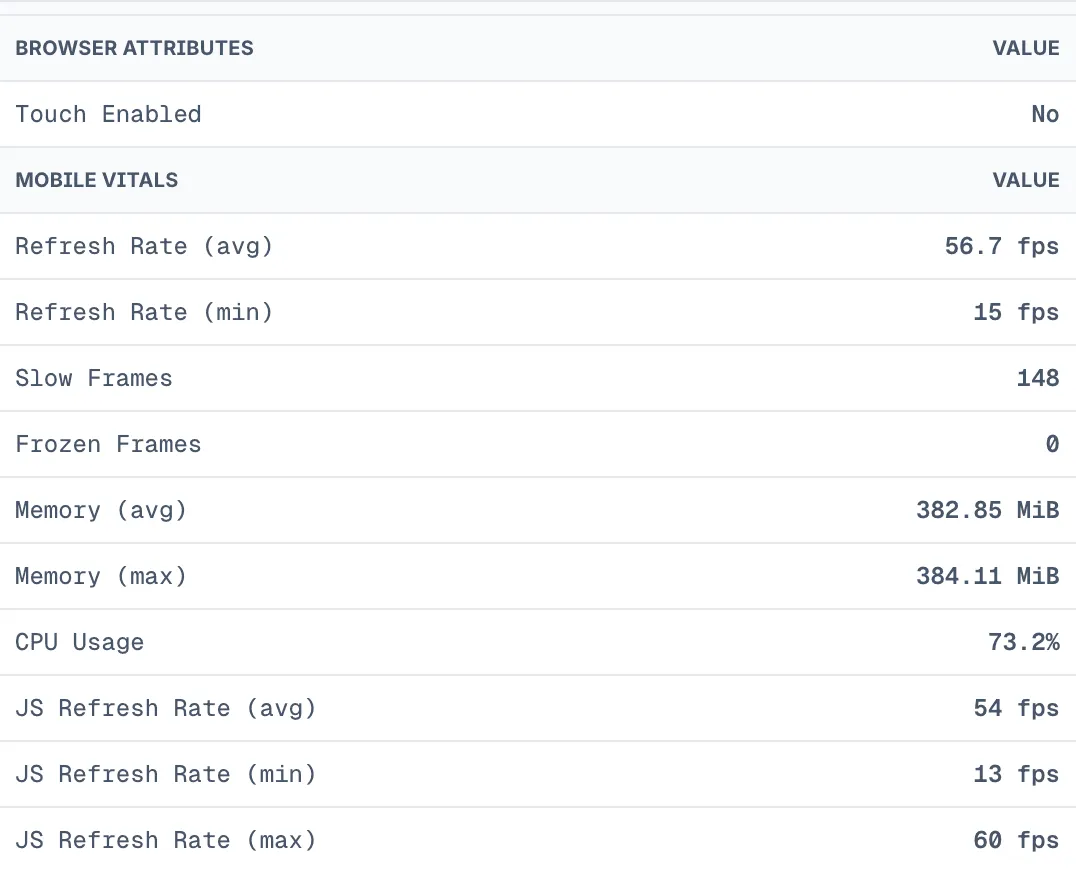
Where to see it: open a session in the Last9 RUM UI, select a view on the timeline, and check the Attributes tab. Views that carry these attributes show a MOBILE VITALS section with rows such as Refresh Rate (avg), Slow Frames, Frozen Frames, Memory (avg), and CPU Usage, formatted with units. Web views are unaffected.
API reference
Automatic view tracking
Attach L9NavigationObserver to your MaterialApp or CupertinoApp:
MaterialApp( navigatorObservers: <NavigatorObserver>[L9NavigationObserver()], // ...);Network ignore patterns
Skip noisy URLs before span creation by matching against full URL, pathname, or hostname. L9UrlPattern.contains() uses substring matching; L9UrlPattern.regex() uses regex search semantics.
await L9Rum.initialize(L9RumConfig( // ...required config ignorePatterns: L9NetworkIgnorePatterns( fullUrl: <L9UrlPattern>[ L9UrlPattern.contains('https://cdn.example.com'), L9UrlPattern.regex(RegExp(r'^https://.*\.example\.com', caseSensitive: false)), ], pathname: <L9UrlPattern>[ L9UrlPattern.contains('.pdf'), L9UrlPattern.contains('.jpg'), L9UrlPattern.regex(RegExp(r'^/internal/metrics')), ], hostname: <L9UrlPattern>[ L9UrlPattern.contains('cdn.example.com'), L9UrlPattern.regex(RegExp(r'(^|\.)assets\.example\.com$', caseSensitive: false)), ], ), // preserve (default): keep traceparent on ignored requests. // strip: remove traceparent from ignored requests. propagationMode: L9PropagationMode.strip,));Network phase child spans
Network instrumentation emits child spans for individual HTTP phases where native timing hooks are available:
| Child span | What it measures |
|---|---|
dns | DNS lookup duration |
tcp_connect | TCP connection establishment |
tls_handshake | TLS negotiation |
ttfb | Time from request sent to first response byte |
No SDK config change is required. The native Android and iOS layers use OkHttp EventListener and URLSession task metrics respectively.
Reused connections skip DNS, TCP, and TLS work. For those requests the SDK emits zero-duration child spans with l9rum.network.phase.skipped=true so the waterfall shape stays consistent.
HTTP client instrumentation
When networkInstrumentation is true, the SDK installs a dart:io HttpOverrides that wraps the default HttpClient. Requests made through the http package and dio go through HttpClient under the hood and are traced automatically — no extra setup needed.
From 1.3.0, REST network span names fold fully-numeric and UUID path segments to ? (for example GET /workspaces/1 becomes GET /workspaces/?). GraphQL span names are unaffected. The raw URL is retained on the native span.
GraphQL network observability
GraphQL enrichment (Layer 1) is automatic. L9HttpClient captures the request body and the SDK taps the response body to detect GraphQL errors before ending the span:
| Span attribute | Example | Notes |
|---|---|---|
| Span name | GraphQL: "GetUserPreferences" query | Renamed to a descriptive name |
graphql.operation.name | GetUserPreferences | query, mutation, or subscription name |
graphql.operation.type | query | Operation type |
error.type | GraphQLError | Set when the response contains a non-empty errors[] |
graphql.error.count | number | Number of entries in the errors[] array |
Layer 2 — Dio and gql interceptors (opt-in)
For richer GraphQL telemetry, wire the client-specific integration:
L9DioInterceptor— add to a Dio client’s interceptor chain.L9GqlLink— a link for thegql/graphqlpackages. It requiresendpointUrland suppresses the duplicatedart:iotransport span while forwarding toHttpLink.
Both support opt-in captureErrorMessages (truncated) and captureVariables (redacted).
import 'package:dio/dio.dart';import 'package:last9_rum_flutter/last9_rum_flutter.dart';
final dio = Dio()  ..interceptors.add(L9DioInterceptor(    captureErrorMessages: true,    captureVariables: true,  ));
Identify a user
await L9Rum.identify(const L9UserInfo( id: 'user-123', name: 'Jane', email: 'jane@example.com', fullName: 'Jane Doe', roles: <String>['admin'],));Clear user on sign-out
await L9Rum.clearUser();Capture errors
try { // risky operation} catch (error, stackTrace) { await L9Rum.captureError( error, stackTrace: stackTrace, context: <String, dynamic>{'screen': 'checkout'}, );}The SDK normalizes non-Error Dart payloads and bridged native fallback errors, so exception.type stays populated.
Unhandled error forwarding
Flutter’s error surfaces are separate — framework, platform dispatcher, and async zones each need wiring:
void main() async {  WidgetsFlutterBinding.ensureInitialized();  await L9Rum.initialize(config);
  // Flutter framework errors  FlutterError.onError = (FlutterErrorDetails details) {    FlutterError.presentError(details);    L9Rum.captureError(details.exception, stackTrace: details.stack);  };
  // Platform dispatcher errors  PlatformDispatcher.instance.onError = (Object error, StackTrace stack) {    L9Rum.captureError(error, stackTrace: stack);    return true;  };
  // Async errors via zone  runZonedGuarded(    () => runApp(const MyApp()),    (Object error, StackTrace stack) {      L9Rum.captureError(error, stackTrace: stack);    },  );}
Track views manually
await L9Rum.startView('ProductDetailsScreen');await L9Rum.setViewName('Product #42');From 1.5.0, startView never leaves a duplicate native view alongside Activity/ViewController auto-tracking, and setViewName renames the active view in place. Set autoViewTrackingEnabled: false when the app owns all view names.
Custom events
await L9Rum.addEvent('purchase_completed', attributes: <String, dynamic>{ 'product_id': '12345', 'amount': 29.99,});Each call dual-emits (behavior inherited from the native Android and iOS SDKs):
- A span event on the active view span, so the event shows up on the view’s timeline in RUM.
- An OTLP log record carrying
event.type=custom,event.name, your attributes, andsession.id/user attributes. When a view is active the log is correlated to it viatrace.id/span.id/view.id, so you can pivot between the log and the RUM session.
Log emission is unconditional. If no view is active when you call addEvent, the span event is dropped (no view is fabricated to attach it to) but the log is still sent as an orphan, omitting trace.id/span.id/view.id. A custom event never silently vanishes because it fired outside a view.
From 1.5.2, an addEvent fired while a screen is being torn down attaches to that screen (a 1000 ms grace window after the view ends), not the next one. After the window, and whenever no view is current, the OTLP log still correlates to the last view for the rest of the session. A manual startView(...) ends the previous view immediately. Prefer firing screen summaries before teardown (for example in dispose() / a route’s pop callback).
Global span attributes
await L9Rum.spanAttributes(<String, dynamic>{  'experiment': 'checkout_v2',  'feature_flag': 'new_cart',});
// Clearawait L9Rum.spanAttributes(null);
Session ID
final String? sessionId = await L9Rum.getSessionId();From 1.1.9 (native iOS Last9RUM 1.1.9 and Android rum-android:1.1.9), getSessionId() returns a real session id as soon as initialize() completes, and null (never an empty string) when there is no active session. On iOS this closes a window where a read soon after init could race asynchronous session creation and return null or an internal placeholder; Android was already synchronous.
From 1.4.1, backgrounding the app no longer ends the RUM session. Returning within 30 minutes resumes the same session.id. A force-quit or crash backfills Session End on the next cold start (session.end_reason=process_death) and starts a fresh session.
Every span carries session.start_time (epoch ms) alongside session.id, so the backend can read the real start time of a session from any span. When a session rolls over on inactivity timeout or max duration, Session End and session.time_spent use the last recorded activity, so idle and background time is not counted, and the new session keeps session.previous_id. No Dart API change.
Flush pending data
await L9Rum.flush();Embedded per-flow lifecycle
For embedded integrations scoped to a single flow, use shutdown() and isActive() (both bridged to the native SDKs) to control the SDK lifecycle:
// Scope RUM to a single flow, then tear it down so the next flow starts clean.await L9Rum.initialize(config);
// Attributes known only after the flow starts apply to every later span.await L9Rum.spanAttributes(<String, dynamic>{'tenant.id': 'acme', 'feature.flag': 'beta'});
if (await L9Rum.isActive()) { await L9Rum.shutdown(); // flush + full teardown; a later initialize() re-arms RUM}shutdown()flushes pending spans and fully tears RUM down so a laterinitialize()starts a clean flow.isActive()reports whether RUM is currently running.
WebView correlation
L9Rum.getWebViewInjectedJavaScript() returns a script that writes the current native session.id and native.view.id into the WebView so Browser RUM spans share the native session. Pair it with webview_flutter’s NavigationDelegate.onPageStarted so id rollovers reach the page on every navigation:
import 'package:webview_flutter/webview_flutter.dart';import 'package:last9_rum_flutter/last9_rum_flutter.dart';
Future<void> setupProductWebView() async {  late final WebViewController controller;  controller = WebViewController()    ..setJavaScriptMode(JavaScriptMode.unrestricted)    ..setNavigationDelegate(NavigationDelegate(      onPageStarted: (_) async {        final script = await L9Rum.getWebViewInjectedJavaScript();        await controller.runJavaScript(script);      },    ))    ..loadRequest(Uri.parse('https://app.example.com'));}
Calling getWebViewInjectedJavaScript() also stamps the active native view with view.type=webview. Call it after L9Rum.startView(...) so the marker lands on the right view.
In-WebView SPA routes stay on Browser RUM startView(). See the WebView Session Correlation guide for the full pattern, auto-load options, and verification steps.
Next steps
Once data is flowing, explore it in Discover > Applications — performance, errors, and sessions.
For the version history of this SDK, see the RUM changelog.
Troubleshooting
Please get in touch with us on Discord or Email if you have any questions.