
Product
Adaptive Alerting
How the Adaptive algorithm detects anomalies using a standard-deviation model instead of fixed thresholds.
The Adaptive algorithm flags anomalies by comparing a metric against its own recent history instead of a fixed threshold. It learns a baseline band from the metric’s mean and standard deviation over a lookback window, and fires when the metric breaks out of that band — so it adapts to normal traffic variation rather than a number you have to guess. It’s the recommended starting point for general anomaly detection.
How it works
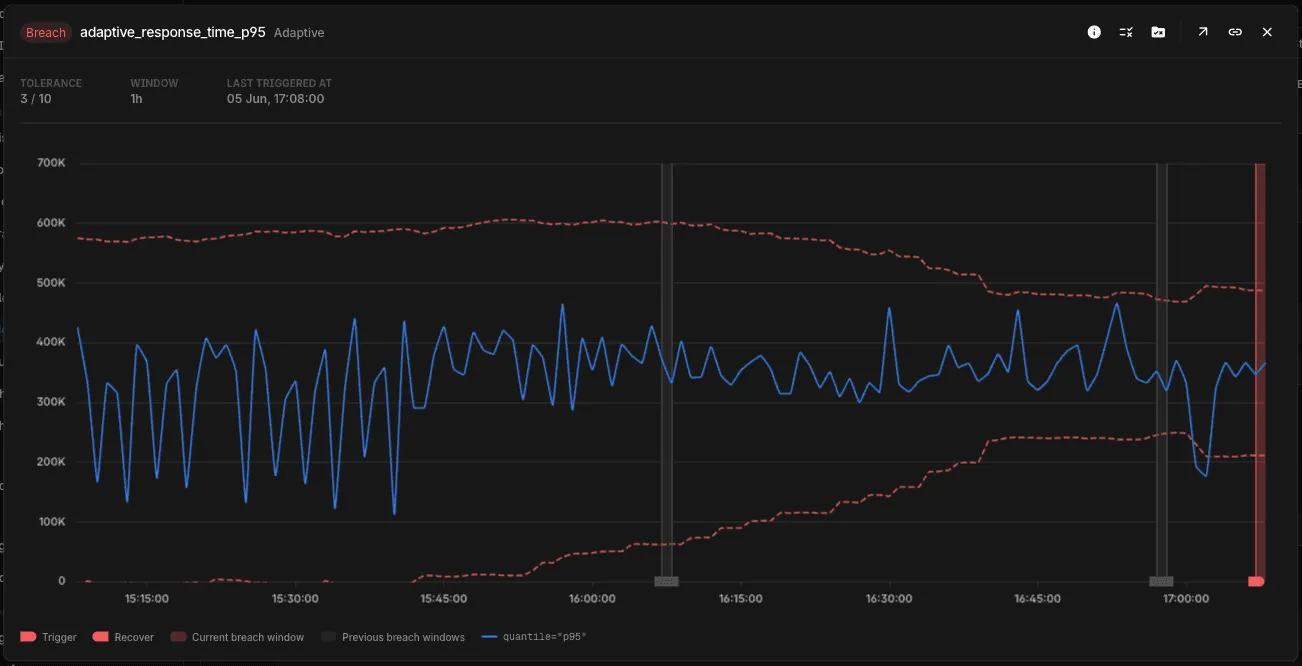
Adaptive builds a baseline band — the mean ± a multiple of the standard deviation over a lookback window — and treats points outside the band as anomalous. Two controls shape it:
- Tolerance (1–10) — how wide the band is. Higher values are more tolerant: a wider band and fewer alerts.
- Window — the lookback used to learn the band (for example,
1h). Shorter windows react faster; longer windows smooth over daily or weekly patterns.
The preview shades the learned band (dashed bounds) around the metric, so you can see exactly where it would break out and fire:
Setting up an Adaptive alert
- Create an Alert Rule and choose Metrics.
- Build your query in the Builder or PromQL.
- In the Condition section, select the Adaptive algorithm.
- Set Tolerance and Window.
- Check the live preview against the learned band, then save.
See Creating an Alert Rule for the full editor walkthrough.
Recommendations
- Tolerance — start in the middle of the range and adjust from the preview. Lower it for critical signals where small deviations matter; raise it for noisy signals to cut false positives.
- Window — match it to how the signal behaves:
1hor less for fast-changing, real-time services; a few hours for standard web services; a day or more for signals with daily or weekly patterns.
Alerting on logs or traces
Adaptive runs on metrics. To use it on log or trace data, first convert it to a metric with LogMetrics or TraceMetrics, then point an Adaptive rule at the resulting metric.
When should I use Adaptive Alerting?
Use Adaptive Alerting for new metric rules when you want to detect deviations from a learned baseline instead of maintaining a fixed threshold. For other cases:
- Use a static threshold for fixed or discrete signals.
- Existing legacy spike and changepoint rules continue to evaluate, but those algorithms cannot be selected for new rules. See Anomaly Algorithms (Legacy) when maintaining an existing rule.
Advanced: the adaptive_std_cmp macro
For advanced cases — or to embed adaptive logic inside a larger PromQL expression — the same model is available as the adaptive_std_cmp macro, used as a Threshold query. It returns 1 when the metric deviates beyond the given number of standard deviations and 0 otherwise; set the Threshold to fire when the value is > 0.5.
adaptive_std_cmp(query, std_factor, duration)- query — base PromQL metric query
- std_factor — standard deviations from the mean:
2≈ 95% of normal variation (sensitive),2.5balanced,3≈ 99.7% (least sensitive) - duration — lookback window for the calculation (without quotes)
adaptive_std_cmp(trace_service_response_time{service_name="prod-api-service"}, 2, 10m)Troubleshooting
Please get in touch with us on Discord or Email if you have any questions.