
Product
React Native RUM SDK
Install and configure the Last9 React Native RUM SDK. TypeScript API, CDN-hosted npm tarball, TurboModule over native Android and iOS SDKs. Auto-instruments fetch/XHR, React Navigation, errors, ANRs. New Architecture (bridgeless) supported.
Real User Monitoring for React Native apps. Automatic instrumentation for sessions, views, network requests (fetch/XHR), errors, and resource metrics via OpenTelemetry. ANR detection is available on Android only.
The React Native SDK wraps the Android and iOS native SDKs. Each platform’s CDN repo must be configured so the native dependencies resolve.
Prerequisites
- React Native >= 0.74 (New Architecture / bridgeless is the default from 0.76+; supported from SDK
1.1.6) - iOS 15.1+
- Android minSdk 21 (Android 5.0+)
- Native dependencies:
- Android:
io.last9:rum-android:1.8.0(resolved from CDN Maven — the consumer app must declare the repo; see Installation) - iOS:
Last9RUM 1.8.0(resolved from CDN podspec)
- Android:
Create Client Monitoring Tokens
Create one Client token per platform — do not combine Android and iOS origins on a single token. Each build uses the native SDK for that platform, so separate tokens keep origin scoping, rotation, and access control aligned with Android and iOS setup.
- Open Last9 → Settings → Ingestion Tokens
- Click Create Token → choose type Client → create an Android token with allowed origin
android://com.yourcompany.yourapp(your app’s exact package name). Copy the token. - Create a second Client token for iOS with allowed origin
ios://com.yourcompany.yourapp(your app’s exact bundle ID). Copy the token. - Copy the OTLP endpoint URL (the same URL is used for both platforms)
CDN artifacts
| Artifact | Stable URL | Versioned URL |
|---|---|---|
| Tarball | https://cdn.last9.io/rum-sdk/react-native/builds/stable/v1/last9-rum-react-native.tgz | https://cdn.last9.io/rum-sdk/react-native/builds/1.8.0/last9-rum-react-native-1.8.0.tgz |
| Checksum | https://cdn.last9.io/rum-sdk/react-native/builds/stable/v1/last9-rum-react-native.tgz.sha256 | https://cdn.last9.io/rum-sdk/react-native/builds/1.8.0/last9-rum-react-native-1.8.0.tgz.sha256 |
The major-pinned stable/v1 channel currently serves React Native RUM SDK
1.8.0. The latest versioned release is 1.8.0; staging builds use the
-alpha.<run_number> suffix and explicit versioned URLs.
Installing or upgrading to 1.8.0
The stable/v1 tarball currently serves 1.8.0. To pin an explicit version in
your lockfile, use the versioned 1.8.0 URL. npm and yarn pin URL dependencies in the
lockfile with an integrity hash from the first download, so using an explicit
version also avoids stable-channel cache and EINTEGRITY surprises:
# npmnpm uninstall @last9/rum-react-nativenpm cache clean --forcenpm install https://cdn.last9.io/rum-sdk/react-native/builds/1.8.0/last9-rum-react-native-1.8.0.tgz
# yarn: remove the @last9/rum-react-native entry from yarn.lock, thenyarn cache cleanyarn add https://cdn.last9.io/rum-sdk/react-native/builds/1.8.0/last9-rum-react-native-1.8.0.tgz
To check which version the stable channel currently serves:
curl -sL https://cdn.last9.io/rum-sdk/react-native/builds/stable/v1/last9-rum-react-native.tgz | tar -xzO package/package.json | grep '"version"'Installation
-
Install the package
npm install https://cdn.last9.io/rum-sdk/react-native/builds/1.8.0/last9-rum-react-native-1.8.0.tgz -
Android — add the CDN Maven repository
Gradle repositories are not transitive — the React Native package cannot inject this repo into your app. Your consumer app must declare it so
io.last9:rum-androidresolves on the app’s classpath.In
android/settings.gradle(orandroid/build.gradle):dependencyResolutionManagement {repositories {google()mavenCentral()maven { url uri("https://cdn.last9.io/rum-sdk/android/maven/") }}} -
iOS — add the Last9RUM podspec
In
ios/Podfile:pod 'Last9RUM', :podspec => 'https://cdn.last9.io/rum-sdk/ios/builds/1.8.0/Last9RUM.podspec'Then install pods:
cd ios && pod install -
Initialize the SDK
At app entry (before any screens render):
import { Platform } from "react-native";import { L9Rum } from "@last9/rum-react-native";const isIos = Platform.OS === "ios";try {const { sessionId } = await L9Rum.initialize({baseUrl: "https://otlp-ext-aps1.last9.io/v1/otlp/organizations/<org>",// Use the platform-matching token and origin pair — see// "Create Client Monitoring Tokens" above.origin: isIos? "ios://com.yourcompany.yourapp": "android://com.yourcompany.yourapp",clientToken: isIos? "your-ios-client-token": "your-android-client-token",serviceName: "my-rn-app",serviceVersion: "1.0.0",deploymentEnvironment: "production",});// Prefer awaiting initialize (or L9Rum.isActive()) over treating a null// getSessionId() after a fire-and-forget call as the only failure signal.console.log("RUM ready", sessionId);} catch (error) {console.error("RUM failed to initialize", error);}
There is no postinstall script or codegen stub to run after npm install — the package ships a real React Native Codegen spec (RNL9RumSpec) and Codegen runs as part of the normal native build.
Expo (Continuous Native Generation)
From SDK 1.2.0, an Expo config plugin re-applies the native install steps on every expo prebuild. Add the plugin to app.json (or app.config.js):
{ "expo": { "plugins": ["@last9/rum-react-native"] }}Then run a prebuild or dev build:
npx expo prebuild --clean# or: npx expo run:ios / npx expo run:androidThe plugin injects the Last9 CDN Maven repository on Android and the Last9RUM podspec source on iOS into the generated native projects. It is idempotent across repeated prebuilds and requires a development build (EAS Build or expo run:*) — it does not run in Expo Go, which cannot load native modules. Bare React Native apps can continue using the manual install steps above.
New Architecture (bridgeless)
From SDK 1.1.6, the native module is a real TurboModule (RNL9RumSpec). JS↔native calls dispatch over JSI directly, so promises settle reliably on the New Architecture (bridgeless mode, the default in React Native 0.76+).
| Architecture | Support |
|---|---|
| New Architecture (bridgeless) | Full support from 1.1.6. Use await L9Rum.initialize(...) as shown above. |
| Old Architecture (Paper) | Still supported. TurboModuleRegistry.getEnforcing falls back to the legacy native module path when bridgeless is off. |
The public JS API (L9Rum, config types) is unchanged — no app-code changes are required beyond upgrading the package and rebuilding native projects (pod install, Gradle sync).
What’s captured automatically
| Signal | Details |
|---|---|
| Sessions | Started by initialize(). Home or background keeps the session, and returning within 30 minutes resumes the same session.id (v1.4.1+) |
| Screen views | Native Activity and ViewController auto-tracking, controlled by autoViewTrackingEnabled (v1.5.0+) |
| Network requests | Native OkHttp (Android) and URLSession (iOS) interception — latency, status code, URL |
| Network phases | dns, tcp_connect, tls_handshake, and ttfb child spans on each request |
| GraphQL | Operation name and type on the span, and error.type when an HTTP 200 carries a non-empty errors[] |
| Errors | Unhandled JavaScript errors and promise rejections |
| Resource metrics | Memory and CPU sampled every resourceSamplingIntervalMs |
| View vitals | Per-view refresh rate, slow/frozen frames, memory, plus a JS-thread refresh rate on each View span (v1.7.0+) |
| ANR detection | Main thread blocks beyond anrThresholdMs — Android only |
Everything else needs app code. React Navigation screen names, user identity, custom events, manual views, and WebView correlation are all in the API reference below.
Per-view performance vitals (v1.7.0+)
When resourceMonitoringEnabled is on (the default), each View span carries per-view frame and memory vitals so you can find which screens janked or ran hot without extra instrumentation. React Native adds a JS-thread refresh rate on top of the native UI-frame vitals.
| Attribute | Type | Description |
|---|---|---|
view.refresh_rate_average | float | Average native UI refresh rate over the view, normalized to 0–60 Hz across 60 Hz and 120 Hz devices |
view.refresh_rate_min | float | Lowest native UI refresh rate seen during the view |
view.frame.slow | int | Slow native frames — inter-tick interval above 1.5× the display refresh period |
view.frame.frozen | int | Frozen native frames — longer than 700 ms |
view.memory_average | int | Average resident memory bytes over the view |
view.memory_max | int | Peak resident memory bytes during the view |
process.cpu.usage | float | Process CPU usage averaged over the view |
view.js_refresh_rate.average | float | Average JS-thread refresh rate over the view |
view.js_refresh_rate.min | float | Lowest JS-thread refresh rate over the view |
view.js_refresh_rate.max | float | Highest JS-thread refresh rate over the view |
- The
view.refresh_rate_*,view.frame.*,view.memory_*, andprocess.cpu.usagevitals come from the native SDKs. Theview.js_refresh_rate.*vitals are measured on the JS thread, so a busy JS thread shows up even when native UI frames look healthy. - JS-thread vitals are flushed onto each View before
startViewand onshutdown; the JS monitor stops cleanly when monitoring is disabled or on shutdown. view.js_refresh_rate.*is clamped to a 60 Hz ceiling because React Native exposes no reliable display refresh rate, so on 90/120 Hz devices it under-reports relative to the nativeview.refresh_rate_*. Frame gaps longer than 1 s (for example while backgrounded) are discarded rather than recorded as a near-zero sample.- No wrapper API change: the vitals ride on the existing
resourceMonitoringEnabledflag. Set it tofalseto turn off resource sampling and these vitals together.
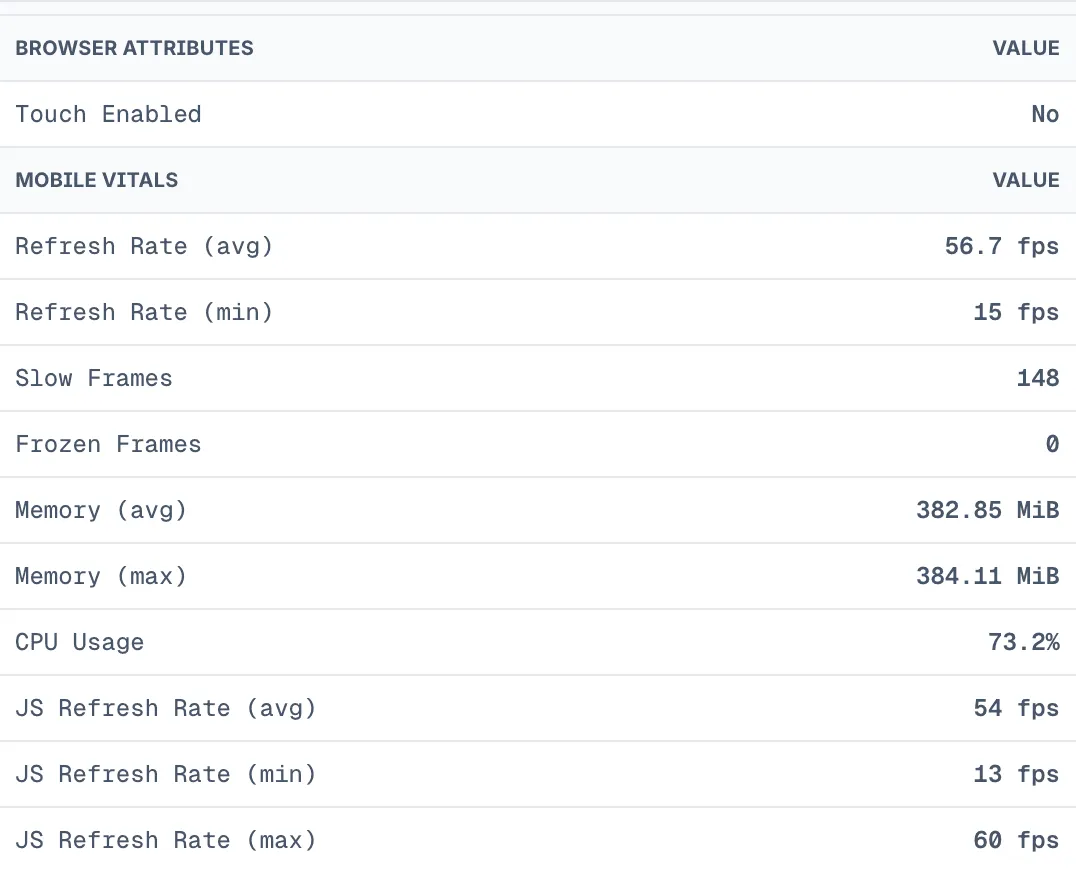
Where to see it: open a session in the Last9 RUM UI, select a view on the timeline, and check the Attributes tab. Views that carry these attributes show a MOBILE VITALS section, with rows such as Refresh Rate (avg), Slow Frames, Frozen Frames, Memory (avg), and CPU Usage. JS Refresh Rate (avg/min/max) appears when present, and all rows are formatted with units. Web views are unaffected.
Configuration
L9Rum.initialize({  // --- Required ---------------------------------------------------------
  // OTLP collector endpoint  baseUrl: "https://otlp-ext-aps1.last9.io/v1/otlp/organizations/<org>",
  // Authentication token from Last9 — use the Android or iOS Client token  // for the platform this build is running on.  clientToken:    Platform.OS === "ios"      ? "your-ios-client-token"      : "your-android-client-token",
  // Application identifier (maps to service.name)  serviceName: "my-rn-app",
  // App version string (maps to service.version)  serviceVersion: "1.0.0",
  // Environment name  deploymentEnvironment: "production",
  // --- Optional ---------------------------------------------------------
  // Origin sent as X-LAST9-ORIGIN header. Required for client_monitoring  // tokens. Must match the origin on the platform's Client token —  // android://<package> on Android, ios://<bundle-id> on iOS. Pass the  // matching clientToken for the same platform. Needs `import { Platform }  // from "react-native"` as shown in the Installation section above.  origin:    Platform.OS === "ios"      ? "ios://com.yourcompany.yourapp"      : "android://com.yourcompany.yourapp",
  // Specific build identifier (maps to app.build_id)  appBuildId: "1.0.0-build-42",
  // Optional override for the app.installation.id resource attribute.  // The Client-ID header always uses the native SDK-generated per-install UUID.  appInstallationId: undefined,
  // Session sampling rate: 0-100 (percentage). 100 = sample everything.  // Fractional values are rounded to the nearest integer before  // the native bridge, so iOS and Android sample at the same percentage.  sampleRate: 100,
  // Print debug logs to console  debugLogs: false,
  // Automatically instrument network requests through native hooks  networkInstrumentation: true,
  // Automatically capture unhandled JS errors  errorInstrumentation: true,
  // Max spans per export batch  maxExportBatchSize: 100,
  // How long native batch processors wait before flushing queued spans/logs (ms).  // Omit: 5000 in production, 1000 when debugLogs is true (`v1.4.0+`).  scheduleDelayMs: undefined,
  // When false, native Activity/ViewController auto-tracking no longer opens  // or closes view spans — the app owns view names (`v1.5.0+`).  autoViewTrackingEnabled: true,
  // Export timeout in milliseconds  exportTimeoutMs: 30000,
  // ANR detection (Android only)  anrDetectionEnabled: true,  anrThresholdMs: 5000,
  // Periodically sample memory and CPU  resourceMonitoringEnabled: true,  resourceSamplingIntervalMs: 30000,
  // Setting this to true will hide network requests (and their  // DNS/TCP/TLS/TTFB phase child spans) from the Last9 dashboard's  // Sessions → APIs tab. Each request would get its own traceId  // instead of sharing the current view's traceId, and that tab  // only fetches spans that share the View's traceId. Keep this  // false unless you specifically need per-request trace isolation.  isolateTracePerRequest: false,
  // Fine-grained network ignore rules, and traceparent handling for the  // requests they drop. See "Network ignore patterns" below for the shape  // of these two options.  ignorePatterns: undefined,  propagationMode: "preserve",
  // Custom resource attributes added to every span  resourceAttributes: {    "app.platform": "react-native",  },
// W3C Baggage propagation on outgoing requests baggage: { enabled: false, allowedKeys: ["session.id", "user.id"], maxTotalBytes: 8192, warnAtPercentage: 80, },});appInstallationId only overrides the app.installation.id resource attribute. It does not override the Client-ID header, so the header and the resource attribute can differ when you set appInstallationId manually.
Country and city
The mobile SDKs do not automatically infer location from IP addresses or collect GPS location. To populate country and city in Sessions, add the location your app already knows to resourceAttributes in your existing L9Rum.initialize() configuration:
const geoResourceAttributes = { "enduser.geo.country": "India", "enduser.geo.country_code": "IN", "enduser.geo.city": "Bengaluru",};Set resourceAttributes: geoResourceAttributes, or merge these keys with your other resource attributes. Values must be strings; use a two-letter country code. Replace the example values with known location data and omit unknown fields.
Use coarse location already available from your app or backend, including a cached result. Do not delay SDK initialization for a network lookup. Resource attributes are set at initialization; calling initialize() again does not update them. identify() and spanAttributes() do not populate the standard session location fields.
Network ignore patterns
Skip noisy URLs before span creation by matching against full URL, pathname, or hostname. Strings use substring matching; RegExp uses regex search semantics.
L9Rum.initialize({ ignorePatterns: { fullUrl: ["https://cdn.example.com", /^https:\/\/.*\.example\.com/i], pathname: [".pdf", ".jpg", /^\/internal\/metrics/], hostname: ["cdn.example.com", /(^|\.)assets\.example\.com$/i], }, // 'preserve' (default): keep traceparent on ignored requests. // 'strip': remove traceparent from ignored requests. propagationMode: "strip",});Network phase child spans
Network instrumentation is native by default so the SDK emits child spans for individual HTTP phases:
| Child span | What it measures |
|---|---|
dns | DNS lookup duration |
tcp_connect | TCP connection establishment |
tls_handshake | TLS negotiation |
ttfb | Time from request sent to first response byte |
No SDK config change is required. Android wires the OkHttp client factory with the Last9 interceptor and EventListener.Factory. iOS uses native URLProtocol/URLSession instrumentation and reads URLSession task metrics.
Reused connections skip DNS, TCP, and TLS work. For those requests the SDK emits zero-duration child spans with l9rum.network.phase.skipped=true so the waterfall shape stays consistent.
When nativeNetworkInterception is enabled, React Native Android apps use the native OkHttp interceptor. As of native 1.1.1, telemetry attribute collection is isolated from the request path, and telephony reads are permission-gated and guarded. A missing or OEM-restricted READ_PHONE_STATE permission can no longer turn a successful HTTP response into a failed request. iOS is not affected.
From 1.3.0, REST network span names fold fully-numeric and UUID path segments to ? (for example GET /workspaces/1 becomes GET /workspaces/?). GraphQL span names are unaffected. The raw URL is retained on the native span.
GraphQL network observability
GraphQL enrichment is on by default (Layer 1). GraphQL requests get a descriptive span name and operation metadata, and server-side errors returned with an HTTP 200 are flagged:
| Span attribute | Example | Notes |
|---|---|---|
| Span name | GraphQL: "GetUserPreferences" query | Renamed to a descriptive name |
graphql.operation.name | GetUserPreferences | query, mutation, or subscription name |
graphql.operation.type | query | Operation type |
error.type | GraphQLError | Set when the response contains a non-empty errors[] |
graphql.error.count | number | Number of entries in the errors[] array |
With native interception enabled, enrichment comes from the Android/iOS interceptors. When nativeNetworkInterception: false, the JS fetch/XHR interceptor captures request/response bodies (capped) and forwards them through the bridge so the same enrichment applies.
Layer 2 — Apollo Link (opt-in)
For richer GraphQL telemetry with Apollo Client, use the l9GqlLink Apollo Link. It owns the GraphQL span and suppresses the SDK’s JS transport interceptor for that request, so pair it with nativeNetworkInterception: false. It requires the optional @apollo/client peer dependency.
import { ApolloClient, InMemoryCache, HttpLink, from } from "@apollo/client";import { l9GqlLink } from "@last9/rum-react-native";
const client = new ApolloClient({ cache: new InMemoryCache(), link: from([ l9GqlLink({ captureVariables: true, // allow-listed + redacted captureErrorMessages: true, // truncated }), new HttpLink({ uri: "https://api.example.com/graphql" }), ]),});captureVariables— opt in to capture operation variables. Values are allow-listed and redacted.captureErrorMessages— opt in to capture GraphQL error messages. Values are truncated.
API reference
Every method below is on the L9Rum object, except the two named exports in the last two rows.
| Method | What it does |
|---|---|
await initialize(config) | Starts the SDK and resolves with { sessionId }. Rejects when native init fails |
await isActive() | true between a successful initialize and shutdown |
await getSessionId() | The current session.id. Never an empty string from 1.1.9 |
await shutdown() | Flushes and tears down. A later initialize re-arms the SDK. See Embedded per-flow lifecycle |
flush() | Sends queued spans and logs without tearing down |
identify(user) | Attaches id, name, email, and roles to the session. See Identify a user |
clearUser() | Drops the identified user on sign-out |
captureError(error, attributes?) | Records a handled error. See Capture errors |
startView(name) | Opens a view span. Ends the previous view immediately |
setViewName(name) | Renames the active view in place |
addEvent(name, attributes?) | Emits a span event on the active view and an OTLP log. See Custom events |
spanAttributes(attributes) | Sets global attributes on every later span. Pass null to clear |
instrumentWebView(target) | Shares the native session with Browser RUM inside a WebView. See WebView correlation |
L9ReactNavigationInstrumentation.onStateChange | Pass to NavigationContainer for automatic screen names |
l9GqlLink(options) | Apollo Link for richer GraphQL telemetry. See Layer 2 |
React Navigation integration
For automatic view tracking with React Navigation:
import { L9ReactNavigationInstrumentation } from '@last9/rum-react-native';import { NavigationContainer } from '@react-navigation/native';
function App() {  return (    <NavigationContainer      onStateChange={L9ReactNavigationInstrumentation.onStateChange}    >      {/* screens */}    </NavigationContainer>  );}
Identify a user
L9Rum.identify({ id: "user-123", name: "Jane", email: "jane@example.com", fullName: "Jane Doe", roles: ["admin"],});Clear user on sign-out
L9Rum.clearUser();Capture errors
try { // risky operation} catch (error) { L9Rum.captureError(error, { screen: "checkout" });}The SDK normalizes non-Error JavaScript throws and promise rejections, including strings, primitives, plain objects, and bridged native fallback errors, so exception.type stays populated.
Track views manually
L9Rum.startView("ProductDetailsScreen");L9Rum.setViewName("Product #42");From 1.5.0, startView never leaves a duplicate native view alongside Activity/ViewController auto-tracking, and setViewName renames the active view in place (including auto-tracked child view controllers). Set autoViewTrackingEnabled: false when the app owns all view names via navigation instrumentation or manual startView.
Custom events
L9Rum.addEvent("purchase_completed", { product_id: "12345", amount: 29.99,});Each call dual-emits (behavior inherited from the native Android and iOS SDKs):
- A span event on the active view span, so the event shows up on the view’s timeline in RUM.
- An OTLP log record carrying
event.type=custom,event.name, your attributes, andsession.id/user attributes. When a view is active the log is correlated to it viatrace.id/span.id/view.id, so you can pivot between the log and the RUM session.
Log emission is unconditional. If no view is active when you call addEvent, the span event is dropped (no view is fabricated to attach it to) but the log is still sent as an orphan, omitting trace.id/span.id/view.id. A custom event never silently vanishes because it fired outside a view.
From 1.5.2, an addEvent fired while a screen is being torn down attaches to that screen (a 1000 ms grace window after the view ends), not the next one. After the window, and whenever no view is current, the OTLP log still correlates to the last view for the rest of the session. A manual startView(...) ends the previous view immediately. Prefer firing screen summaries before teardown (for example on blur / a screen’s unmount effect).
Global span attributes
L9Rum.spanAttributes({  experiment: "checkout_v2",  feature_flag: "new_cart",});
// ClearL9Rum.spanAttributes(null);
Session ID / init status
const { sessionId: readySessionId } = await L9Rum.initialize(config);const sessionId = await L9Rum.getSessionId(); // same id once activeconst running = await L9Rum.isActive(); // true between successful initialize and shutdowninitialize rejects when native init fails (missing config or the SDK does not become active). Use that rejection — or isActive() — rather than assuming a null getSessionId() after a void/fire-and-forget call.
From 1.1.9, when initialize() resolves it always returns a real sessionId — never null or an empty string. Earlier iOS builds could resolve successfully but hand back an empty or missing session id because the native session started asynchronously; native session start is now synchronous and the internal placeholder id is never surfaced. getSessionId() never returns an empty string on either platform.
From 1.4.1, backgrounding the app (Home button or a system file picker) no longer ends the RUM session. Returning within 30 minutes resumes the same session.id. A force-quit or crash backfills Session End on the next cold start (session.end_reason=process_death) and starts a fresh session.
Every span carries session.start_time (epoch ms) alongside session.id, so the backend can read the real start time of a session from any span. When a session rolls over on inactivity timeout or max duration, Session End and session.time_spent use the last recorded activity, so idle and background time is not counted, and the new session keeps session.previous_id. No wrapper API change.
Browser RUM spans inside an instrumented WebView adopt the native session.id, but do not carry session.start_time: the native-context bridge does not send a start time.
Flush pending data
L9Rum.flush();Embedded per-flow lifecycle
For embedded integrations scoped to a single flow, use shutdown() and isActive() (both bridged to the native SDKs) to control the SDK lifecycle:
// Scope RUM to a single flow, then tear it down so the next flow starts clean.await L9Rum.initialize(config);
// Attributes known only after the flow starts apply to every later span.L9Rum.spanAttributes({ "tenant.id": "acme", "feature.flag": "beta" });
if (await L9Rum.isActive()) {  await L9Rum.shutdown(); // flush + full teardown; a later initialize() re-arms RUM}
shutdown() returns a Promise<void> that resolves once native teardown completes, so a per-flow caller can await L9Rum.shutdown() before re-initializing the next flow instead of racing teardown. A later initialize() starts a fresh flow.
WebView correlation
Instrument a react-native-webview WebView to share the native session ID with Browser RUM spans running inside it:
import { WebView } from 'react-native-webview';import { L9Rum } from '@last9/rum-react-native';
<WebView  source={{ uri: 'https://app.example.com' }}  onLoadStart={(e) => L9Rum.instrumentWebView(e.nativeEvent.target)}/>
Pass the load event’s nativeEvent.target (the native reactTag). This form works across all react-native-webview versions and both RN architectures. instrumentWebView also accepts a numeric tag, a ref object, or a component instance, but react-native-webview >= 13 exposes a methods-only imperative handle on .current that cannot be resolved — so prefer the event.
The SDK resolves the underlying native WKWebView (iOS) or android.webkit.WebView (Android) and re-injects session context on every navigation automatically.
From 1.6.0, the host native view is auto-named from the current main-frame URL: app.screen.name becomes the folded pathname, and view.url carries the full URL. Android updates the name on full loads and in-WebView history changes; iOS updates on navigation commit (SPA route changes are not observable). An explicit L9Rum.startView / setViewName still wins.
Name the native host screen with setViewName() — do not call native startView() on an auto-tracked Activity/ViewController. In-WebView SPA routes stay on Browser RUM startView(). See the WebView Session Correlation guide for the full pattern, auto-load options, and verification steps.
Verification
Confirm the SDK is reporting before you move on:
- Set
debugLogs: trueand rebuild. The console prints SDK initialization output. - Await
initialize()and log the returnedsessionId, or callawait L9Rum.isActive(). A rejection orfalsemeans native init failed. - Watch the device’s outgoing requests for calls to your
baseUrl. A403means theoriginandclientTokenpair does not match the token you created. - Open Discover > Applications and confirm the session appears within 2-3 minutes.
Next steps
Once data is flowing, explore it in Discover > Applications — performance, errors, and sessions.
For the version history of this SDK, see the RUM changelog.
Troubleshooting
-
await L9Rum.initialize()never resolves (hangs)Symptom: The app starts but RUM never becomes active —
initialize()never settles andisActive()stays false.Cause: On the New Architecture (bridgeless), SDK versions before
1.1.6routed through React Native’s legacy interop layer, where nativeresolve()did not deliver to the JS promise.Fix: Upgrade to
@last9/rum-react-native1.1.6or later (latest versioned:1.8.0), rebuild native projects (cd ios && pod install, then a clean Android build), and confirm withawait L9Rum.initialize(...). -
Android
:app:configureCMakeDebugfails on clean build (New Architecture)Symptom: Clean or parallel Android builds (or Android Studio Gradle sync) fail with
add_subdirectory given source ".../codegen/jni/" which is not an existing directoryandreact_codegen_RNL9RumSpec which is not built by this project.Cause: Introduced in React Native SDK
1.1.6(TurboModule/Codegen migration). The app’s CMake configure can run before the library’s Gradle codegen task produces the JNI directory.Fix: Upgrade to
@last9/rum-react-native1.2.1or later (stable/v1currently serves1.8.0; latest versioned is1.8.0), reinstall fromstable/v1or the versioned tarball, then run a clean Android build. -
Android build cannot resolve
io.last9:rum-androidGradle repositories are not transitive. Add the Last9 CDN Maven repo to your app’ssettings.gradle/build.gradleas shown in Installation — not only in a library module. -
iOS
pod installfails to findLast9RUMAdd the CDN podspec URL to yourPodfileas shown in Installation. The pod is not published to the public CocoaPods trunk.
Please get in touch with us on Discord or Email if you have any questions.