
Product
Python GenAI SDK
Track LLM conversations, tool calls, and token usage from Python AI applications using the Last9 GenAI SDK
Track multi-turn LLM conversations, tool executions, and token usage from Python AI applications. The Last9 GenAI SDK extends OpenTelemetry with conversation grouping, workflow tracking, and prompt/completion capture — so you can trace an entire user session from first message to final response.
What is the Last9 GenAI SDK?
The Last9 GenAI SDK is an OpenTelemetry span processor that enriches traces with AI-specific context. It works alongside your existing OTel setup — no separate tracing pipeline needed.
Key capabilities:
- Conversation tracking — Group multi-turn interactions under a single
conversation_id(e.g., a Slack thread or chat session) - Workflow tracking — Group multi-step operations like RAG pipelines or tool-use loops
- Agent identity — Track
gen_ai.agent.nameandgen_ai.agent.idper OTel GenAI semantic conventions - Automatic prompt/completion capture —
gen_ai.promptandgen_ai.completionon every span viaopentelemetry-instrumentation-openai-v2 - Cost tracking — Automatic for 20+ models; bring your own pricing for the rest
- Provider-agnostic — Works with OpenAI, Anthropic, Google, Cohere, or any LLM provider
- Thread-safe — Uses Python
contextvarsfor safe concurrent execution
Prerequisites
- Last9 Account — Sign up at app.last9.io
- Python 3.10+ with an existing LLM application
- OTel credentials — Get your endpoint and auth header from Integrations → OpenTelemetry
Integration Setup
-
Install the SDK
pip install last9-genai opentelemetry-exporter-otlp-proto-grpc -
Set environment variables
export OTEL_SERVICE_NAME=<your_service_name>export OTEL_EXPORTER_OTLP_ENDPOINT=<your_last9_otlp_endpoint>export OTEL_EXPORTER_OTLP_HEADERS="Authorization=<your_auth_header>"Find these values in your Last9 dashboard under Integrations → OpenTelemetry.
-
Initialize with
install()Add this to your application startup:
from last9_genai import installfrom opentelemetry.sdk.trace.export import BatchSpanProcessorfrom opentelemetry.exporter.otlp.proto.grpc.trace_exporter import OTLPSpanExporterhandle = install()handle.tracer_provider.add_span_processor(BatchSpanProcessor(OTLPSpanExporter()))install()wires the TracerProvider, LoggerProvider, all processors, and OpenAI instrumentation in one call.OTLPSpanExporter()reads your endpoint and headers from environment variables automatically. -
Wrap LLM calls with conversation context
from openai import OpenAIfrom last9_genai import conversation_contextclient = OpenAI()with conversation_context(conversation_id="session_123", user_id="user_456"):response = client.chat.completions.create(model="gpt-4o",messages=[{"role": "user", "content": "Hello!"}],)All spans inside the
conversation_contextblock are tagged withgen_ai.conversation.idanduser.id. Prompts and completions are captured automatically — no manual span events needed.
Multi-Turn Conversation Example
Each turn in a conversation uses the same conversation_id. In Last9, you can filter by this ID to see the full conversation timeline:
from last9_genai import conversation_context
THREAD_ID = "slack-thread-abc123"
# Turn 1with conversation_context(conversation_id=THREAD_ID, user_id="user_1"):    response = client.chat.completions.create(        model="gpt-4o",        messages=[{"role": "user", "content": "What pods are failing?"}],    )
# Turn 2 — same conversation_id links the turnswith conversation_context(conversation_id=THREAD_ID, user_id="user_1"):    response = client.chat.completions.create(        model="gpt-4o",        messages=[            {"role": "user", "content": "What pods are failing?"},            {"role": "assistant", "content": "api-gateway is in CrashLoopBackOff."},            {"role": "user", "content": "Check the logs for that pod"},        ],    )
Workflow Tracking
Group multi-step operations — RAG pipelines, tool-use loops, agent chains — as a named workflow:
from last9_genai import conversation_context, workflow_context
with conversation_context(conversation_id="session_123", user_id="user_1"):    # Workflows nest inside conversations    with workflow_context(workflow_id="rag_pipeline_001", workflow_type="retrieval"):        docs = retrieve_documents(query)        context = rerank_documents(docs)        response = generate_answer(context)
Workflow spans carry workflow.id and workflow.type attributes, making it easy to filter and compare pipeline performance in Last9.
Agent Identity
For multi-agent applications, tag each agent’s spans with its identity using agent_context:
from last9_genai import conversation_context, agent_context
with conversation_context(conversation_id="session_123"):    with agent_context(agent_name="support-bot", agent_id="bot-001"):        # All spans get gen_ai.agent.name and gen_ai.agent.id automatically        response = client.chat.completions.create(            model="gpt-4o",            messages=[{"role": "user", "content": "Help me with my order"}],        )
agent_context composes with conversation_context and workflow_context. Use it for multi-agent handoffs — each agent sets its own identity on its spans.
Viewing Traces in Last9
After sending LLM requests, navigate to LLM Monitoring in your Last9 dashboard. The Conversations tab shows all tracked conversations with cost, token usage, and duration:

Click on a conversation to see the full Conversation Flow — each interaction shows the prompt, response, token counts, cost, and trace ID:
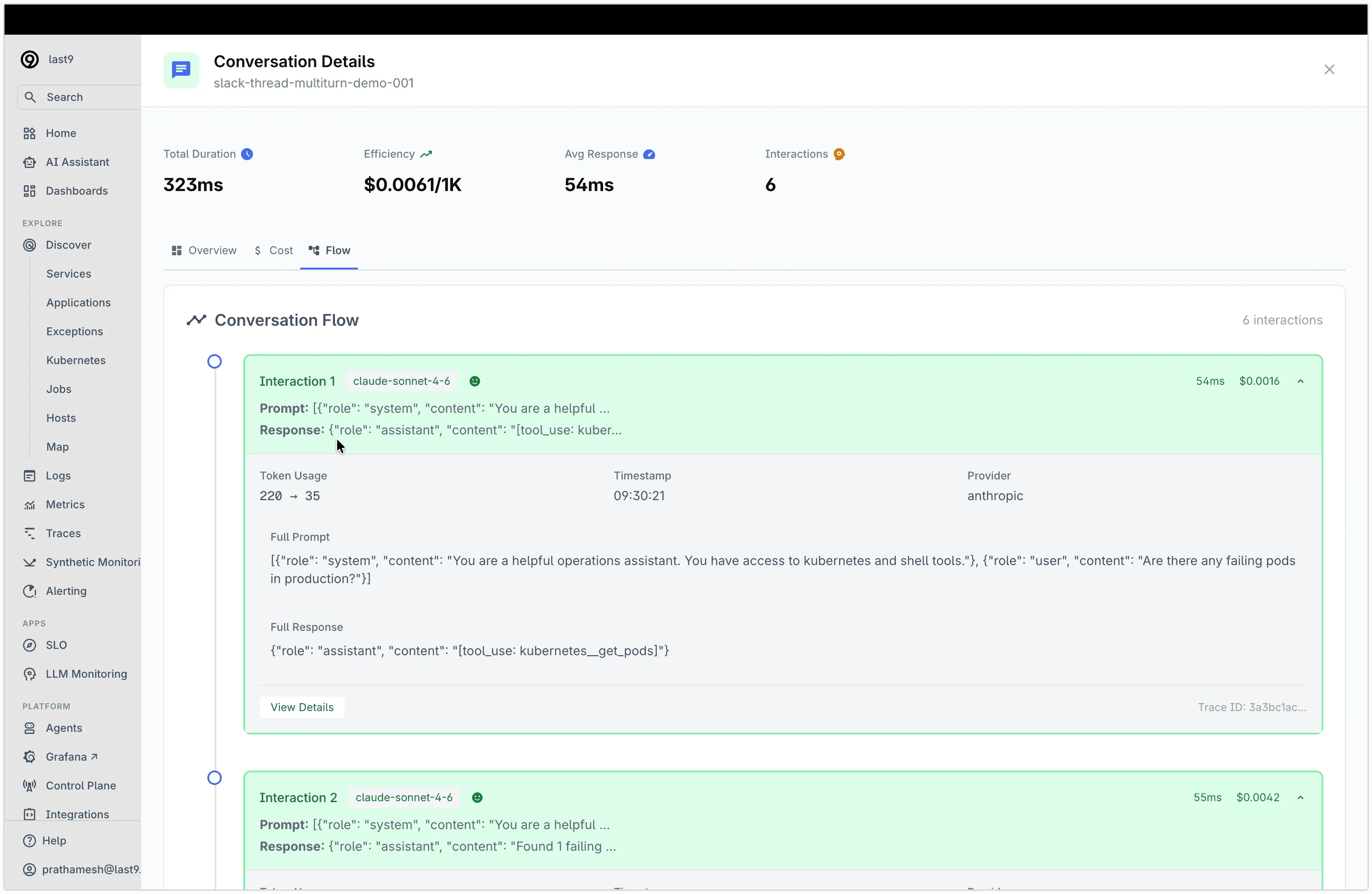
From the conversation detail view, you can:
- See all interactions in a conversation grouped by
gen_ai.conversation.id - View full prompts and responses for each LLM call
- Track token usage and cost per interaction
- Click View Details to jump to the full trace with span-level timing
Use Cases
- Conversation Debugging — Trace a user’s full session across multiple turns to find where responses degraded or tools failed
- Latency Analysis — Compare LLM call latencies across models, prompt sizes, and tool-use patterns
- Token Cost Tracking — Monitor input/output token counts per conversation to identify expensive interactions
- Agent Observability — Track tool-use loops in AI agents: which tools were called, whether they were approved, and how they affected the final response
Troubleshooting
gen_ai.prompt / gen_ai.completion missing on spans
Two likely causes:
OTEL_INSTRUMENTATION_GENAI_CAPTURE_MESSAGE_CONTENTis nottrue.install(capture_content=True)sets this automatically — confirm you’re usinginstall().OpenAIInstrumentor().instrument()was called withoutlogger_provider=. The bridge only works if openai-v2 routes logs to the sameLoggerProvider.install()handles this automatically.
No traces appearing in Last9
install() does not add an OTLP exporter — you must wire one explicitly:
from opentelemetry.sdk.trace.export import BatchSpanProcessorfrom opentelemetry.exporter.otlp.proto.grpc.trace_exporter import OTLPSpanExporter
handle.tracer_provider.add_span_processor(BatchSpanProcessor(OTLPSpanExporter()))
Python 3.14 + wrapt error
TypeError: wrap_function_wrapper() got an unexpected keyword argument 'module'Pin wrapt<2 — wrapt 2.0 renamed the kwarg and opentelemetry-instrumentation-openai-v2 hasn’t caught up yet.
Other issues
- Verify the Auth Header includes the
Basicprefix - Confirm the OTLP endpoint URL is correct
- Check that
opentelemetry-sdkversion is >= 1.20.0 - Set
OTEL_LOG_LEVEL=debugto see export diagnostics
Please get in touch with us on Discord or Email if you have any questions.