
Product
AWS CloudWatch Metrics
AWS CloudWatch Metric Streams enable customers to send their CloudWatch metrics to Last9.
Pre-requisites
Obtain the following and copy it to your clipboard from the Home > Integrations > CloudWatch section.
HTTP Endpoint URLUsernamePassword

Setting up required IAM policy
{ "Version": "2012-10-17", "Statement": [ { "Sid": "CloudWatchMetricStreams", "Effect": "Allow", "Action": [ "cloudwatch:StartMetricStreams", "cloudwatch:PutMetricStream", "cloudwatch:GetMetricStream", "cloudwatch:GetMetricData", "cloudwatch:ListMetrics", "cloudwatch:ListMetricStreams" ], "Resource": ["*"] }, { "Sid": "Firehose", "Effect": "Allow", "Action": [ "firehose:PutRecord", "firehose:CreateDeliveryStream", "firehose:DescribeDeliveryStream", "firehose:PutRecordBatch", "firehose:UpdateDestination", "firehose:ListDeliveryStreams", "firehose:TagDeliveryStream" ], "Resource": ["*"] }, { "Sid": "S3BackupBucket", "Effect": "Allow", "Action": [ "s3:ListAllMyBuckets", "s3:CreateBucket", "s3:GetBucketLocation", "s3:GetObject", "s3:ListBucket", "s3:ListBucketMultipartUploads", "s3:PutObject" ], "Resource": ["arn:aws:s3:::*"] }, { "Sid": "IamRoleManagementInline", "Effect": "Allow", "Action": [ "iam:CreateRole", "iam:GetRole", "iam:PutRolePolicy", "iam:DeleteRolePolicy" ], "Resource": "arn:aws:iam::<account_id>:role/l9-cwstream-*" }, { "Sid": "IamPassRoleToStreamingServices", "Effect": "Allow", "Action": "iam:PassRole", "Resource": "arn:aws:iam::<account_id>:role/l9-cwstream-*", "Condition": { "StringEquals": { "iam:PassedToService": [ "streams.metrics.cloudwatch.amazonaws.com", "firehose.amazonaws.com" ] } } }, { "Sid": "Logs", "Effect": "Allow", "Action": [ "logs:CreateLogGroup", "logs:CreateLogStream", "logs:PutLogEvents" ], "Resource": [ "arn:aws:logs:<region>:<account_id>:log-group:*:log-stream:*" ] } ]}Creating an Amazon Data Firehose stream
Amazon Data Firehose was formerly Kinesis Data Firehose. The AWS Console now uses Firehose stream for the resource you create.
-
Open Amazon Data Firehose in the AWS Console.
-
Go to Firehose streams and click Create Firehose stream.
-
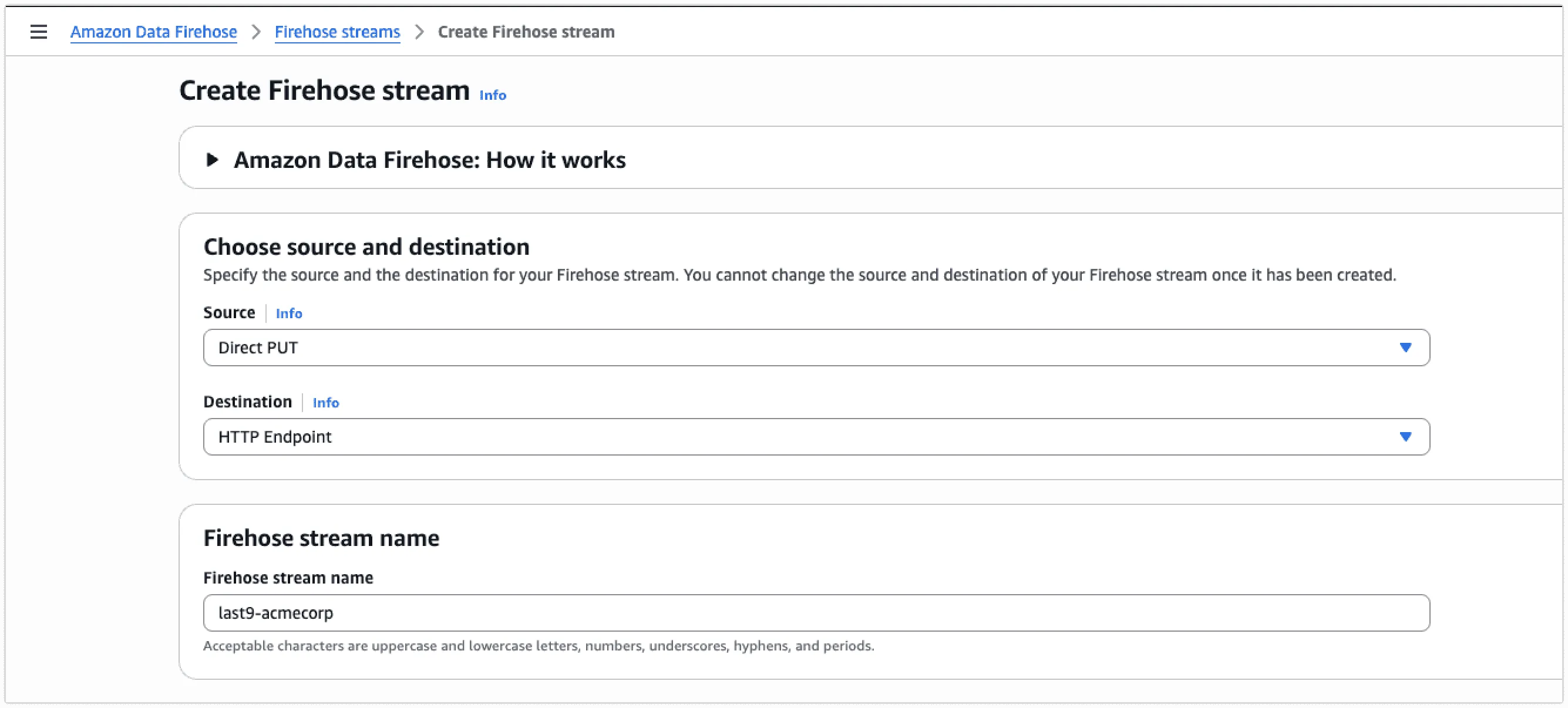
In Choose source and destination, set:
- Source:
Direct PUT - Destination:
HTTP endpoint - Firehose stream name:
last9-$your_organization_name
- Source:
-
Set HTTP endpoint URL to the copied Last9 CloudWatch metric stream endpoint.
-
Under Authentication, select Use access key and leave Access key empty.
-
Set Content encoding to
GZIP. -
Set Retry duration to
300seconds. -
Under Parameters, add:
Key Value usernameLast9 username copied earlier passwordLast9 password copied earlier 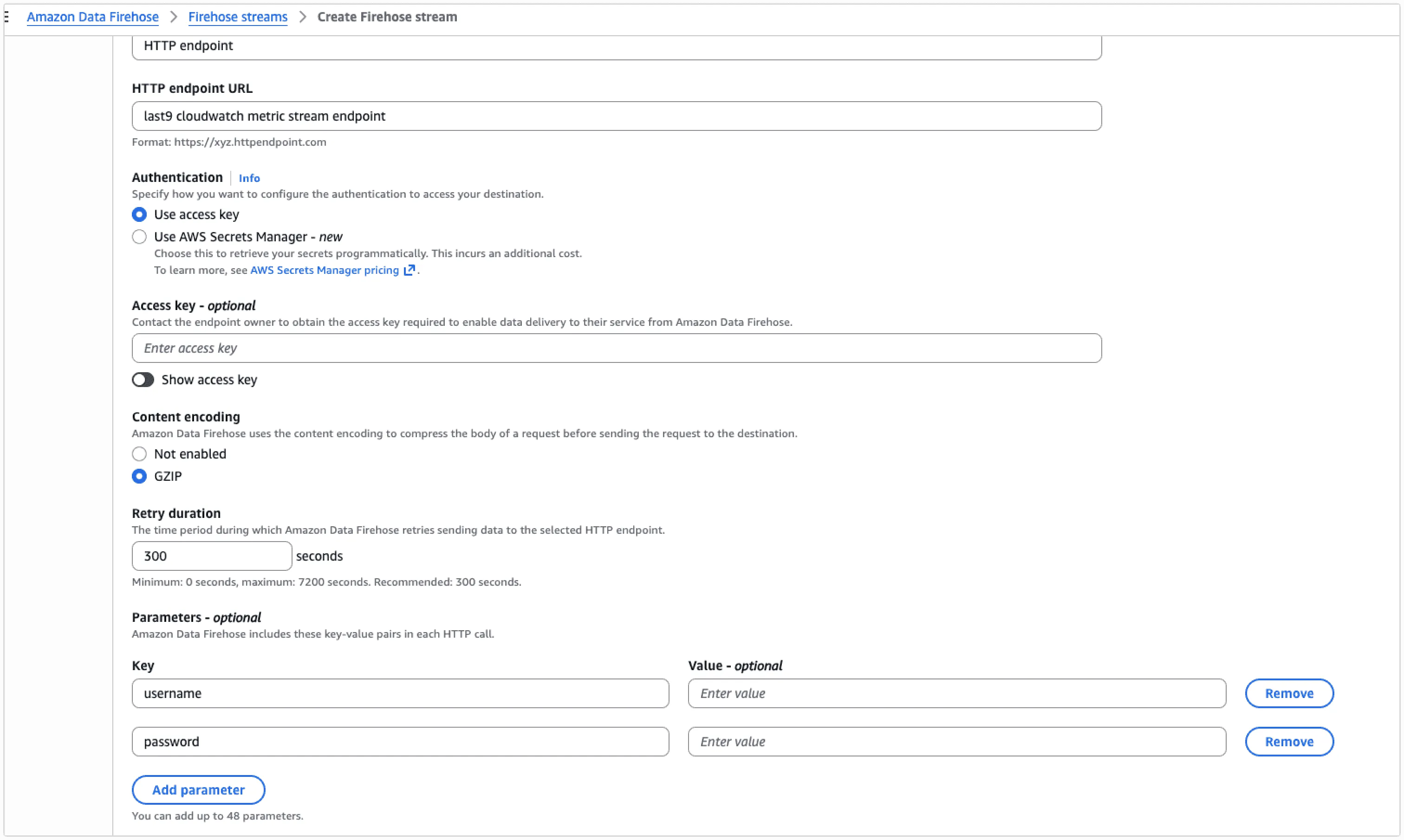
-
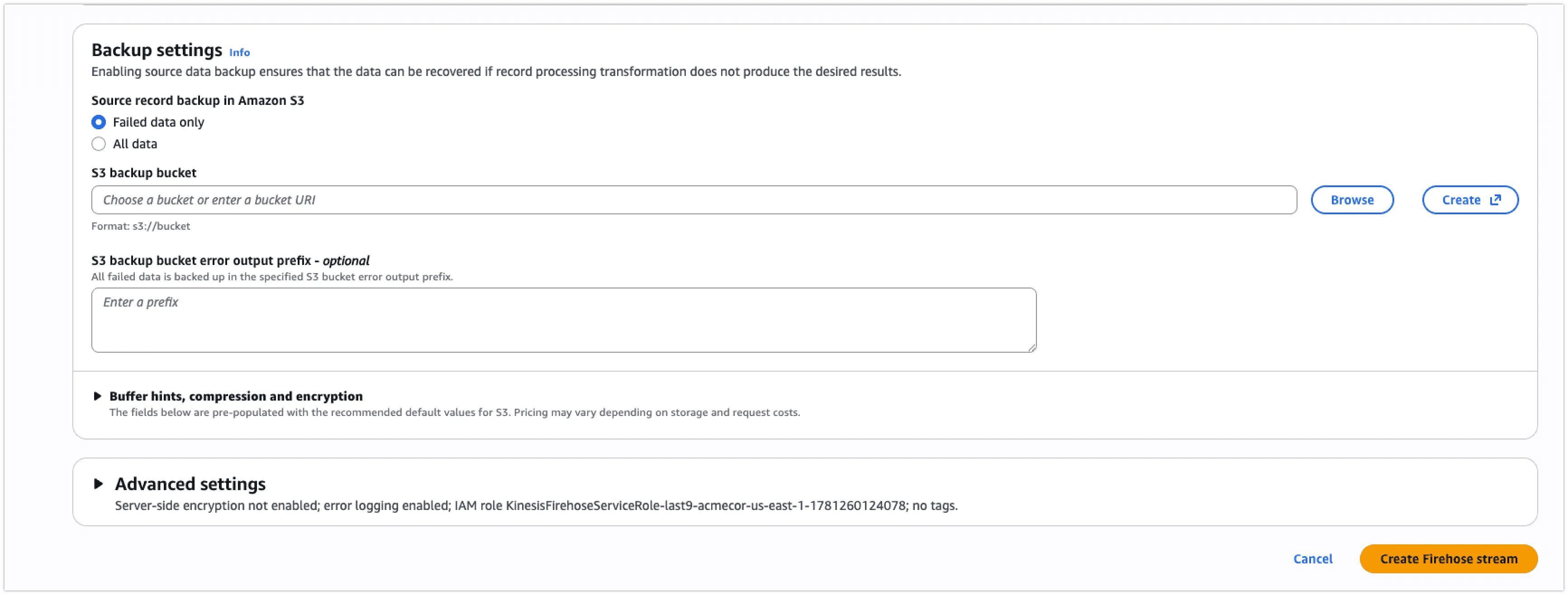
Under Backup settings, set Source record backup in Amazon S3 to Failed data only.
-
Choose or create an S3 backup bucket to store records the Firehose stream fails to deliver.
-
Click Create Firehose stream.
Sending data from CloudWatch to the Firehose stream
-
Open the CloudWatch console and click on
Metrics -> Streams
-
Click on
Create metric stream
-
Choose
All metricsto send all CloudWatch metrics. Optionally, you can also select the metrics you want to stream. You can include or exclude specific namespaces and metrics you want to send by usingSelect metricsoption.
-
Ensure that you use the Firehose stream created in the earlier step and that the output format is
OpenTelemetry 0.7.
-
Enter the Custom Metric stream name as
last9-$your_organization_nameand then click onCreate metric stream
Verification
Once the CloudWatch metric stream is enabled, it sends metrics with the amazonaws_com_AWS prefix. Metrics usually appear within 2-3 minutes in Metrics Explorer.
Troubleshooting
Please get in touch with us on Discord or Email if you have any questions.