
Product
Android / Kotlin
Install and configure the Last9 Android RUM SDK. Kotlin API, CDN-hosted Maven AAR, automatic instrumentation for sessions, views, OkHttp, errors, ANRs, and resource sampling.
Real User Monitoring for Android apps. Automatic instrumentation for sessions, views, network requests, errors, ANR detection, and resource metrics via OpenTelemetry.
Prerequisites
- Android minSdk 21 (Android 5.0+)
- Kotlin 1.9.0+ and Android Gradle Plugin 8.3.0+
- An
Applicationsubclass - A Last9 RUM client token and OTLP endpoint
Create a Client Monitoring Token
- Open Last9 → Settings → Ingestion Tokens
- Click Create Token → choose type Client
- Set the allowed origin to
android://com.yourcompany.yourapp— use your app’s exact package name - Copy the token and the OTLP endpoint URL
CDN artifacts
| Artifact | Stable URL | Versioned URL |
|---|---|---|
| POM | https://cdn.last9.io/rum-sdk/android/builds/stable/v1/rum-android.pom | https://cdn.last9.io/rum-sdk/android/maven/io/last9/rum-android/1.8.0/rum-android-1.8.0.pom |
| AAR | https://cdn.last9.io/rum-sdk/android/builds/stable/v1/rum-android.aar | https://cdn.last9.io/rum-sdk/android/maven/io/last9/rum-android/1.8.0/rum-android-1.8.0.aar |
| Maven repo root | — | https://cdn.last9.io/rum-sdk/android/maven/ |
Maven coordinates for the latest versioned release: io.last9:rum-android:1.8.0.
The major-pinned stable/v1 direct-download channel currently serves 1.8.0;
staging builds use the -alpha suffix.
Installation
-
Add the CDN Maven repository
dependencyResolutionManagement {repositories {google()mavenCentral()maven { url = uri("https://cdn.last9.io/rum-sdk/android/maven/") }}}dependencyResolutionManagement {repositories {google()mavenCentral()maven { url uri("https://cdn.last9.io/rum-sdk/android/maven/") }}} -
Add the dependency
In your app’s
build.gradle.kts:dependencies {// Pinned to an exact release (reproducible builds):implementation("io.last9:rum-android:1.8.0")// Or resolve the newest published 1.x release from the versioned Maven repo// (independent of the stable/v1 direct-download alias):// implementation("io.last9:rum-android:1.+")} -
Initialize the SDK
In your
Applicationsubclass:import android.app.Applicationimport io.last9.rum.L9Rumimport io.last9.rum.L9RumConfigimport io.last9.rum.L9BaggageConfigclass MyApplication : Application() {override fun onCreate() {super.onCreate()L9Rum.initialize(this,L9RumConfig(baseUrl = "https://otlp-ext-aps1.last9.io/v1/otlp/organizations/<org>",// Use android://com.your.package.name — must match the// origin allowlist on your Last9 client token.origin = "android://com.example.myapp",clientToken = "your-client-token",serviceName = "my-android-app",serviceVersion = "1.0.0",deploymentEnvironment = "production",))}} -
Register the Application class
In
AndroidManifest.xml:<application android:name=".MyApplication" ... >
What’s captured automatically
| Signal | Details |
|---|---|
| Network requests | OkHttp interceptor — latency, status code, URL |
| Screen views | Activity lifecycle via ActivityLifecycleCallbacks |
| Sessions | 30m inactivity / 4h max, persisted across restarts. Home/background keeps the session (v1.4.1+) |
| App launch time | Cold and warm start duration |
| Resource metrics | Memory and CPU sampled periodically |
| View vitals | Per-view refresh rate, slow/frozen frames, and memory on each View span (v1.7.0+) |
| Errors | Unhandled exceptions and JVM crashes |
| ANR detection | Main thread blocks beyond threshold (default 5s) |
view.ttfd | Time from last HTTP response to next rendered frame — measures post-API render latency on data-driven screens |
View time-to-full-display (view.ttfd)
view.ttfd measures how long it takes for the screen to render after the last API response completes. It captures the delta between the HTTP response timestamp and the next Choreographer frame — giving you end-to-end visibility on data-driven screens where content appears only after a network call.
| Attribute | Type | Description |
|---|---|---|
view.ttfd | float | Milliseconds between HTTP response end and next rendered frame |
view.ttid | float | Milliseconds from screen open to first frame (unchanged) |
How it works: after any L9NetworkInterceptor span ends, the SDK schedules a Choreographer.FrameCallback. The callback fires on the next VSYNC, and the SDK records the delta as view.ttfd on the active View span.
- Works on both Jetpack Compose and View-based UIs with no app code changes.
- Applies to the View span that was active when the HTTP call was made.
- If no View span is active when the response arrives, the measurement is skipped.
Per-view performance vitals (v1.7.0+)
When resourceMonitoringEnabled is on (the default), each View span carries per-view frame and memory vitals, so you can find which screens janked or ran hot without extra instrumentation.
| Attribute | Type | Description |
|---|---|---|
view.refresh_rate_average | float | Average refresh rate over the view, normalized to 0–60 Hz so 60 Hz and 120 Hz devices compare directly |
view.refresh_rate_min | float | Lowest refresh rate seen during the view (the worst dip) |
view.frame.slow | int | Slow frames — inter-vsync interval above 1.5× the display refresh period (a skipped vsync) |
view.frame.frozen | int | Frozen frames — longer than 700 ms |
view.memory_average | int | Average resident-set-size (RSS) bytes over the view |
view.memory_max | int | Peak RSS bytes during the view |
process.cpu.usage | float | Process CPU usage averaged over the view’s lifetime |
- Frame timing comes from a Choreographer frame-rate tracker. Per-view memory is sampled (RSS) at each view start and end, so even short screens get coverage — alongside the periodic
resource.samplespan, which also carriesprocess.memory.pss(proportional set size). - Frame tracking pauses while the app is backgrounded, so a background gap is never counted as a frozen frame.
- Periodic
resource.samplespans now carryview.idwhile a view is active, so process-level samples can be correlated to the screen that was active. - No API change: the vitals ride on the existing
resourceMonitoringEnabledflag. Set it tofalseto turn off resource sampling and these vitals together.
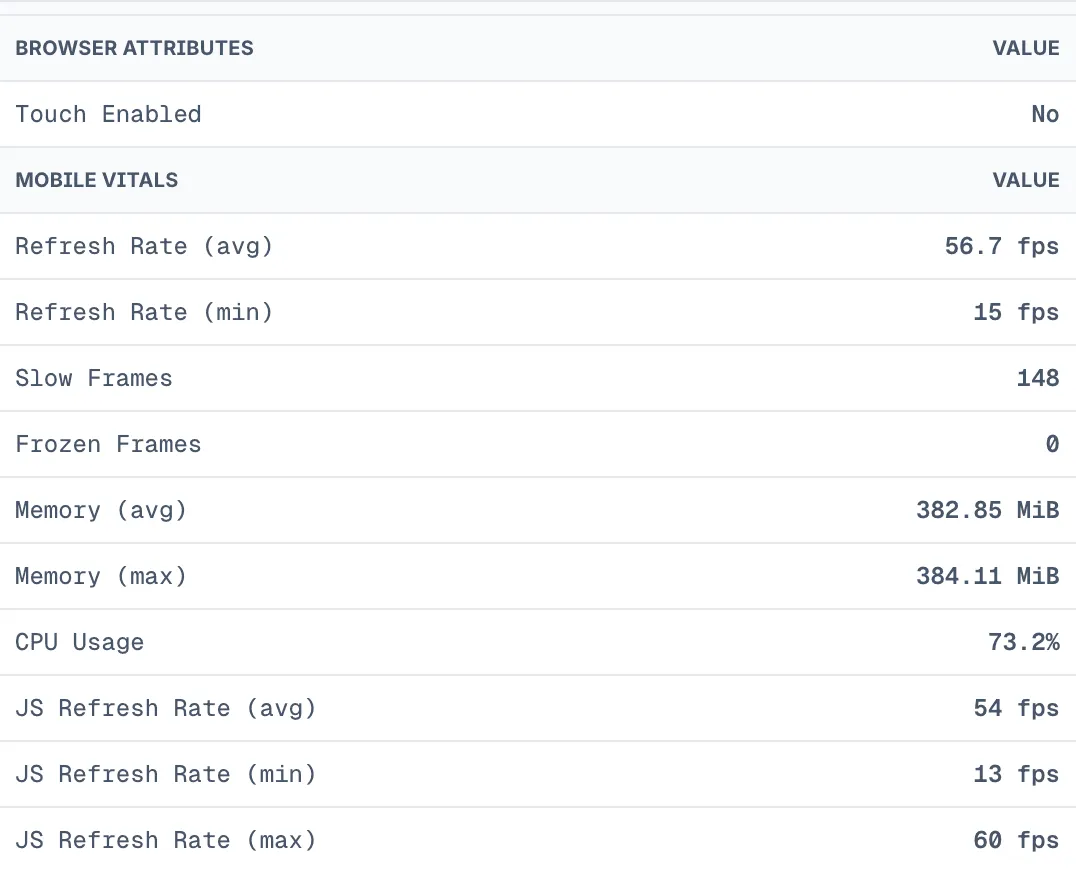
Where to see it: open a session in the Last9 RUM UI, select a view on the timeline, and check the Attributes tab. Views that carry these attributes show a MOBILE VITALS section with rows such as Refresh Rate (avg), Slow Frames, Frozen Frames, Memory (avg), and CPU Usage, formatted with units. Web views are unaffected.
Configuration
L9RumConfig(    // --- Required ---------------------------------------------------------
    // OTLP collector endpoint    baseUrl = "https://otlp-ext-aps1.last9.io/v1/otlp/organizations/<org>",
    // Authentication token from Last9    clientToken = "your-client-token",
    // Application identifier (maps to service.name)    serviceName = "my-android-app",
    // App version string (maps to service.version)    serviceVersion = "1.0.0",
    // Environment name    deploymentEnvironment = "production",
    // --- Optional ---------------------------------------------------------
    // Required for client_monitoring tokens. Use android://com.your.package.name —    // must match the origin allowlist configured on your Last9 client token.    origin = "android://com.example.myapp",
    // Specific build identifier (maps to app.build_id)    appBuildId = "1.0.0-build-42",
    // Optional override for the app.installation.id resource attribute.    // The Client-ID header always uses the SDK-generated per-install UUID.    appInstallationId = null,
    // Session sampling rate: 0-100 (percentage). 100 = sample everything.    sampleRate = 100,
    // Print debug logs to logcat    debugLogs = false,
    // Automatically trace HTTP requests via OkHttp interceptor    networkInstrumentation = true,
    // Automatically capture unhandled exceptions    errorInstrumentation = true,
    // Max spans per export batch    maxExportBatchSize = 100,
    // How long batch processors wait before flushing queued spans/logs (ms).    // Unset: 5000 in production, 1000 when debugLogs is true (`v1.4.0+`).    scheduleDelayMs = null,
    // When false, Activity resume/pause no longer opens or closes view spans —    // the app owns view names via startView / setViewName (`v1.5.0+`).    autoViewTrackingEnabled = true,
    // Export timeout in milliseconds    exportTimeoutMs = 30_000L,
    // Enable ANR (Application Not Responding) detection    anrDetectionEnabled = true,
    // ANR threshold in milliseconds    anrThresholdMs = 5_000L,
    // Periodically sample memory and CPU    resourceMonitoringEnabled = true,
    // Interval between resource samples (ms)    resourceSamplingIntervalMs = 30_000L,
    // Setting this to true will hide network requests (and their    // DNS/TCP/TLS/TTFB phase child spans) from the Last9 dashboard's    // Sessions → APIs tab. Each request would get its own traceId    // instead of sharing the current view's traceId, and that tab    // only fetches spans that share the View's traceId. Keep this    // false unless you specifically need per-request trace isolation.    isolateTracePerRequest = false,
    // Custom resource attributes added to every span    resourceAttributes = mapOf(        "app.platform" to "android",    ),
    // W3C Baggage propagation on outgoing requests    baggage = L9BaggageConfig(        enabled = false,        allowedKeys = listOf("session.id", "user.id"),        maxTotalBytes = 8192,        trackedUrlPatterns = emptyList(),        warnAtPercentage = 80,    ),
    // Substring patterns — matching URLs are skipped before span creation.    // Prefer ignorePatterns below for regex support and hostname/pathname targeting.    excludedUrlPatterns = listOf(".jpg", ".png", ".pdf", "cdn.example.com"),
    // Fine-grained network ignore rules. Matched URLs are dropped before span    // creation. Strings use substring matching; L9UrlPattern.Regex uses regex    // search semantics. Takes precedence over excludedUrlPatterns.    ignorePatterns = L9NetworkIgnorePatterns(        fullUrl = listOf(            L9UrlPattern.Contains("https://cdn.example.com"),            L9UrlPattern.Regex("^https://.*\\.example\\.com", flags = "i"),        ),        pathname = listOf(            L9UrlPattern.Contains(".pdf"),            L9UrlPattern.Contains(".jpg"),            L9UrlPattern.Regex("^/internal/metrics"),        ),        hostname = listOf(            L9UrlPattern.Contains("cdn.example.com"),            L9UrlPattern.Regex("(^|\\.)assets\\.example\\.com$", flags = "i"),        ),    ),
// Trace header propagation for ignored URLs. // PRESERVE (default): keep traceparent on ignored requests so downstream // services retain trace context. // STRIP: remove traceparent from ignored requests (e.g. third-party CDNs). propagationMode = L9PropagationMode.PRESERVE,)Per-install Client-ID
Starting with 0.8.0, the Client-ID ingestion header is an SDK-generated per-install UUID, not serviceName. The UUID is generated on first launch and stored in Context.getNoBackupFilesDir(), which is excluded from Android Auto Backup. This keeps each device in its own ingestion rate-limit bucket.
appInstallationId only overrides the app.installation.id resource attribute. It does not override the Client-ID header, so the header and the resource attribute can differ when you set appInstallationId manually.
API reference
Identify a user
L9Rum.identify("user-123", mapOf( "email" to "user@example.com", "plan" to "premium",))Clear user on sign-out
L9Rum.clearUser()Capture errors
try { // risky operation} catch (e: Exception) { L9Rum.captureError(e, mapOf("screen" to "checkout"))}Unhandled exceptions are captured automatically when errorInstrumentation = true.
Track views
Activities are tracked automatically via ActivityLifecycleCallbacks. Use the manual API for fragments or Compose destinations:
L9Rum.startView("ProductDetailsScreen")L9Rum.setViewName("Product #42")From 1.5.0, startView ends whichever native view is currently open before opening a new one, so mixing a manual startView with Activity auto-tracking no longer leaves a duplicate native view. setViewName renames the active view in place with no extra span — the recommended way to name a WebView host Activity alongside instrument(webView). From 1.6.0, instrumented WebView host views are also auto-named from the folded URL pathname (view.url holds the full URL); setViewName still wins. Set autoViewTrackingEnabled = false when the app owns all view names.
Custom events
L9Rum.addEvent("purchase_completed", mapOf( "product_id" to "12345", "amount" to 29.99,))Each call dual-emits:
- A span event on the active view span, so the event shows up on the view’s timeline in RUM.
- An OTLP log record carrying
event.type=custom,event.name, your attributes, andsession.id/user attributes. When a view is active the log is correlated to it viatrace.id/span.id/view.id, so you can pivot between the log and the RUM session.
Log emission is unconditional. If no view is active when you call addEvent, the span event is dropped (no view is fabricated to attach it to) but the log is still sent as an orphan, omitting trace.id/span.id/view.id. A custom event never silently vanishes because it fired outside a view.
From 1.5.2, an addEvent fired while a screen is being torn down attaches to that screen (a 1000 ms grace window after the view ends), not the next one. After the window, and whenever no view is current, the OTLP log still correlates to the last view for the rest of the session. A manual startView(...) ends the previous view immediately. Prefer firing screen summaries in onPause (Activity) / onDestroyView or onPause (Fragment) rather than onDestroy.
Global span attributes
// Inject attributes into every spanL9Rum.spanAttributes(mapOf(    "experiment" to "checkout_v2",    "feature_flag" to "new_cart",))
// ClearL9Rum.spanAttributes(null)
A Java map with null keys or null values does not throw a NullPointerException. The SDK drops the null entries and applies the valid entries in the same map.
Network phase child spans
When OkHttp instrumentation is enabled, each parent HTTP span includes child spans for individual network phases:
| Child span | What it measures |
|---|---|
dns | DNS lookup duration |
tcp_connect | TCP connection establishment |
tls_handshake | TLS negotiation |
ttfb | Time from request sent to first response byte |
No SDK config change is required — phase spans are emitted automatically.
Reused connections skip DNS, TCP, and TLS work. For those requests the SDK emits zero-duration child spans with l9rum.network.phase.skipped=true so the waterfall shape stays consistent.
Network interceptor (manual OkHttp setup)
When networkInstrumentation = true, HTTP calls through the SDK’s default client are traced automatically including network phase child spans. For a custom OkHttpClient, use L9Rum.instrumentOkHttp(builder, context) to attach both the HTTP span interceptor and the OkHttp EventListener.Factory required for phase timings:
val client = OkHttpClient.Builder() .let { L9Rum.instrumentOkHttp(it, context) } .build()If you use SSL pinning:
val client = OkHttpClient.Builder() .certificatePinner(existingPinner) // SSL pinning unchanged .let { L9Rum.instrumentOkHttp(it, context) } .build()GraphQL network observability
When OkHttp instrumentation is enabled, GraphQL requests are enriched automatically — the SDK parses the operation name and type from JSON request bodies and /graphql paths. No extra configuration is required.
| Span attribute | Example | Notes |
|---|---|---|
| Span name | GraphQL: "GetUserPreferences" query | Renamed to a descriptive name |
graphql.operation.name | GetUserPreferences | Operation name parsed from the request body |
graphql.operation.type | query | query, mutation, or subscription |
l9.span.category | network | Categorizes the span for dashboard filtering |
GraphQL servers often return errors with an HTTP 200 status and an errors[] array in the response body. The SDK detects these and marks the span as an error:
| Span attribute | Value | Notes |
|---|---|---|
error.type | GraphQLError | Set when the response contains a non-empty errors[] |
graphql.error.count | number | Number of entries in the errors[] array |
For cross-cutting customization of any network span (GraphQL or REST), set networkSpanHook on L9RumConfig to inspect and enrich spans before they are exported.
From 1.3.0, REST network span names fold fully-numeric and UUID path segments to ? (for example GET /workspaces/1 becomes GET /workspaces/?). Version-like segments such as v2 are preserved. GraphQL span names are unaffected. The raw URL remains on url.full. A spanNameOverride or networkSpanHook still overrides the folded name.
Network connectivity attributes
HTTP spans are annotated with the device’s network conditions — connection type (wifi, cell, etc.), cellular subtype, and carrier name when available.
The SDK does not require the READ_PHONE_STATE permission. Without it (the common case), the connection is still reported as cell and the network.connection.subtype attribute is simply omitted. Telemetry attribute collection is fully isolated from the request path, so a permission check can never fail an otherwise-successful HTTP request.
Session ID
val sessionId: String? = L9Rum.getSessionId()Session start is synchronous, so getSessionId() returns the active session id as soon as initialize() returns. From 1.1.9, it returns null (never an empty string) when there is no active session, and addSessionIdObserver’s initial callback reports the same value — both read through one accessor, so an internal placeholder id is never surfaced to callers.
From 1.4.1, backgrounding the app (Home button or a system file picker) no longer ends the RUM session. Returning within the 30-minute inactivity window resumes the same session, so later events keep their session.id. Rollover still happens on inactivity timeout, max duration, or shutdown(). A force-quit, crash, or OS kill backfills Session End on the next cold start — backdated to last activity, with session.end_reason=process_death — then starts a fresh session chained via session.previous_id. A same-process re-init (for example a React Native JS reload) still restores the in-window session.
Every span carries session.start_time (epoch ms) alongside session.id, so the backend can read the real start time of a session from any span. The Session Start, Session End, and process-death tombstone spans carry the start time of the session they belong to. When a session rolls over on inactivity timeout or max duration, Session End and session.time_spent use the last recorded activity, so idle and background time is not counted, and the new session keeps session.previous_id. exit, shutdown, and process_death ends are unchanged.
Flush pending data
L9Rum.flush()Call flush() before the app exits or in response to critical lifecycle events where losing the last batch matters.
Embedded per-flow lifecycle
For embedded integrations scoped to a single flow (for example, RUM that should only run while a specific feature or mini-app is open), use shutdown() and isActive() to control the SDK lifecycle:
// Scope RUM to a single flow, then tear it down so the next flow starts clean.L9Rum.initialize(application, config)
// Attributes known only after the flow starts apply to every later span,// and are cleared on shutdown().L9Rum.spanAttributes(mapOf("tenant.id" to "acme", "feature.flag" to "beta"))
if (L9Rum.isActive()) { L9Rum.shutdown() // flush + full teardown; a later initialize() re-arms RUM}shutdown()flushes pending spans and fully tears RUM down. It ends the active view and emits the session-end span before flushing, so short per-flow sessions export cleanly.Activitylifecycle callbacks are unregistered and the previous uncaught-exception handler is restored. If another crash reporter installed its handler after Last9,shutdown()keeps that reporter installed and does not restore the older handler.isActive()reports whether RUM is currently running.- After
shutdown(), callinginitialize()again starts a fresh flow (supported re-init cycle).
Network ignore patterns
Skip noisy URLs before span creation by matching against full URL, pathname, or hostname. Strings use substring matching; L9UrlPattern.Regex uses regex search semantics.
import io.last9.rum.L9NetworkIgnorePatternsimport io.last9.rum.L9UrlPattern
L9Rum.initialize( this, L9RumConfig( // ...required config ignorePatterns = L9NetworkIgnorePatterns( fullUrl = listOf( L9UrlPattern.Contains("https://cdn.example.com"), L9UrlPattern.Regex("^https://.*\\.example\\.com", flags = "i"), ), pathname = listOf( L9UrlPattern.Contains(".pdf"), L9UrlPattern.Contains(".jpg"), L9UrlPattern.Regex("^/internal/metrics"), ), hostname = listOf( L9UrlPattern.Contains("cdn.example.com"), L9UrlPattern.Regex("(^|\\.)assets\\.example\\.com$", flags = "i"), ), ), // PRESERVE (default): keep traceparent on ignored requests. // STRIP: remove traceparent from ignored requests. propagationMode = L9PropagationMode.PRESERVE, ),)WebView correlation
Inject the active native session and view IDs into a WebView so Browser RUM spans share the same session.id:
// After inflating the WebView — call once per WebView instance.L9Rum.instrument(webView)
// Set a friendly name on the auto-tracked native host view.// Do NOT call startView() here — Activity lifecycle already tracks the screen.L9Rum.setViewName("WebViewActivity")- Native context is re-injected on every session or view rollover via
evaluateJavascript. - Browser RUM spans that adopt the native
session.iddo not carrysession.start_time. The native-context bridge does not send a start time. - Calling
instrument(webView)beforeL9Rum.initialize(...)emits a warning and is a no-op. - Detached or destroyed WebViews are pruned automatically.
- In-WebView SPA routes are also tracked via Browser RUM
startView()inside the WebView. Native-emitted WebView page views and Browser RUM route views are joined bysession.idandnative.view.id. - Calling
L9Rum.startView()on a WebView host screen that is already auto-tracked is the wrong API — usesetViewName()to rename the auto-tracked view in place. Before1.5.0that call also left a duplicate native view span. - From
1.6.0, an instrumented WebView host view is auto-named from the current main-frame URL:app.screen.namebecomes the folded pathname (e.g./health-record; numeric/UUID segments fold to?), andview.urlcarries the full URL. An explicitstartView/setViewNamestill wins. - From
1.6.2, each WebView page becomes its own view. Every committed main-frame navigation rotates the native view span into a freshview.type=webviewview, carryingview.url, the foldedapp.screen.name, its ownnative.view.id, andprevious_url. The first committed URL names the existing host view; query-only changes and shared hosts (2+ WebViews) do not rotate. The name updates on full loads and in-WebView history changes.- Breaking (
1.6.2): this replaces the earlierwebview_page_loadspan event. Move any dashboards or alerts that queriedwebview_page_loadto theview.type=webviewview events.
- Breaking (
Requires the Browser RUM JS SDK on the page. The JS SDK adopts the native session ID and fires l9rum:session_rollover when the session rotates, rotating the view span accordingly.
See the WebView Session Correlation guide for the full integration pattern, React Native/Flutter setup, the static-script path, auto-load Browser RUM, and verification steps.
Security
Client monitoring tokens are write-only and origin-scoped to your app’s package name. Safe to ship in the app binary.
Next steps
Once data is flowing, explore it in Discover > Applications — performance, errors, and sessions.
For the version history of this SDK, see the RUM changelog.
Troubleshooting
Please get in touch with us on Discord or Email if you have any questions.