
Product
Spinnaker
Send deployment markers to Last9 from Spinnaker pipeline events to correlate deployments with service performance and error rates.
The Last9 Spinnaker integration converts Spinnaker pipeline lifecycle events into Last9 Change Events. Each deployment appears as a start and stop marker on the matching service dashboard.
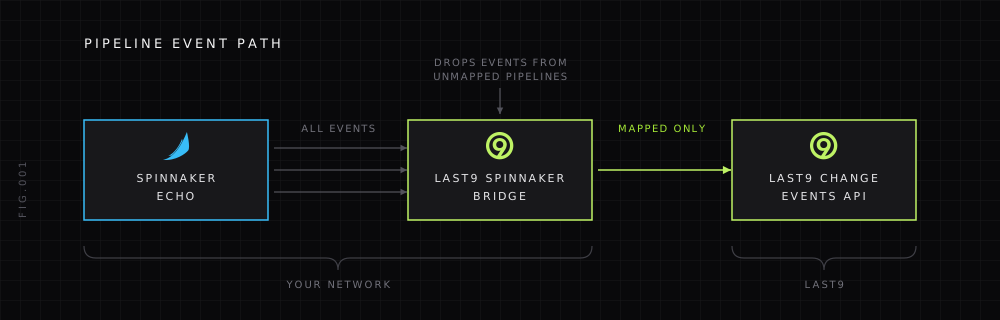
The bridge runs inside your network. Spinnaker Echo sends events to the bridge, which filters configured pipelines and forwards only mapped deployment events to Last9.
Prerequisites
- Spinnaker with the Echo REST module enabled
- Docker or another container runtime
- A Last9 access or refresh token with write access. See Getting Started with API.
- The Last9 organization slug, APM service name, and deployment environment for every pipeline you want to track
Install
-
Map Spinnaker pipelines to Last9 services
Create
config.jsonwith one explicit mapping for each production pipeline. Application and pipeline names are exact matches; unmapped events are ignored.{"org_slug": "example","mappings": [{"application": "payments","pipeline": "deploy-production","service_name": "payments-api","deployment_environment": "production","env": "production"}]}org_slugapplies to every mapping in the file. Deploy one bridge and configuration per Last9 organization. When environments use separate Last9 organizations, run separate bridge deployments with the corresponding organization slug and pipeline mappings.The bridge does not infer production from names. To collect production only, add only production pipelines.
-
Run the bridge
docker pull ghcr.io/last9/last9-spinnaker-integration:v0.1.0docker run --rm --publish 8080:8080 \--mount type=bind,src="$PWD/config.json",dst=/etc/last9-spinnaker/config.json,readonly \--env LAST9_REFRESH_TOKEN \ghcr.io/last9/last9-spinnaker-integration:v0.1.0Pin a release tag or image digest in production. Pass tokens through your container platform’s secret store. Do not put them in the image or mapping file.
Variable Required Default Description LAST9_CONFIG_FILENo /etc/last9-spinnaker/config.jsonPath to the JSON mapping file LAST9_REFRESH_TOKENOne token form — Preferred token for long-running deployments LAST9_ACCESS_TOKENOne token form — Short-lived fallback for local testing LAST9_API_BASE_URLNo https://app.last9.ioLast9 API base URL LAST9_EVENT_NAMENo deploymentChange-event name LAST9_MAX_ATTEMPTSNo 4Maximum Last9 delivery attempts LAST9_RETRY_BACKOFFNo 500msInitial delivery retry delay LAST9_DELIVERY_TIMEOUTNo 15sTotal deadline for delivering one event LAST9_DEDUP_TTLNo 24hHow long a delivered event remains deduplicated SPINNAKER_WEBHOOK_TOKENNo — Bearer token required by POST /eventswhen setLISTEN_ADDRNo :8080Bridge listen address Use
LAST9_REFRESH_TOKENfor long-running deployments.LAST9_ACCESS_TOKENis a short-lived fallback for local testing. When both are set, the refresh token takes precedence and the access token is ignored. -
Configure Echo
Add the bridge to
echo.ymlusing Spinnaker’s Echo REST listener:rest:enabled: trueendpoints:- wrap: falseurl: http://last9-spinnaker-integration:8080/eventswrap: falsesends the native Echo event payload expected by the bridge. Echo sends every event to its REST listeners; the bridge only processes mapped pipeline events.Echo’s documented REST listener does not guarantee custom request headers. Keep the bridge private when calling it directly. To use
SPINNAKER_WEBHOOK_TOKEN, place an authenticated gateway in front of the bridge that adds the bearer token. -
Verify the integration
Check the bridge health endpoint:
curl --fail http://localhost:8080/healthzRun a mapped pipeline, then query the resulting metric in Last9:
last9_change_events{event_name="deployment",service_name="payments-api",deployment_environment="production"}Confirm that the deployment has one
startmarker and one terminalstopmarker.
Event mapping
The bridge accepts native Echo payloads at POST /events and handles these pipeline events:
| Echo event | Last9 event_state | outcome |
|---|---|---|
orca:pipeline:starting | start | started |
orca:pipeline:complete | stop | Derived from content.execution.status |
orca:pipeline:failed | stop | Derived from content.execution.status |
Terminal outcomes preserve success, canceled, failed, stopped, skipped, or unknown. The bridge uses Spinnaker’s execution timestamps when available and falls back to the Echo event timestamp, then receipt time.
Every marker includes these attributes:
| Attribute | Source |
|---|---|
service_name | Explicit mapping |
deployment_environment | Explicit mapping |
env | Explicit mapping, when provided |
spinnaker_application | details.application |
spinnaker_pipeline | content.execution.name |
spinnaker_execution_id | Echo execution ID |
spinnaker_event_type | details.type |
spinnaker_status | content.execution.status |
outcome | Normalized execution outcome |
trigger_user | Pipeline trigger user, when provided |
trigger_type | Pipeline trigger type, when provided |
revision | Trigger artifact; legacy execution artifact or trigger parameter as fallback |
image | Trigger image artifact; legacy execution artifact or image parameter as fallback |
artifact_count | Number of artifact tuples included in the marker |
artifacts | JSON array of artifact type, name, version, and hashed reference |
artifact_metadata_truncated | true when artifact metadata was clipped or omitted |
bridge_source | spinnaker |
idempotency_key | Hash of execution ID and lifecycle |
timestamp_source | Field used for the marker timestamp |
The bridge never sends data_source_name; Last9 uses the organization’s default data source.
Before enabling production traffic, capture and redact one starting, successful, failed, and canceled event from your Spinnaker version. Validate each field path and mapping against the service and environment labels already present in Last9.
Artifact metadata is limited to 20 artifacts and 256 bytes per type, name, or version. The bridge hashes artifact references before sending them so artifacts remain distinguishable without exposing raw reference values.
Delivery and deduplication
- The bridge retries network errors and HTTP
429or5xxresponses up toLAST9_MAX_ATTEMPTS, with exponential backoff starting atLAST9_RETRY_BACKOFF. - A Last9
401or403invalidates the cached access token and triggers one immediate refresh and retry whenLAST9_REFRESH_TOKENis configured. - Last9 delivery is bounded by
LAST9_DELIVERY_TIMEOUT. Configure Echo or the proxy in front of the bridge with a read timeout greater than this value so it can receive the bridge’s final HTTP response. - Delivery is at least once. Echo retry duplicates are suppressed using the execution ID and lifecycle (
startorstop), but an ambiguous network response can create a duplicate if Last9 accepted the first request before the connection failed. - Deduplication is recorded only after Last9 accepts the event. Failed deliveries remain eligible for retry.
- The cache is in memory, expires entries after
LAST9_DEDUP_TTL, and is local to one bridge process. A restart clears it, and replicas do not share state. Run one replica unless your Last9 account provides server-side idempotency. - The bridge returns HTTP
202only after Last9 accepts the event. A completed duplicate returns204; a duplicate still in flight returns503so Echo can retry. A Last9 delivery failure returns502.
Security
- Keep the bridge on a private network reachable by Echo. If that is not possible, put it behind an authenticated gateway and TLS.
- Give the bridge only a Last9 token with the required write access.
- Mount the mapping file read-only and keep credentials out of it.
- Do not expose
POST /eventsdirectly to the public internet.
Roll back
Remove the Last9 endpoint from echo.yml, reload or restart Echo according to your Spinnaker deployment method, and stop the bridge container. This stops new markers without changing any Spinnaker pipeline.
Troubleshooting
-
The health check fails
Confirm the container is running,
LISTEN_ADDRmatches the published port, and the process can readLAST9_CONFIG_FILE. -
Echo receives an HTTP authorization error
Confirm the gateway supplies the bearer token configured in
SPINNAKER_WEBHOOK_TOKEN. -
No deployment marker appears
Compare the event’s application and pipeline names with
config.json; matching is exact. Then check bridge logs for Last9 authentication or delivery errors. -
Echo logs a 404 on the configured URL
Check Echo’s own pod logs for
RestServiceorRestEventListenerlines. The outbound request line can show a trailing slash (.../events/) that does not match theurlinecho.yml. This is expected on Echo builds before Spinnaker 2025.0.7 / 2025.1.2. See the note under “Configure Echo” above. Confirm that the bridge answers both forms:curl -X POST http://<bridge>:8080/eventscurl -X POST http://<bridge>:8080/events/Both requests must return a status other than
404. If one returns404, upgrade the bridge image. Releases afterv0.1.0accept the trailing-slash form. -
The marker does not appear on the service dashboard
Compare
service_nameanddeployment_environmentin the mapping with the labels on the application’s telemetry. They are case-sensitive. -
Duplicate markers appear after a restart or with multiple replicas
The built-in cache is process-local and delivery is at least once. Run one replica, route the same Echo event consistently to one replica, and account for duplicates after restarts or ambiguous network responses.
Please get in touch with us on Discord or Email if you have any questions.