
Product
Profiles Services View
Find the services that use the most CPU with the Profiles services view, and filter by environment, cluster, namespace, and runtime.
The Profiles landing page lists every service that sent profile samples in the selected time range, sorted by its share of total samples. Start here to find which services are worth investigating.
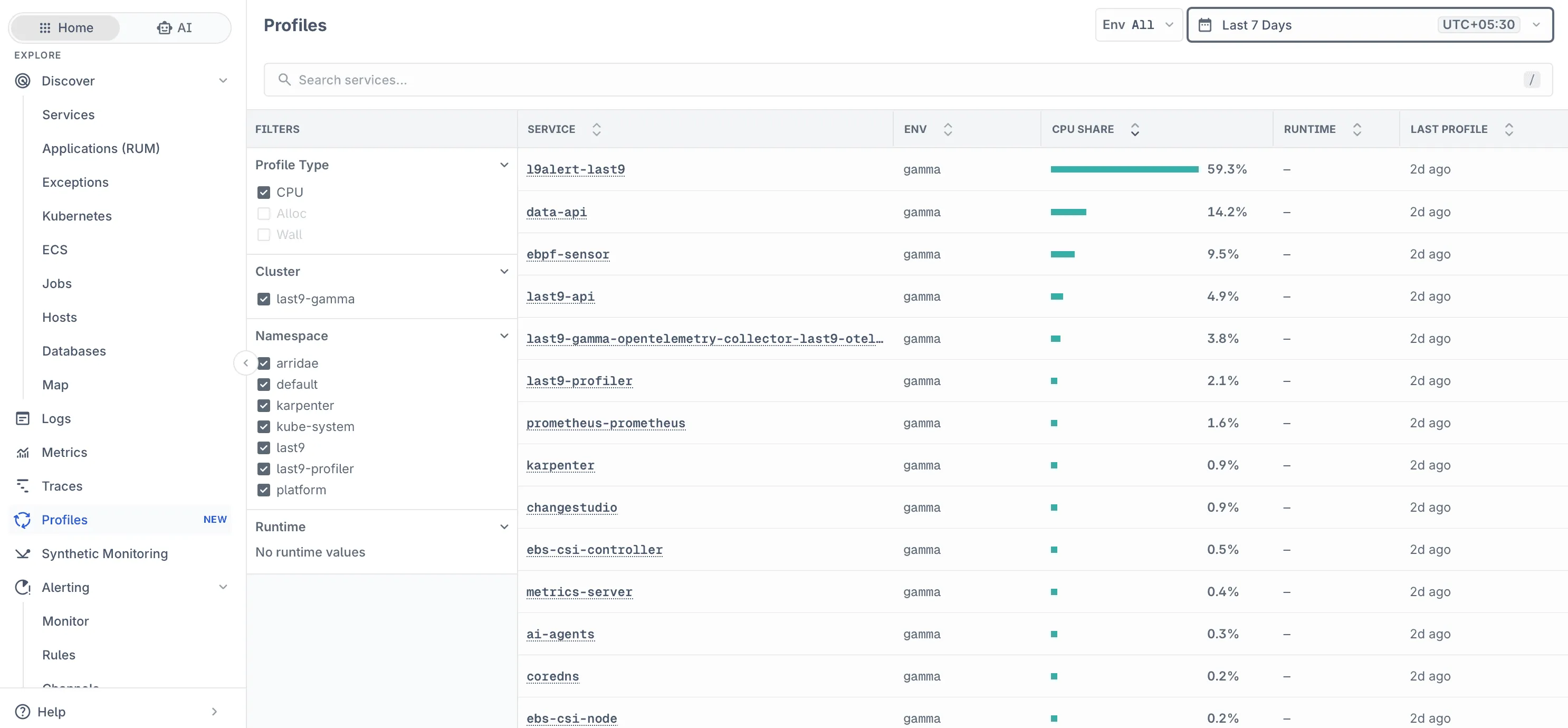
Columns
| Column | Description |
|---|---|
| Service | Service name, from the service.name resource attribute. Click it to open the flamegraph. |
| Env | Deployment environment, from deployment.environment.name. Shown when the environment selector is All. |
| CPU share | The service’s share of all CPU samples across listed services in the selected range. |
| Runtime | Language runtime, from telemetry.sdk.language, when the profiler reports it. |
| Last profile | When the most recent sample for the service arrived. |
CPU share is relative, not absolute. A service at 59% is using more than half of the CPU sampled across the profiled services, not 59% of a core.
Narrowing the List
Use the controls at the top of the page:
- Environment selector: limit results to one environment.
- Time range: choose the window to aggregate samples over.
- Search services: filter the list by service name. Press
/to focus the search box.
Filters
The Filters panel on the left narrows results by profile attributes:
| Filter | Source attribute | Notes |
|---|---|---|
| Profile Type | Profile sample type | CPU, Alloc, or Wall. Types with no data in the current range are disabled. |
| Cluster | k8s.cluster.name | Set by clusterName in the Helm chart values. |
| Namespace | k8s.namespace.name | Kubernetes namespace of the profiled pod. |
| Runtime | telemetry.sdk.language | Shows No runtime values when the profiler does not report a runtime. |
Troubleshooting
-
Filters look empty
- Runtime shows No runtime values. The profiler does not report
telemetry.sdk.languagefor these services. Other filters still work. - Alloc or Wall is disabled. No samples of that type arrived in the selected range.
- Runtime shows No runtime values. The profiler does not report
-
Services are missing or the list is empty. See Troubleshooting in the Profiles overview.
Please get in touch with us on Discord or Email if you have any questions.