
Product
AWS DevOps Agent — Last9 MCP
Register Last9's hosted MCP server as a capability provider in AWS DevOps Agent so the agent can query your production telemetry — exceptions, logs, traces, metrics, alerts, and change events — while investigating issues.
AWS DevOps Agent connects to external tools through capability providers. Register Last9’s hosted MCP server as a capability provider and the agent gains the full Last9 toolset — exceptions, logs, traces, PromQL queries, alerts, and change events — to use while it investigates infrastructure and pipeline issues across your Agent Spaces.
The hosted Last9 MCP server authenticates via OAuth, so each registration connects with a real Last9 account and the access scope (read-only or read + write) is chosen at authorization time. AWS DevOps Agent’s Dynamic Client Registration option means you never have to manage a client ID, client secret, or static token by hand.
Prerequisites
- Access to AWS DevOps Agent in a supported region (e.g. US East — N. Virginia)
- IAM permissions to register capability providers in AWS DevOps Agent
- A Last9 account with access to the org you want the agent to query — and your org slug (the path segment right after
app.last9.io/in your browser, e.g.https://app.last9.io/acme-corp/...→acme-corp)
Setup
-
Open Capability Providers
In the AWS console, go to AWS DevOps Agent → Capability Providers → Registration tab. This lists every capability you can register with this DevOps Agent account.
-
Register the generic MCP Server provider
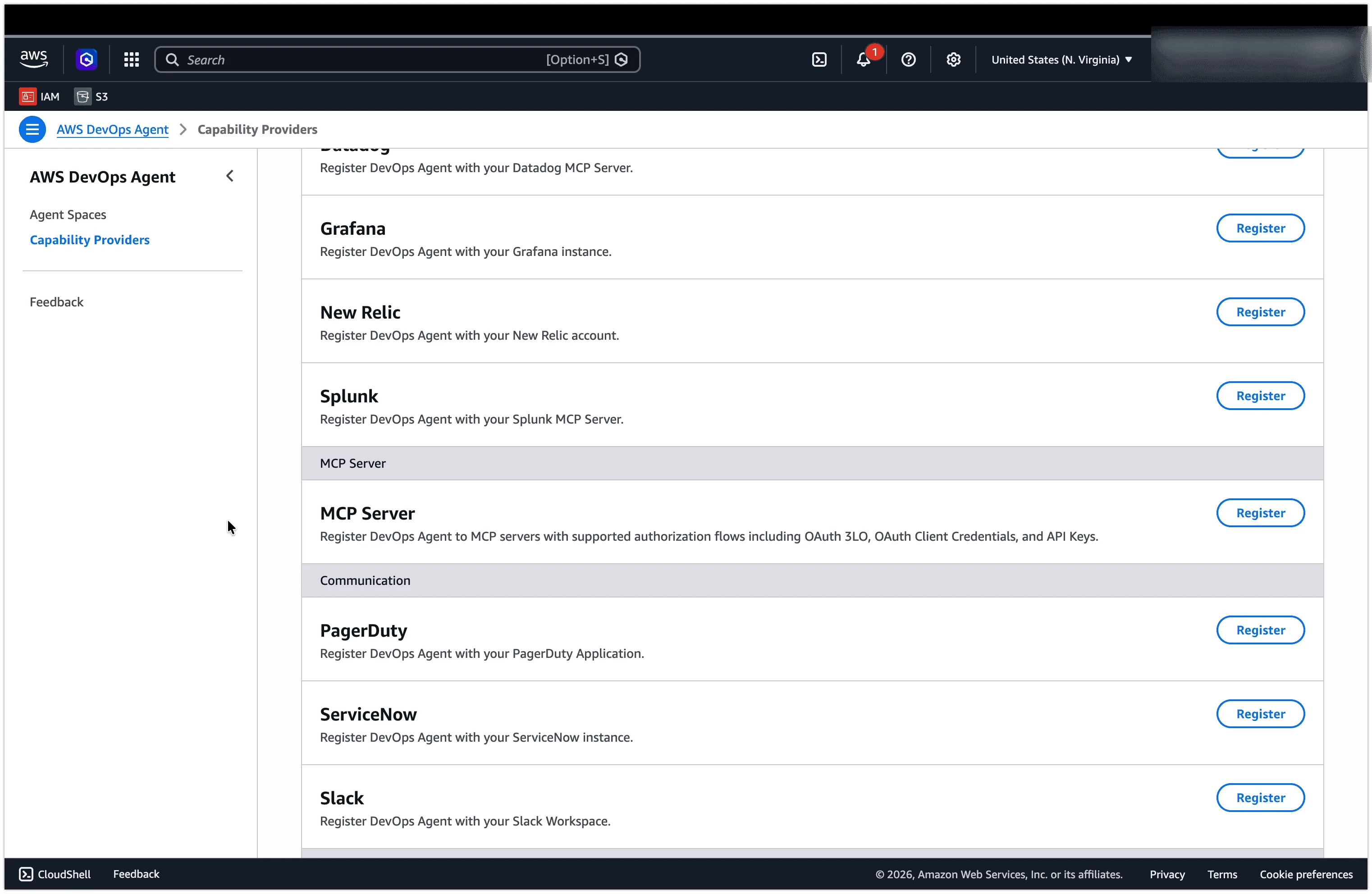
Scroll the Available list to the MCP Server section and click Register on the MCP Server tile.
Use this generic tile — not the vendor-specific tiles (Datadog, Grafana, New Relic, Splunk). The generic MCP Server provider registers DevOps Agent to any MCP server with supported authorization flows, including OAuth 3LO, OAuth Client Credentials, and API Keys.
-
Step 1 — MCP server details
Fill in the registration form:
Field Value Name last9Endpoint URL https://app.last9.io/api/v4/organizations/<org_slug>/mcpDescription Optional — e.g. Last9 production telemetryReplace
<org_slug>with your organization slug. The endpoint URL is recorded in your account’s AWS CloudTrail logs.Then:
- Check Enable Dynamic Client Registration. This lets DevOps Agent automatically register itself with Last9’s authorization server — no manual client ID or secret required.
- Leave Connect to endpoint using a private connection unchecked. The hosted Last9 endpoint is reached over the public internet. (Only check this if you’ve set up a private connection.)
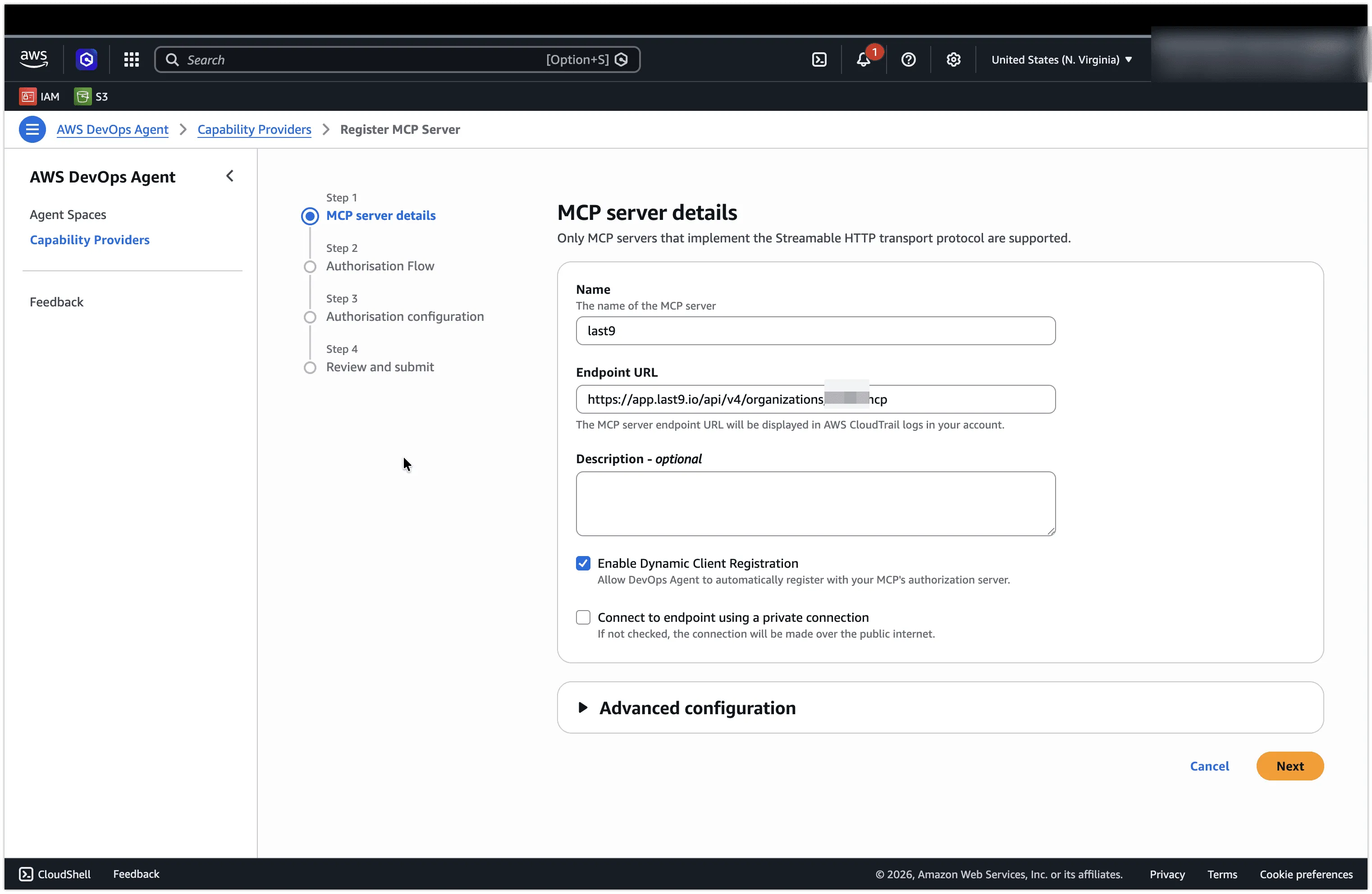
Click Next.
-
Step 2 — Authorisation Flow
Select the OAuth authorization flow (3LO / authorization code). Because Dynamic Client Registration is enabled, DevOps Agent discovers and registers the OAuth client with Last9 automatically. Click Next.
-
Step 3 — Authorisation configuration
With Dynamic Client Registration enabled, the authorization and token endpoints and scopes are discovered automatically from Last9. Review the values and click Next.
-
Step 4 — Review and submit
Confirm the details and click Register (or Submit).
-
Authorize Last9 access
An OAuth window opens with the Last9 consent screen: Allow your AI tool to access Last9? Pick the access scope for this connection:
Scope What it grants Read only Query all telemetry — good for debugging and investigation. Read + write Query and act — create alerts, add/edit Control Plane rules, and more. Only needed if your agent workflow requires it. 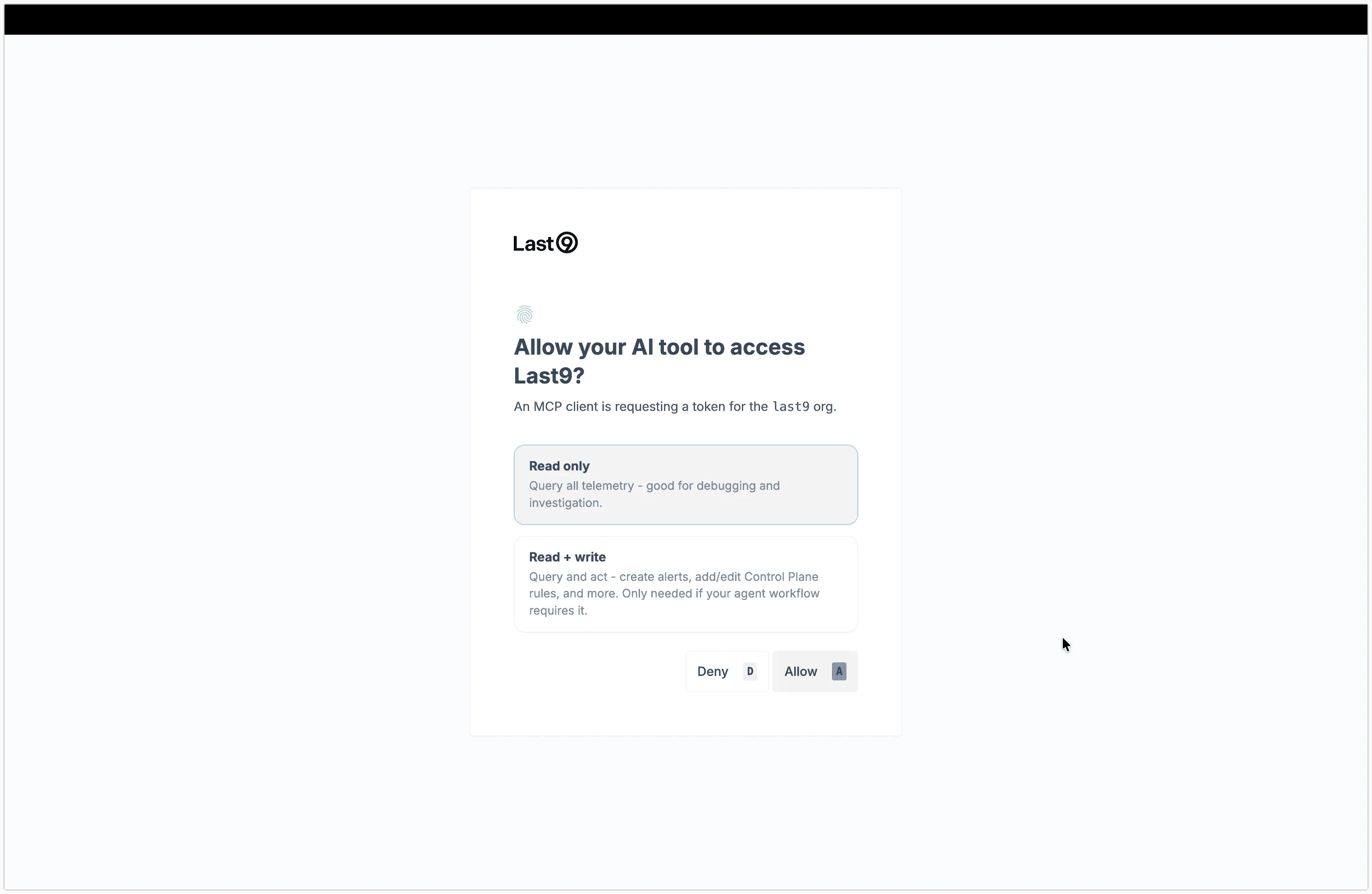
Click Allow. Start with Read only unless the agent genuinely needs to make changes.
-
Verify the registration
Back on Capability Providers → Registration, the Currently registered section now lists an MCP Server entry named
last9. The DevOps Agent can now use Last9 tools in your Agent Spaces.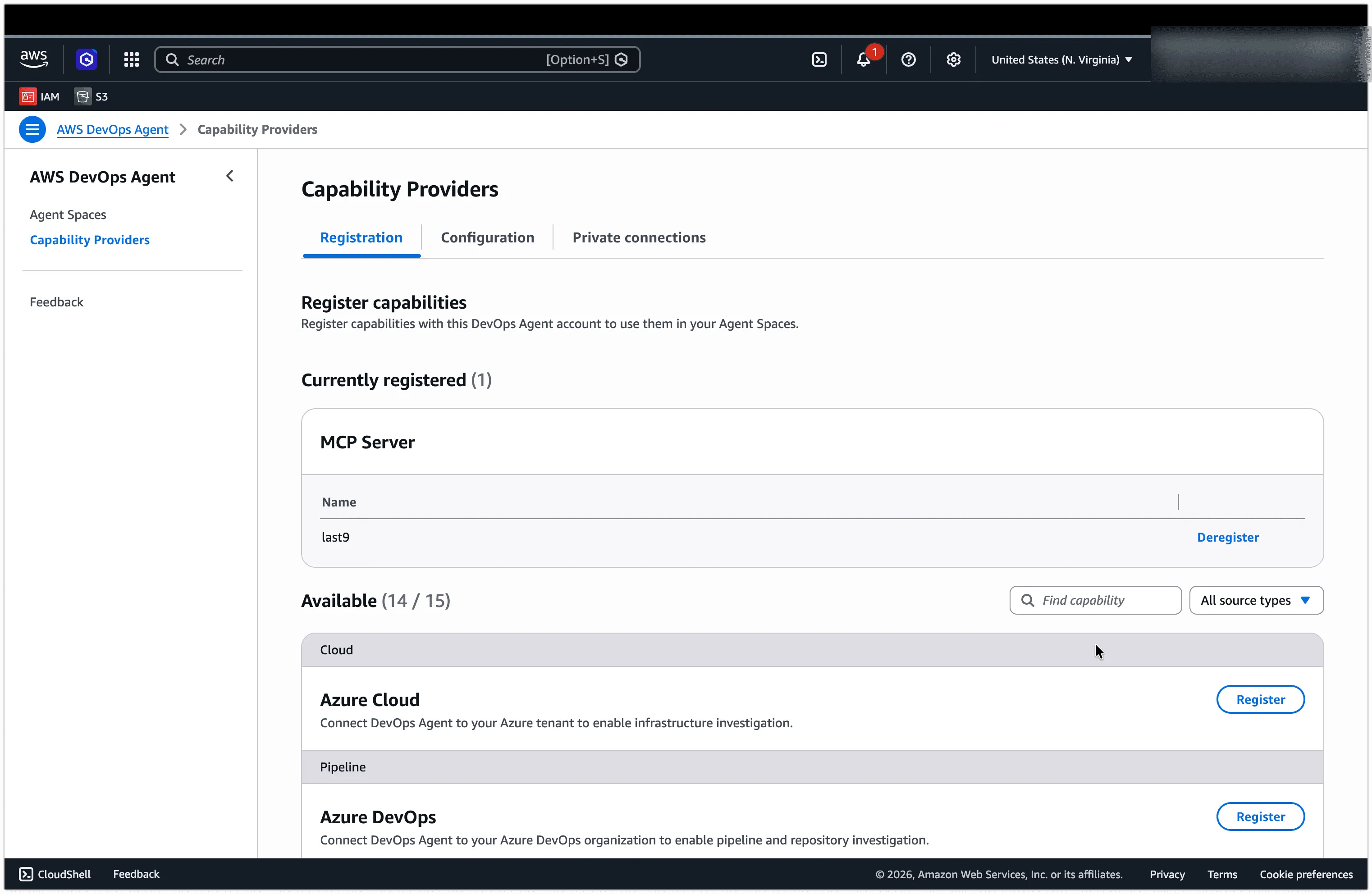
What you can ask the agent
Once registered, the DevOps Agent can pull live context from Last9 while it works. Prompts that name a specific service, time window, or signal type work best:
What exceptions has the payment-service thrown in the last 30 minutes?Group by exception type and include the most recent stack trace for each.The checkout-api latency p99 is above 2s. Check recent exceptions,any change events (deploys, config changes) in the last 2 hours, anddownstream service error rates. Summarize the likely root cause.The agent picks the right Last9 tools automatically based on your prompt.
Available Last9 MCP tools
For the full list of tools and their parameters, see the Last9 MCP reference. The hosted MCP server exposes the same toolset to any connected client.
Troubleshooting
last9 doesn’t appear under Currently registered.
The registration didn’t complete. Re-run the flow and make sure you clicked Allow on the Last9 consent screen — closing the OAuth window before authorizing cancels the registration.
OAuth flow redirects to a 404 or won’t complete. Make sure you’re logged in to app.last9.io in the same browser before authorizing. Log in to the dashboard first, then re-initiate the registration.
Wrong org slug.
The slug is the path segment immediately after app.last9.io/ — not your team name, display name, or email address. Check your browser URL bar. A wrong slug points the agent at an org you can’t access.
Agent can’t create alerts or edit rules. You authorized with the Read only scope. Re-register and choose Read + write on the consent screen.
“Only Streamable HTTP is supported” error.
The hosted Last9 endpoint speaks Streamable HTTP. Confirm the Endpoint URL is exactly https://app.last9.io/api/v4/organizations/<org_slug>/mcp with no trailing path or transport suffix.
Please get in touch with us on Discord or Email if you have any questions.