
Koa
Send distributed traces to Last9 from a Koa app using OpenTelemetry
Koa is a web framework for Node.js. This comprehensive guide will help you instrument your Koa application with OpenTelemetry, seamlessly sending the traces to Last9.
You can also check out the example application on GitHub↗.
Pre-requisites
- You have a Koa application
- You have signed up for Last9, created a cluster, and obtained the following OTLP credentials from the Integrations page:
endpointauth_header
Install OpenTelemetry packages
To perform the instrumentation, install the following OpenTelemetry packages.
npm install --save \ @opentelemetry/api@1.9.0 \ @opentelemetry/auto-instrumentations-node@0.59.0 \ @opentelemetry/core@2.0.1 \ @opentelemetry/exporter-trace-otlp-http@0.201.1 \ @opentelemetry/instrumentation@0.201.1 \ @opentelemetry/resources@2.0.1 \ @opentelemetry/sdk-node@0.201.1 \ @opentelemetry/sdk-trace-base@2.0.1 \ @opentelemetry/sdk-trace-node@2.0.1 \ @opentelemetry/semantic-conventions@1.34.0To know more about them, you can check: https://opentelemetry.io/docs/languages/js/libraries/
Setup auto-instrumentation using OpenTelemetry
Add the necessary environment variables that can be obtained from the Integrations page.
export OTEL_SERVICE_NAME="koa-api-server"export OTEL_EXPORTER_OTLP_ENDPOINT="<ENDPOINT>"export OTEL_EXPORTER_OTLP_HEADERS="Authorization=Basic <BASIC_AUTH_HEADER>"export OTEL_TRACES_SAMPLER="always_on"export OTEL_RESOURCE_ATTRIBUTES="deployment.environment=local"export OTEL_LOG_LEVEL=error
Next, create a file named instrumentation.ts and add the following code:
import * as api from "@opentelemetry/api";import {  NodeTracerProvider,  TracerConfig,} from "@opentelemetry/sdk-trace-node";import { BatchSpanProcessor, SpanProcessor, Span } from "@opentelemetry/sdk-trace-base";import { OTLPTraceExporter } from "@opentelemetry/exporter-trace-otlp-http";import { registerInstrumentations } from "@opentelemetry/instrumentation";import { getNodeAutoInstrumentations } from "@opentelemetry/auto-instrumentations-node";import { ATTR_SERVICE_NAME } from "@opentelemetry/semantic-conventions";import { resourceFromAttributes } from "@opentelemetry/resources";import { W3CTraceContextPropagator, W3CBaggagePropagator, CompositePropagator } from "@opentelemetry/core";
// For troubleshooting, uncomment the following lines to enable OpenTelemetry debug logging:// import { diag, DiagConsoleLogger, DiagLogLevel } from "@opentelemetry/api";// diag.setLogger(new DiagConsoleLogger(), DiagLogLevel.DEBUG);
// BaggageSpanProcessor - propagates W3C Baggage entries as span attributes for RUM correlationclass BaggageSpanProcessor implements SpanProcessor {  onStart(span: Span, parentContext: api.Context): void {    const baggage = api.propagation.getBaggage(parentContext || api.context.active());    if (!baggage) return;    for (const [key, entry] of baggage.getAllEntries()) {      span.setAttribute(key, entry.value);    }  }  onEnd(): void {}  forceFlush(): Promise<void> { return Promise.resolve(); }  shutdown(): Promise<void> { return Promise.resolve(); }}
export const setupTracing = (serviceName: string) => {  const providerConfig: TracerConfig = {    resource: resourceFromAttributes({      [ATTR_SERVICE_NAME]: serviceName,      'deployment.environment': process.env.NODE_ENV,    }),    spanProcessors: [      new BaggageSpanProcessor(),      new BatchSpanProcessor(new OTLPTraceExporter()),    ],  };
  // Initialize and register the tracer provider  const provider = new NodeTracerProvider(providerConfig);
  // Automatically instrument HTTP and Koa  registerInstrumentations({    instrumentations: [      getNodeAutoInstrumentations({        "@opentelemetry/instrumentation-fs": {          enabled: false,        },      }),    ],    tracerProvider: provider,  });
  provider.register({    propagator: new CompositePropagator({      propagators: [new W3CTraceContextPropagator(), new W3CBaggagePropagator()],    }),  });
  return api.trace.getTracer(serviceName);};
This above code performs the following steps:
- Set up Trace Provider with the application’s name as Service Name.
- Set up OTLP Exporter with Last9 OTLP endpoint.
- Set up auto instrumentation for all the supported libraries.
Next, this script must be imported at the application’s entry point, even before importing koa package. For instance, if you have server.ts as your entry file, then import it at the top of the file as follows:
import { setupTracing } from "./instrumentation";// Do this before requiring koa packagesetupTracing("koa-api-server");import Koa from "koa";// other imports...Visualize the traces in Last9
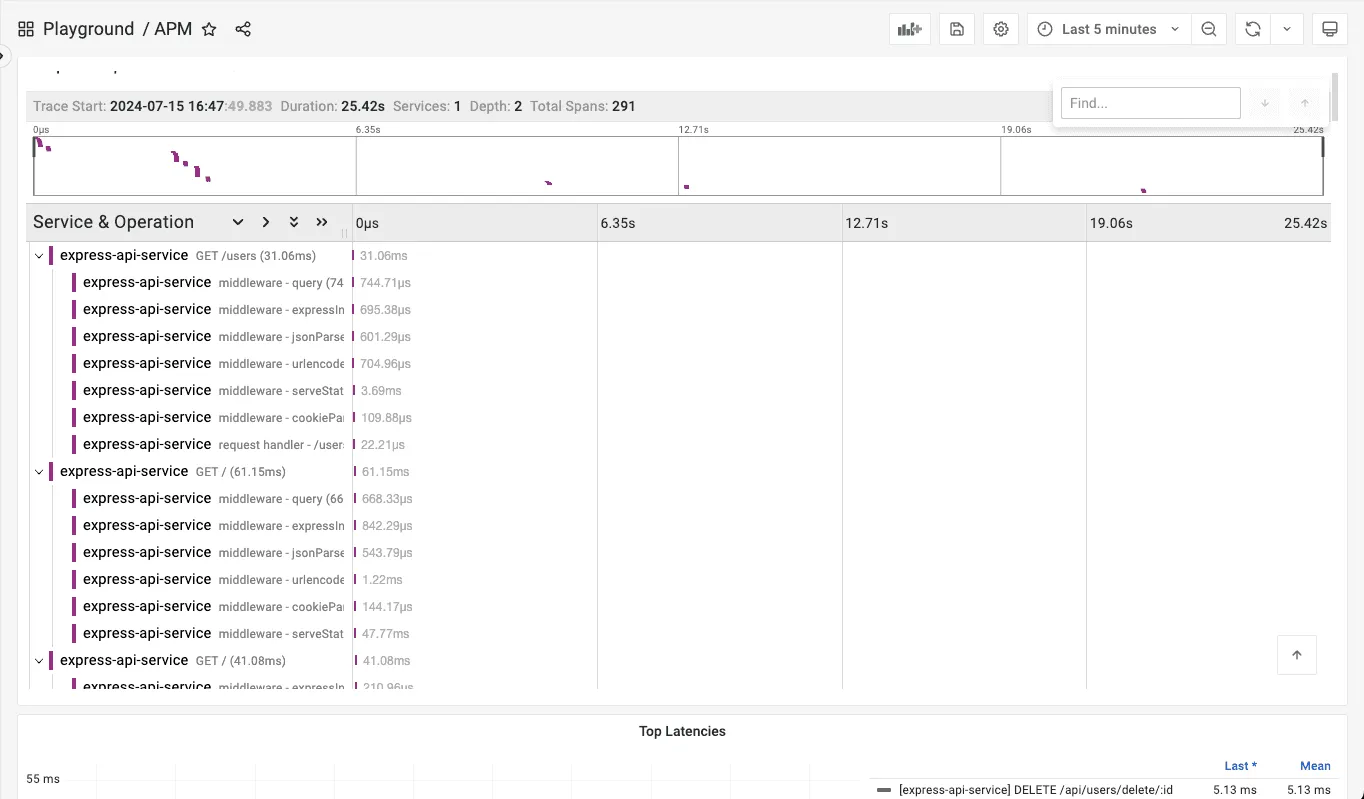
Once the application runs with the above code, it will start pushing traces to Last9. You can see the result in action by looking at the APM dashboard in Last9.
Troubleshooting
Please get in touch with us on Discord or Email if you have any questions.