

RAG pipeline observability means recording what happens at every stage of a retrieval augmented generation request: the query embedding, the vector search, the reranker, the prompt that gets assembled and the model call that answers it. Each stage gets a span, a few attributes and a handful of metrics.
The reason to bother is that a RAG system can return a confident, wrong answer while every service reports healthy. The vector database answered in 40 ms, the model returned 200, and the user still got an answer built from the wrong chunks. Latency and error rates can’t see that. Retrieval scores, context size and evaluation results can.
This guide covers the stages to trace, the OpenTelemetry attributes to set on each one, the metrics that show retrieval drifting, the evaluation scores worth running on live traffic, and how to keep prompts and documents out of storage when they shouldn’t be there.
What does RAG pipeline observability cover?
A RAG request has more moving parts than a plain LLM call. Our LLM observability guide covers the model call itself: tokens, latency, cost and errors. RAG adds a retrieval system in front of it, and that system fails in its own ways.
Observability for RAG covers three layers:
- System telemetry: latency, errors and throughput for every stage, from the embedding call to the final token.
- Retrieval telemetry: how many chunks came back, their scores, which index and data source they came from, and how many tokens they added to the prompt.
- Quality telemetry: evaluation scores such as faithfulness and context precision, run on a sample of production requests.
The first layer tells you the pipeline is slow or broken. The second and third tell you it’s wrong.
Which stages of a RAG pipeline should you trace?
Give each user request one trace and each stage its own child span. A typical pipeline has six stages:
| Stage | What it does | What to record | Failure it hides |
|---|---|---|---|
| Query rewrite | Rewrites or expands the user’s question | Model, tokens, rewritten query length | A rewrite that drops the key term |
| Embed | Turns the query into a vector | Embedding model, dimensions, latency | A model mismatch with the index |
| Retrieve | Searches the vector store or hybrid index | Data source, top_k, result count, top score | Empty or low-score results |
| Rerank | Reorders candidates with a cross-encoder or model | Candidates in, chunks out, latency | Reranker dropping the right chunk |
| Assemble | Builds the prompt from chunks and instructions | Chunk count, context tokens, truncation | Context cut off at the token limit |
| Generate | Calls the model with the assembled prompt | Model, input and output tokens, cost, TTFT | Answer that ignores the context |
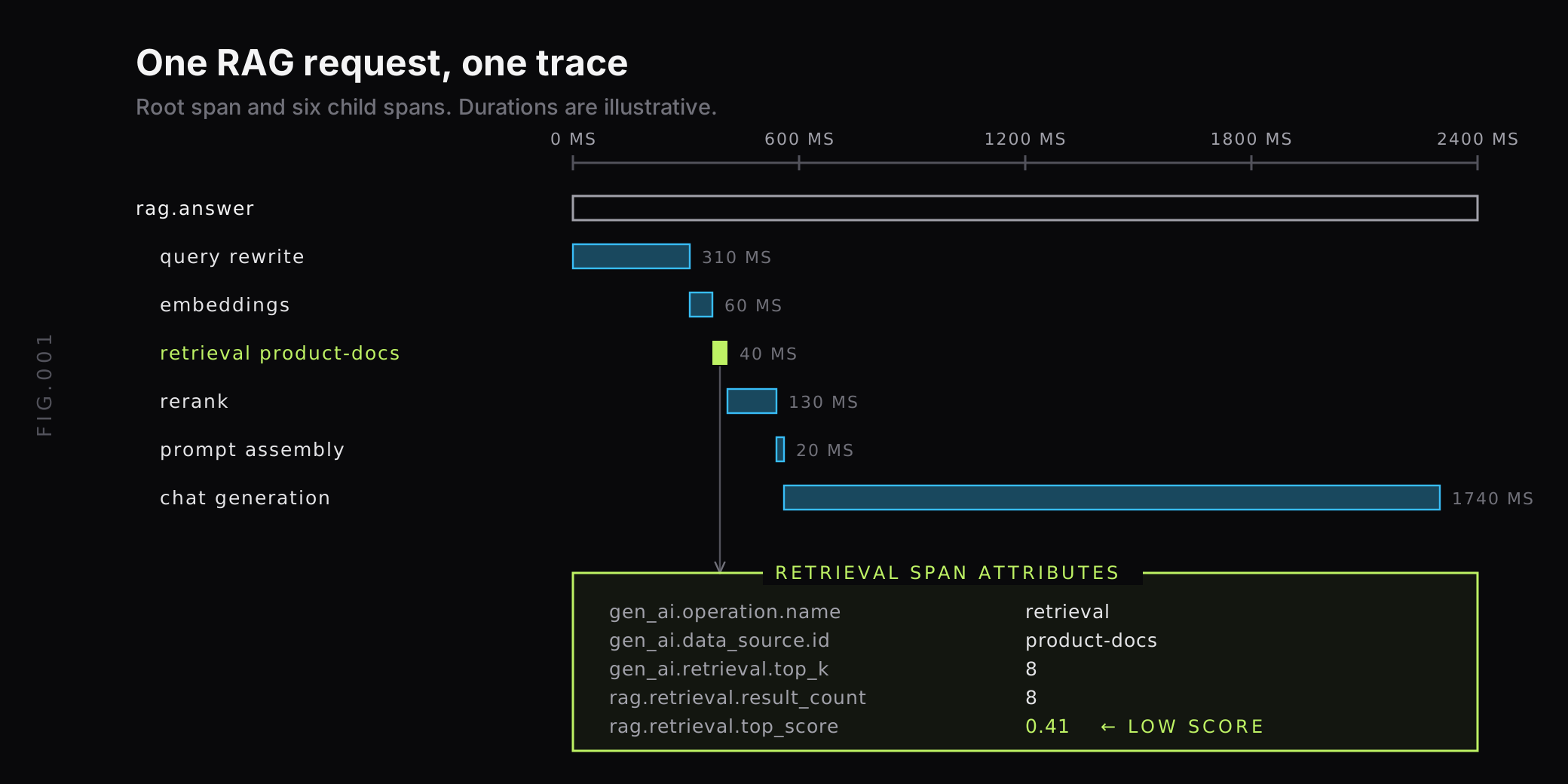
The waterfall below shows how those stages line up inside one request. Generation usually takes most of the time, but the retrieval span carries the attributes that explain a bad answer.
Skip a stage your pipeline doesn’t have. Keep the span names stable across releases, because dashboards and alerts will key on them.
How do you instrument RAG with OpenTelemetry?
The OpenTelemetry project now keeps its generative AI conventions in a dedicated GenAI semantic conventions repository. They’re still marked Development, so names can change between releases, but they already define the two spans RAG needs most.
The embeddings span
The embeddings span describes a request that turns input into vectors. Set gen_ai.operation.name to embeddings, and record gen_ai.request.model, gen_ai.embeddings.dimension.count and gen_ai.usage.input_tokens. Recording the dimension count on every span makes a mismatch between the query model and the index model easy to spot.
The retrieval span
The conventions describe a retrieval span as a request that retrieves relevant information or context from a vector database or search system. The span name should be {gen_ai.operation.name} {gen_ai.data_source.id}, so a search against a product-docs index becomes retrieval product-docs, with span kind CLIENT.
The attributes worth setting:
gen_ai.operation.name:retrieval.gen_ai.data_source.id: the index, collection or knowledge base searched.gen_ai.retrieval.top_k: the maximum number of documents the retriever was asked to return.gen_ai.retrieval.documents(opt-in): the retrieved documents, each with anidand ascorewhen available.gen_ai.retrieval.query.text(opt-in): the query text. The conventions warn that it may contain sensitive information.
Here’s a manual retrieval span in Python. The rag.retrieval.* attributes are our own names for values the conventions don’t cover yet; pick a prefix and keep it consistent.
from opentelemetry import trace
tracer = trace.get_tracer("rag.pipeline")
def retrieve(query_vector, k=8):    with tracer.start_as_current_span(        "retrieval product-docs",        kind=trace.SpanKind.CLIENT,    ) as span:        span.set_attribute("gen_ai.operation.name", "retrieval")        span.set_attribute("gen_ai.data_source.id", "product-docs")        span.set_attribute("gen_ai.retrieval.top_k", k)        hits = index.search(query_vector, limit=k)        span.set_attribute("rag.retrieval.result_count", len(hits))        if hits:            span.set_attribute("rag.retrieval.top_score", hits[0].score)            span.set_attribute("rag.retrieval.doc_ids", [h.id for h in hits])        return hits
Record document IDs and scores by default. They’re small, they don’t carry content, and they let you open the exact chunks later from your index.
Automatic instrumentation
You don’t have to write every span by hand. OpenLLMetry is an open-source set of OpenTelemetry instrumentations for LLM applications. It covers model providers such as OpenAI, Anthropic, Bedrock and Vertex AI, frameworks such as LangChain, LlamaIndex and Haystack, and vector databases including Pinecone, Chroma, Weaviate, Milvus and Qdrant.
For vector database calls, OpenLLMetry records db.system and, depending on the database, attributes such as db.vector.query.top_k, db.vector.query.result_count and db.vector.query.top_score. Coverage varies: some integrations use vendor-specific names such as pinecone.query.top_k or db.chroma.*, so check what your vector database emits before you build dashboards on it.
If your pipeline is built on LangChain, our LangChain observability guide walks through the callbacks and spans it emits.
Group the stages as one workflow
A trace already ties the spans together, but filtering by pipeline is easier with an explicit workflow ID. Our Python GenAI SDK adds a workflow_context that tags every span inside it with workflow.id and workflow.type, and nests inside a conversation:
from last9_genai import conversation_context, workflow_context
with conversation_context(conversation_id="session_123", user_id="user_1"):    with workflow_context(workflow_id="rag_pipeline_001", workflow_type="retrieval"):        docs = retrieve_documents(query)        context = rerank_documents(docs)        response = generate_answer(context)
That gives you one filter for every retrieval, rerank and generation span in a pipeline, and a second for every turn of a user’s conversation.
Which metrics show a RAG pipeline is degrading?
Traces explain one request. Metrics show the trend across all of them. These are the series worth keeping:
| Metric | How to get it | What a change means |
|---|---|---|
| Latency per stage (p50, p95) | GenAI duration histograms by gen_ai.operation.name, or span metrics | A slow index, reranker or model |
| Empty retrieval rate | Count of retrieval spans with zero results | Filters too strict, index missing data |
| Top retrieval score | Histogram of the best score per query | Embedding drift, stale index, new topics |
| Context tokens per request | Tokens added by retrieved chunks | Chunking changes, cost growth, truncation |
| Input and output tokens, cost | GenAI token usage metrics | Prompt growth, model change |
| Time to first token | gen_ai.client.inference.time_to_first_chunk (gen_ai.client.operation.time_to_first_chunk in semconv v1.41.0) for streaming calls, or gen_ai.server.time_to_first_token | Slow model or oversized context |
| Model error rate | error.type on generation spans | Rate limits, timeouts, provider issues |
The conventions specify gen_ai.client.operation.duration as a histogram in seconds with explicit bucket boundaries from 0.01 to 81.92 seconds, wide enough for a 20 ms vector query and a slow embedding batch. The current spec on main, not yet in a tagged release, moves model inference calls to a separate gen_ai.client.inference.duration metric, so check which one your instrumentation emits. Once exported to a Prometheus-compatible backend, dots become underscores, so p95 retrieval latency looks like this:
histogram_quantile( 0.95, sum by (le) ( rate(gen_ai_client_operation_duration_seconds_bucket{gen_ai_operation_name="retrieval"}[5m]) ))The duration metric carries gen_ai.operation.name but not gen_ai.data_source.id. To split retrieval latency by index, generate span metrics from the retrieval spans, which do carry the data source.
The top score histogram is the early warning most teams miss. When the distribution shifts down after an index rebuild, a new embedding model or a content migration, answer quality usually follows. Because scores aren’t comparable across embedding models, label the series with the index or model version so a planned change doesn’t look like an outage.
Keep labels bounded. Index, data source, model, pipeline version and environment are fine. User IDs, query text and document IDs belong on spans, not metric labels. For more on keeping label counts in check, see our guide to managing high cardinality metrics in Prometheus.
Which evaluation scores should you run in production?
System and retrieval metrics can’t tell you whether the answer was right. For that you need evaluation scores. The Ragas paper describes a framework for reference-free evaluation of RAG pipelines, and the open-source Ragas library documents four metrics that map cleanly to pipeline stages:
- Context precision: whether the retriever ranks relevant chunks above irrelevant ones. It’s the mean of precision@k for each chunk in the retrieved context.
- Context recall: how much of the relevant information was retrieved. It needs a reference answer, so it fits offline test sets better than live traffic.
- Faithfulness: the share of claims in the response that the retrieved context supports. A score of 1 means every claim can be traced to a chunk.
- Answer relevancy: how well the response addresses the question. Ragas computes it by generating questions from the answer and comparing their embeddings with the original question.
Most of these use a model as the judge, so each score costs a model call. Run them on a sample of production requests, not all of them, and store each score where you can join it to the trace:
from opentelemetry import metrics
meter = metrics.get_meter("rag.eval")faithfulness = meter.create_histogram("rag.eval.faithfulness", unit="1")
faithfulness.record(    score,    {"rag.pipeline.version": "v14", "gen_ai.data_source.id": "product-docs"},)
Also write the score as a span attribute or event on the sampled trace. The metric shows that faithfulness for v14 dropped. The trace shows which retrieved chunks the low-scoring answers were built from.
Record chunk order alongside chunk IDs
Where a chunk sits in the prompt matters. The Lost in the Middle study found that model performance “is often highest when relevant information occurs at the beginning or end of the input context” and drops when the model has to use information in the middle of a long context.
Record the position of each chunk in the assembled prompt alongside its ID and score. When an answer misses something that was retrieved, the position often explains why, and it tells you whether to cut top_k or reorder chunks.
How do you find the cause of a bad RAG answer?
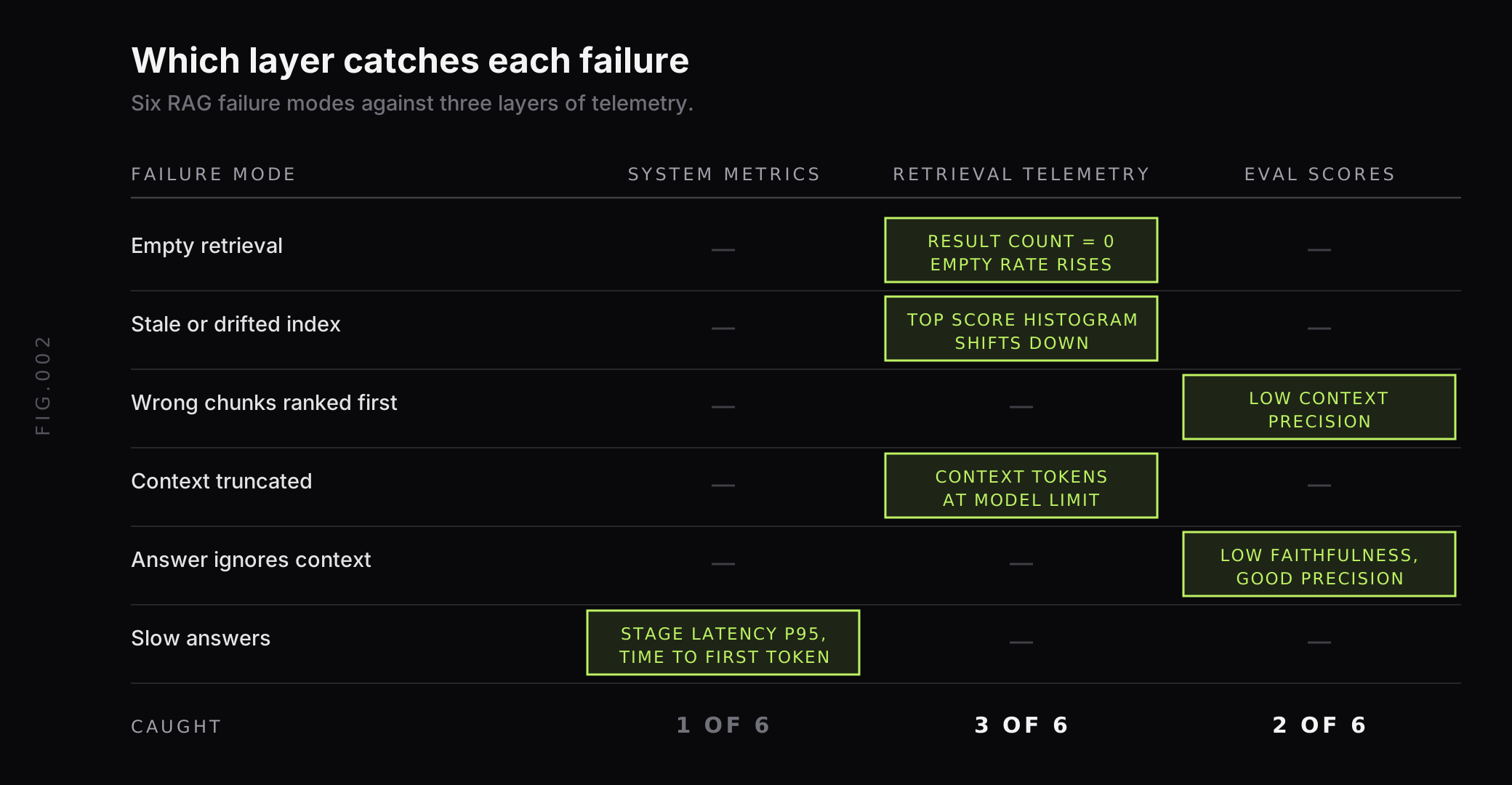
Most RAG failures leave a signature in one layer of telemetry. Start at the retrieval span, then work outward.
A quick order for an investigation:
- Check the retrieval span. Zero results, fewer results than
top_k, or a low top score points to the index or the query embedding. - Check the sources. Document IDs from the wrong data source or an old index version point to routing or a stale build.
- Check context size. Context tokens at the model’s limit, or a truncation flag, mean chunks were cut before the model saw them.
- Check the scores. Good context precision with low faithfulness means retrieval worked and generation didn’t. Low context precision means the opposite.
- Check the versions. Compare the same metrics across pipeline, prompt and index versions to find the release that changed them.
How do you keep prompts and documents out of telemetry?
RAG traces can carry the most sensitive data in your system: user questions, internal documents and model answers. The GenAI conventions make gen_ai.retrieval.query.text and gen_ai.retrieval.documents opt-in for that reason.
A practical default:
- Record IDs, scores and counts on every request. They’re enough to debug retrieval without storing content.
- Capture content only for sampled requests, and only in environments where you’re allowed to keep it.
- Turn off content capture in auto-instrumentation where you don’t need it. OpenLLMetry reads
TRACELOOP_TRACE_CONTENT=falseto stop recording prompts and completions. - Redact at the collector so a missed setting in one service doesn’t leak data. Our guide to redacting sensitive data in the OpenTelemetry Collector shows the processors to use.
How does Last9 fit with RAG pipeline observability?
Our Agents Monitoring view is built on the OpenTelemetry GenAI semantic conventions, so any instrumentation that emits GenAI-convention telemetry feeds it, including OpenLLMetry and our Python GenAI SDK. It reports conversations, cost per conversation, P50 to P99 call latency, token counts, success rate and the models serving traffic. A slow or failing model call links to its full request trace, where the retrieval and rerank spans from the same request sit before it.
The overview is backed by GenAI token usage metrics and the gen_ai_client_operation_duration_seconds histogram, which you can query with PromQL in dashboards and alerts next to your own rag.* and eval metrics. We support 20M series per metric per day by default and keep high-cardinality labels with no sampling, so index, model and pipeline version labels can stay on every series.
Our Control Plane lets you drop, remap, redact, forward and aggregate metrics, logs and traces at ingest, which is where prompt and document content can be removed before storage. For agent pipelines that call tools as well as retrievers, see our AI agent observability best practices.
Trace the retrieval, score the answer
A RAG pipeline needs two kinds of telemetry to be debuggable. The first is the system view every service has: a span per stage, latency and errors. The second is specific to RAG: what the retriever returned, how well it scored, how much of it reached the prompt and whether the answer stayed faithful to it.
Start with a retrieval span that records data source, top_k, result count, top score and document IDs. Add a top score histogram, context tokens per request and sampled faithfulness and context precision scores, all labelled by pipeline and index version. When you want those traces, metrics and eval scores in one place, send them to Last9: we take OpenTelemetry GenAI telemetry as it is.
FAQ
What is RAG observability?
RAG observability is the practice of recording telemetry for every stage of a retrieval augmented generation request, from query embedding through vector search, reranking, prompt assembly and generation. It combines system signals such as latency, errors, token counts and cost with quality signals such as retrieval scores and evaluation results, so you can tell whether a bad answer came from retrieval or from the model.
How do you trace a RAG pipeline with OpenTelemetry?
Create one trace per user request and a child span for each stage. The OpenTelemetry GenAI semantic conventions define an embeddings span with gen_ai.operation.name set to embeddings and a retrieval span with gen_ai.operation.name set to retrieval, named retrieval followed by the data source ID. Libraries such as OpenLLMetry create spans automatically for common LLM providers, frameworks and vector databases, though their vector database attributes vary by integration.
Which metrics should you monitor for a RAG pipeline?
Track latency per stage at p50 and p95, the share of retrievals that return no results or only low scores, the top retrieval score over time, context tokens per request, input and output tokens and cost per request, model errors and time to first token. Add sampled evaluation scores such as faithfulness and context precision, grouped by pipeline version and index version.
What is the difference between RAG evaluation and RAG observability?
RAG evaluation scores the quality of retrieval and answers, usually against a test set before release. RAG observability records what each production request did and how long it took. The two meet when you run sampled evaluations on live traffic and store the scores next to the traces, so a drop in faithfulness can be tied to a specific index build, prompt version or model.
How do you know if retrieval is the cause of a bad RAG answer?
Open the trace and check the retrieval span first. A low top score, fewer results than top_k, or chunks from the wrong source point to retrieval. If the retrieved chunks contain the answer but the response still misses it, the problem is in prompt assembly or generation. Context precision and context recall scores separate the two over many requests.
Should you log prompts and retrieved documents in RAG traces?
Only with care. The OpenTelemetry GenAI conventions mark the retrieval query text and the retrieved documents as opt-in attributes and warn that the query text may contain sensitive information. Many teams record document IDs and scores by default, capture full content only for sampled requests, and redact personal data in the collector before it reaches storage.


