

MCP server monitoring means recording what a Model Context Protocol server does with every request it receives: which method was called, which tool ran, how long it took, whether it failed, and which client session it belonged to. The OpenTelemetry project now defines spans and metrics for exactly this, so an MCP server can be traced like any other service.
There’s one trap specific to MCP. A tool that fails returns a normal, successful JSON-RPC response with isError set to true. HTTP status codes and generic RPC error rates won’t count it, so a server can look healthy while its tool calls fail.
This guide covers what to monitor, why tool failures hide, which OpenTelemetry spans and attributes to use, how trace context crosses from client to server, which metrics and alerts matter, and how to instrument FastMCP and the official Python SDK. Details come from the MCP specification (version 2025-11-25) and the OpenTelemetry GenAI conventions as of October 2026.
This guide is about MCP servers you build and run. If you’re looking for the Last9 MCP server that lets coding agents query your telemetry, see our Last9 MCP docs.
What does MCP server monitoring cover?
An MCP server exposes tools, resources and prompts to AI clients over JSON-RPC. Clients reach it over stdio, as a local subprocess, or over Streamable HTTP, as a remote service. Either way, there are five things to watch:
- Requests by method:
tools/call,resources/read,prompts/get,tools/list,initializeand the rest, with counts and durations. - Tool calls: which tools run, how often, how long each takes and how often each fails.
- Errors: JSON-RPC protocol errors, tool execution errors, timeouts and cancellations.
- Sessions: how many clients are connected, how long sessions last and how many fail to initialize.
- Downstream calls: the APIs, databases and services your tool handlers call, which is where most tool latency comes from.
The first four are specific to MCP. The fifth is ordinary service monitoring, and the same OpenTelemetry instrumentation covers it.
Why do failed MCP tool calls look healthy?
The MCP tools specification defines two ways a tool call can fail:
- Protocol errors are standard JSON-RPC errors, for unknown tools, malformed requests and server errors.
- Tool execution errors are reported in tool results with
isError: true. The specification lists API failures, input validation errors and business logic errors as examples.
The second kind is the one that hides. The JSON-RPC response is a success, and on Streamable HTTP the HTTP response is usually a 200. The specification wants it that way, because tool execution errors carry feedback a model can use to retry with better parameters.
For monitoring, it means a dashboard built on HTTP status codes or JSON-RPC error codes misses every tool execution error. The OpenTelemetry MCP conventions handle this directly: when a CallToolResult comes back with isError set to true, instrumentation should set error.type to tool_error.
The conventions also list JSON-RPC codes that shouldn’t count as errors, because they mean the caller sent a request the server couldn’t serve: -32700 (parse error), -32600 (invalid request), -32601 (method not found), -32602 (invalid params, also returned for a tool that doesn’t exist) and -32002 (resource not found). Any other error code should count as an error.
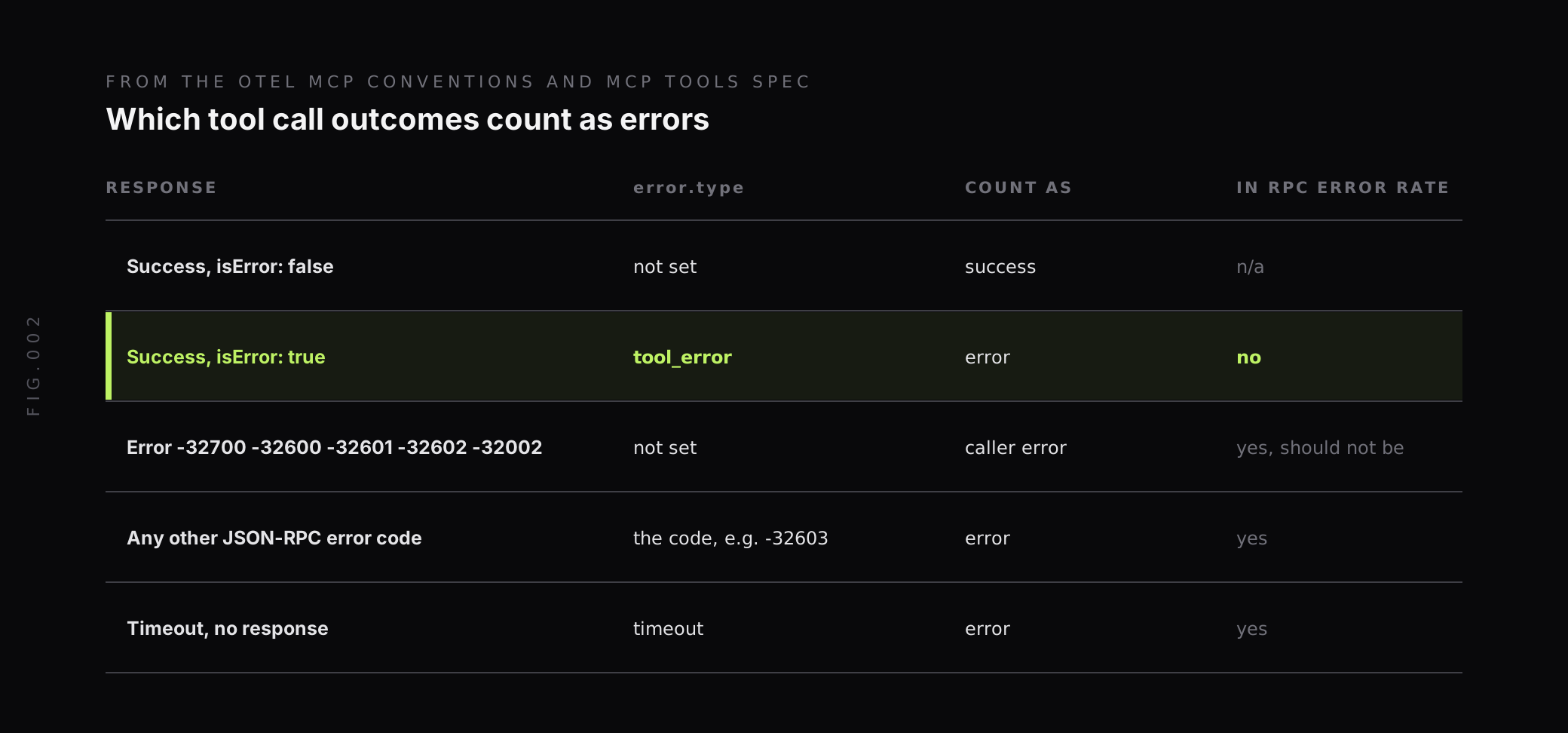
If you only take one thing from this guide, count isError: true results per tool. That number is your real tool error rate.
Which spans does OpenTelemetry define for MCP?
The OpenTelemetry GenAI semantic conventions include a Model Context Protocol section. Like the rest of the GenAI conventions, it’s marked Development, so names can still change between releases.
The server span describes the processing of a request or notification sent by the peer. Its name should be {mcp.method.name} {target}, where the target is the tool or prompt name when there is one. A call to a get-weather tool becomes tools/call get-weather, with span kind SERVER. When there’s no low-cardinality target, the span name is just the method, such as initialize or tools/list.
The attributes worth knowing:
| Attribute | Requirement | What it holds |
|---|---|---|
mcp.method.name | Required | The method, such as tools/call or resources/read |
gen_ai.tool.name | When a tool is involved | The tool name |
gen_ai.prompt.name | When a prompt is involved | The prompt or template name |
mcp.resource.uri | When the request has a resource URI | The resource being read or subscribed to |
error.type | If the operation fails | The JSON-RPC error code, tool_error, or an error class such as timeout |
rpc.response.status_code | If the response has an error code | The JSON-RPC error code |
jsonrpc.request.id | For requests | The request ID that matches request and response |
mcp.session.id | Recommended | The MCP session |
mcp.protocol.version | Recommended | The protocol version, such as 2025-11-25 |
gen_ai.operation.name | Recommended for tool calls | execute_tool, so MCP tool calls line up with other tool spans |
network.transport | Recommended | pipe for stdio, tcp or quic for HTTP |
Tool arguments and results are opt-in, through gen_ai.tool.call.arguments and gen_ai.tool.call.result. They’re useful for debugging and risky to store, so leave them off by default.
Keep resource URIs out of span names. The conventions say instrumentation should not include mcp.resource.uri in the span name by default, to avoid high-cardinality span names. Keep it as an attribute instead.
How does trace context cross from MCP client to server?
Trace context usually travels in HTTP headers. That doesn’t work for MCP. On stdio there are no headers, and on Streamable HTTP one HTTP request can serve several MCP messages through its response stream, while one MCP request can span several HTTP requests if it’s retried.
The OpenTelemetry conventions solve this by putting the context inside the MCP message. Instrumentations should inject it into the request’s params._meta property bag, and the server extracts it from there and uses it as the parent of its span. The keys are traceparent, tracestate and baggage, used as plain key names with no prefix. Here’s the example from the conventions:
{ "jsonrpc": "2.0", "method": "tools/call", "params": { "name": "get-weather", "_meta": { "traceparent": "00-4bf92f3577b34da6a3ce929d0e0e4736-00f067aa0ba902b7-01", "tracestate": "rojo=00f067aa0ba902b7,congo=t61rcWkgMzE" } }, "id": 1}The result is one trace from the agent’s model call, through the client’s tools/call span, into the server’s span and down to the database query inside your tool. The HTTP transport span, when there is one, is recorded as a span link rather than the parent.
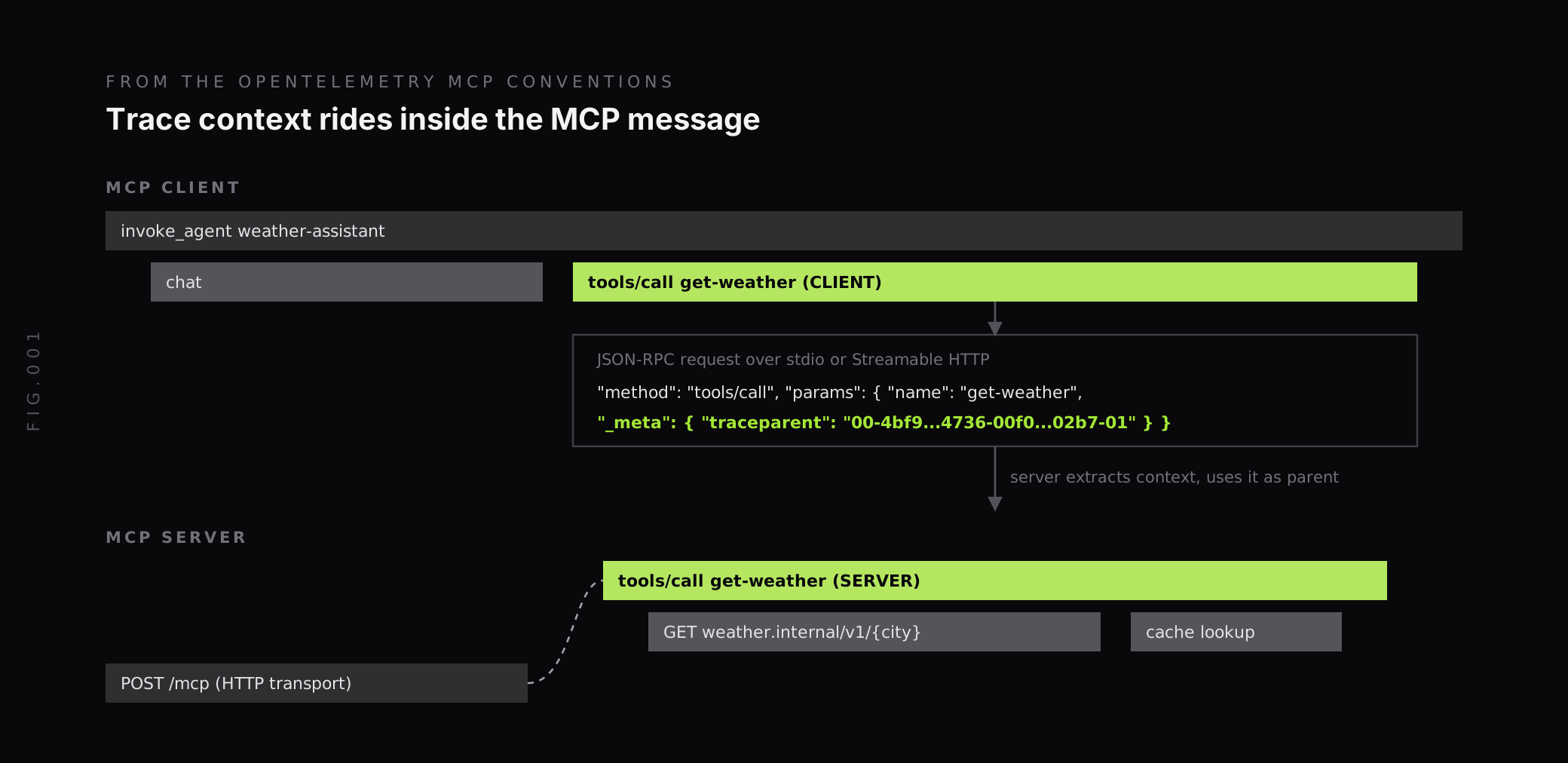
If the client isn’t instrumented, the server still produces its own traces. You lose the link back to the agent run, but you keep tool latency, errors and downstream calls.
Which metrics should you track for an MCP server?
The conventions define four histograms, two on each side. On the server:
mcp.server.operation.duration: the duration of a request or notification, from receipt until the result or ack is sent, in seconds. It carriesmcp.method.name,gen_ai.tool.name,gen_ai.prompt.nameanderror.type.mcp.server.session.duration: how long each MCP session lasted, in seconds.
The client side has matching mcp.client.operation.duration and mcp.client.session.duration metrics. Because the server histogram carries error.type, it gives you request rate, error rate and latency per tool from one metric. After export to a Prometheus-compatible backend, dots become underscores, so the tool error rate looks like this:
sum by (gen_ai_tool_name) ( rate(mcp_server_operation_duration_seconds_count{mcp_method_name="tools/call", error_type!=""}[5m]))/sum by (gen_ai_tool_name) ( rate(mcp_server_operation_duration_seconds_count{mcp_method_name="tools/call"}[5m]))And p95 duration per tool:
histogram_quantile( 0.95, sum by (le, gen_ai_tool_name) ( rate(mcp_server_operation_duration_seconds_bucket{mcp_method_name="tools/call"}[5m]) ))Check the exact metric and label names your instrumentation emits before you build on them. Libraries adopt Development conventions at different speeds.
A few signals are worth tracking on top of the histograms:
tools/listrate: clients usually list tools at session start. A spike means sessions are reconnecting.notifications/cancelledrate: clients cancel requests that time out. A rising rate means tools are slower than client timeouts.- Failed
initializerequests: a version or capability mismatch shows up here first. - Downstream error rate: errors from the APIs your tools call, which usually explain
tool_errorspikes.
Tool name, method and error type make good labels. Session IDs, request IDs and resource URIs belong on spans, not metric labels. For more on keeping label counts in check, see our guide to managing high cardinality metrics in Prometheus.
How do you instrument an MCP server?
Most teams won’t write MCP spans by hand. Two common Python options cover it.
FastMCP
FastMCP has built-in OpenTelemetry tracing. Our FastMCP integration guide shows the setup: install the OpenTelemetry packages, set the OTLP exporter environment variables, run opentelemetry-bootstrap -a install to add instrumentation for your dependencies, and start the server with the instrumentation wrapper:
pip install fastmcp opentelemetry-api opentelemetry-sdk opentelemetry-exporter-otlp opentelemetry-distroopentelemetry-bootstrap -a installopentelemetry-instrument fastmcp run server.pyFastMCP creates a span for every tool call (tools/call {name}), resource read (resources/read {uri}) and prompt render (prompts/get {name}). Auto-instrumentation adds spans for outbound httpx and requests calls and database queries inside your tool handlers. With OTEL_LOGS_EXPORTER=otlp, log records carry trace_id and span_id automatically.
FastMCP’s attribute names may not match the conventions above exactly. Our docs note that each span includes rpc.system=mcp, rpc.method, the session ID, server name and component type. Map those in your queries, or remap them at ingest.
The official Python SDK
For servers built on the official MCP Python SDK, the open-source opentelemetry-instrumentation-mcp package from the OpenLLMetry project adds tracing with one call:
from opentelemetry.instrumentation.mcp import McpInstrumentor
McpInstrumentor().instrument()
Its README notes that, by default, it records prompts, completions and embeddings in span attributes. Set TRACELOOP_TRACE_CONTENT=false to turn that off when tool inputs or outputs may contain sensitive data.
Mark tool failures as errors
Whichever library you use, check how it handles tool execution errors. Our FastMCP docs point out that MCP tools return errors as strings, so spans look healthy by default even when the operation failed. The fix is to record the exception and set the span status inside the handler:
import httpxfrom fastmcp import FastMCPfrom fastmcp.telemetry import get_tracerfrom opentelemetry.trace import StatusCode
mcp = FastMCP("weather-tools")
@mcp.tool()async def get_weather(city: str) -> str:    tracer = get_tracer()    with tracer.start_as_current_span("weather_api_request") as span:        try:            async with httpx.AsyncClient() as client:                resp = await client.get(f"https://weather.internal/v1/{city}", timeout=10)                resp.raise_for_status()                return resp.text        except httpx.HTTPStatusError as exc:            span.record_exception(exc)            span.set_status(StatusCode.ERROR, f"HTTP {exc.response.status_code}")            span.set_attribute("error.type", "tool_error")            return f"Error: weather API returned HTTP {exc.response.status_code}"
Failed calls now show up as error spans you can filter and count, while the model still gets a readable error string to act on.
How should MCP servers handle logs?
Logging has one hard rule. On stdio, the MCP transports specification says the server “MUST NOT write anything to its stdout that is not a valid MCP message”. A stray print() corrupts the protocol stream. Logs go to stderr, which the specification allows for informational, debug and error messages.
Send logs to two places:
- Your logging pipeline: write to stderr or export over OTLP, with trace IDs attached, so a slow
tools/callspan links to its log lines. - The MCP client, when it helps: servers that declare the
loggingcapability can send structured log notifications to the client, using the syslog severity levels from RFC 5424, and clients can set the minimum level withlogging/setLevel.
The MCP logging specification says log messages must not contain credentials or secrets, personal identifying information, or internal system details that could aid attacks. That applies to logs that leave the server through MCP and is good practice for your own pipeline too. Our guide to redacting sensitive data in the OpenTelemetry Collector covers a second line of defence.
How do timeouts and cancellations show up?
The MCP lifecycle specification says implementations should set timeouts for all sent requests. When a request times out, the sender should send a cancellation notification and stop waiting. Implementations may reset the timeout on progress notifications, but should always enforce a maximum.
From the server’s side, that means a slow tool doesn’t always fail. The client gives up, sends notifications/cancelled, and your handler may keep running and finish work nobody is waiting for. Three things help:
- Count cancellations per tool. A tool with a high cancellation rate is slower than its clients will wait.
- Compare tool p95 with client timeouts. If p95 is close to the timeout, cancellations will follow.
- Send progress notifications from long tools, so clients that reset their timeout on progress keep waiting.
Either side can also send ping to check the other is still responsive. A failed ping means the connection is stale, which is worth logging, though it rarely needs its own alert.
Which alerts should you set for an MCP server?
Start with a short list and grow it from incidents:
- Tool error rate per tool above your baseline, counting
tool_erroras well as JSON-RPC errors. - p95
tools/callduration per tool above your target, or close to the timeout your main clients use. - Cancellation rate rising, which usually arrives before users complain.
- Failed
initializerequests above zero after a deploy. - Session duration dropping sharply, which points to clients disconnecting or crashing.
- Downstream errors from the APIs and databases your tools depend on.
For tools that agents call during incidents, treat the tool like any other production dependency and give it an SLO. Our guide to error budgets covers how to set one.
How does Last9 fit with MCP server monitoring?
We take MCP server telemetry over OTLP like any other service. Our FastMCP integration sends traces, metrics and logs with the environment variables from the integrations page, and the correlated logs open from the trace they belong to.
On the client side, our Agents Monitoring view is built on the OpenTelemetry GenAI conventions, so agent runs, model calls and token usage sit in the same place as the MCP server spans they trigger. When context propagates through params._meta, one trace connects the two.
We handle 20M series per metric per day by default, with no sampling, so per-tool and per-method labels can stay on every series. Our Control Plane lets you drop, remap, redact, forward and aggregate metrics, logs and traces at ingest, which is where FastMCP’s attribute names can be remapped to the conventions and tool arguments can be redacted. For agent-side tracing, see our AI agent observability best practices.
Count the tool errors the protocol hides
An MCP server is a JSON-RPC service, and most of its monitoring is familiar: request rate, latency, errors and downstream dependencies. What’s different is where failures live. Tool execution errors arrive as successful responses, trace context rides inside the message, and on stdio a single stray write to stdout breaks the connection.
Before an incident, make sure every tools/call span carries the tool name, isError results set error.type to tool_error, logs go to stderr with trace IDs, and you alert on tool error rate, p95 duration and cancellations. When you want MCP server traces, agent telemetry and downstream service data in one place, Last9 takes OpenTelemetry data as it is.
FAQ
How do you monitor an MCP server?
Record a span for every MCP request the server handles, named after the method and tool, such as tools/call get-weather. Track request duration and error rate by method and tool with the mcp.server.operation.duration histogram, session duration with mcp.server.session.duration, and count tool results that come back with isError set to true. Send logs to stderr or through MCP logging, and correlate them with trace IDs.
Why do failed MCP tool calls not show up as errors?
The MCP specification reports tool execution errors such as API failures and validation errors inside a successful JSON-RPC result, with isError set to true. Without extra instrumentation, the response looks like a success. The OpenTelemetry MCP conventions say to set error.type to tool_error in that case, so failed tool calls can be counted and alerted on.
Does OpenTelemetry support MCP?
Yes. The OpenTelemetry GenAI semantic conventions include a Model Context Protocol section, currently marked Development. It defines client and server spans named after the MCP method and target, attributes such as mcp.method.name, gen_ai.tool.name and mcp.session.id, duration metrics for operations and sessions, and trace context propagation through the params._meta field of each request.
How does trace context work across an MCP client and server?
The OpenTelemetry conventions say instrumentations should inject trace context into the params._meta property of each MCP request or notification, using unprefixed traceparent, tracestate and baggage keys. The server extracts it and uses it as the parent of its span. This works for stdio as well as HTTP, because the context travels inside the MCP message, not in transport headers.
Where should an MCP server write logs?
On the stdio transport, the MCP specification says the server must not write anything to stdout that is not a valid MCP message, so logs go to stderr. Servers can also send structured log messages to the client through MCP logging, which uses the syslog severity levels. Either way, the specification says log messages must not contain credentials, secrets or personal identifying information.
Which alerts should you set for an MCP server?
Start with tool error rate per tool, counting both JSON-RPC errors and results with isError set to true, p95 duration of tools/call per tool, the rate of notifications/cancelled requests, failed initialize requests, and session duration dropping toward zero, which points to clients disconnecting. Add alerts on errors from the downstream APIs your tools call.


