


To monitor HashiCorp Vault, Consul and Nomad, turn on each tool’s telemetry, scrape its HTTP metrics endpoint with Prometheus, and alert on a short list of signals: Raft leadership and commit latency, request throughput, Go runtime memory, plus one signal per tool: audit device failures and leases in Vault, Autopilot health and RPC rate limiting in Consul, and blocked evaluations and allocation state in Nomad.
All three are written in Go and share the same telemetry library, so the setup looks alike. The details that trip people up are different in each one: which setting turns Prometheus output on, which path to scrape, which token the scrape needs, and which nodes answer. This guide covers each tool’s setup and the metrics HashiCorp’s own documentation calls out, with the thresholds it recommends.
What does monitoring the HashiCorp stack involve?
Vault, Consul and Nomad each collect metrics in memory and expose them through their HTTP API, in JSON by default and in Prometheus text format on request. Vault and Consul aggregate metrics on a 10 second interval and keep only a short window in memory (one minute for Vault), so you need an external store such as Prometheus for any history. All three can also push to StatsD or DogStatsD if you already run one.
Metric names use dots in the docs, such as nomad.nomad.job_summary.running. In Prometheus output the dots become underscores, which is why HashiCorp’s Nomad Prometheus tutorial queries nomad_nomad_job_summary_running. Keep that in mind when you copy a metric name from the docs into a PromQL query.
The other shared setting is disable_hostname. It defaults to false in all three, which prefixes gauge names with the machine’s hostname. With Prometheus you want it set to true, so the same metric from every node shares one name and the node shows up as a label instead.
How do you collect Vault metrics with Prometheus?
Add a telemetry stanza to the Vault server configuration. The Vault telemetry configuration docs give this example:
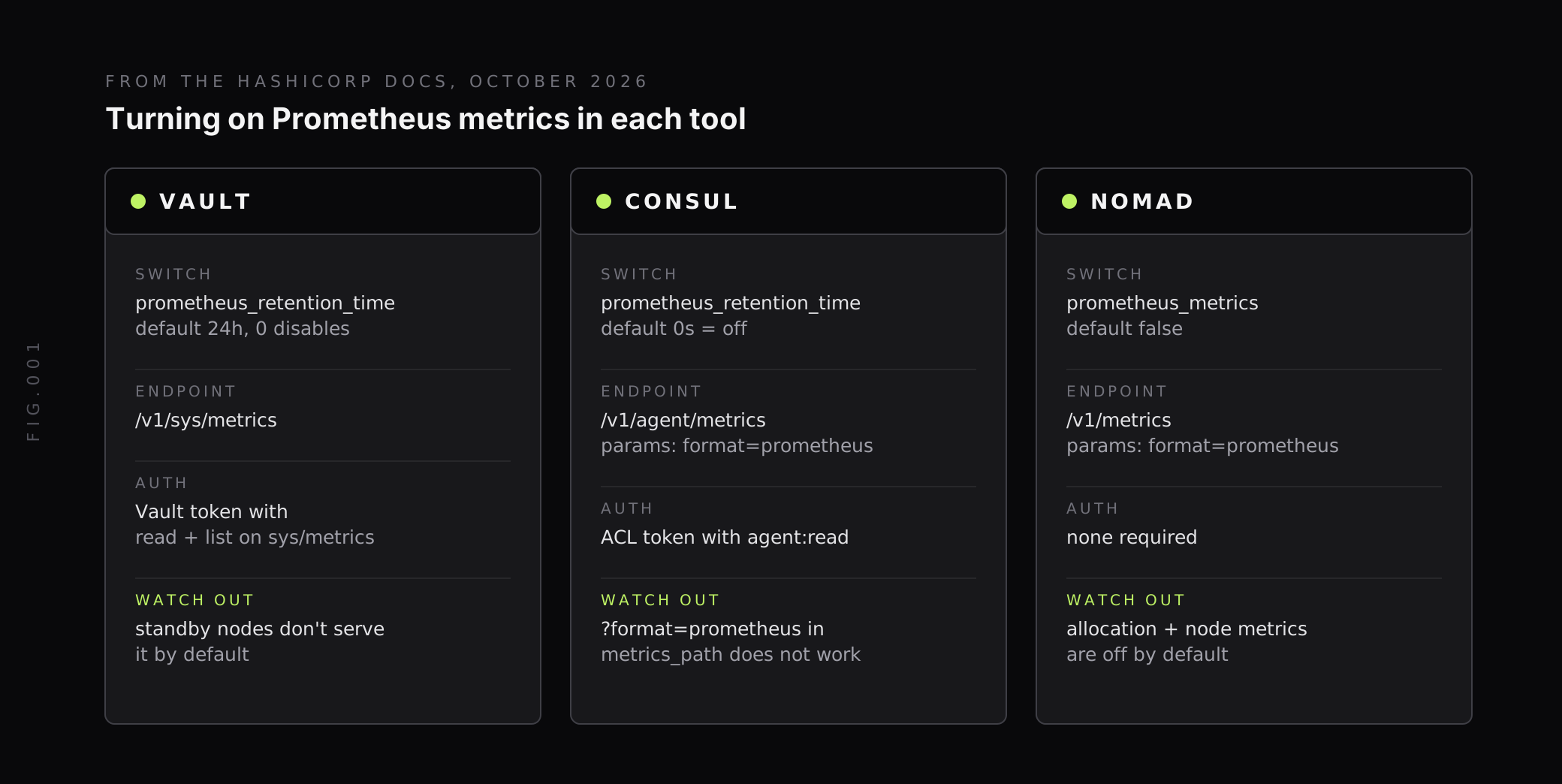
telemetry { prometheus_retention_time = "30s" disable_hostname = true}prometheus_retention_time defaults to 24h and sets how long Prometheus metrics stay in memory. Setting it to 0 disables Prometheus telemetry.
Vault serves metrics at /v1/sys/metrics, not the default /metrics path, and the endpoint needs a Vault token with capabilities = ["read", "list"]. A minimal policy and scrape job look like this:
path "sys/metrics" { capabilities = ["read", "list"]}scrape_configs: - job_name: "vault" metrics_path: "/v1/sys/metrics" scheme: https tls_config: ca_file: /etc/prometheus/vault-ca.pem bearer_token_file: /etc/prometheus/vault-token static_configs: - targets: ["vault-1:8200", "vault-2:8200", "vault-3:8200"]Vault returns Prometheus format when the request carries an Accept: prometheus/telemetry or Accept: application/openmetrics-text header, and the docs note that most Prometheus servers send these by default.
Why do Vault standby nodes not return their own metrics?
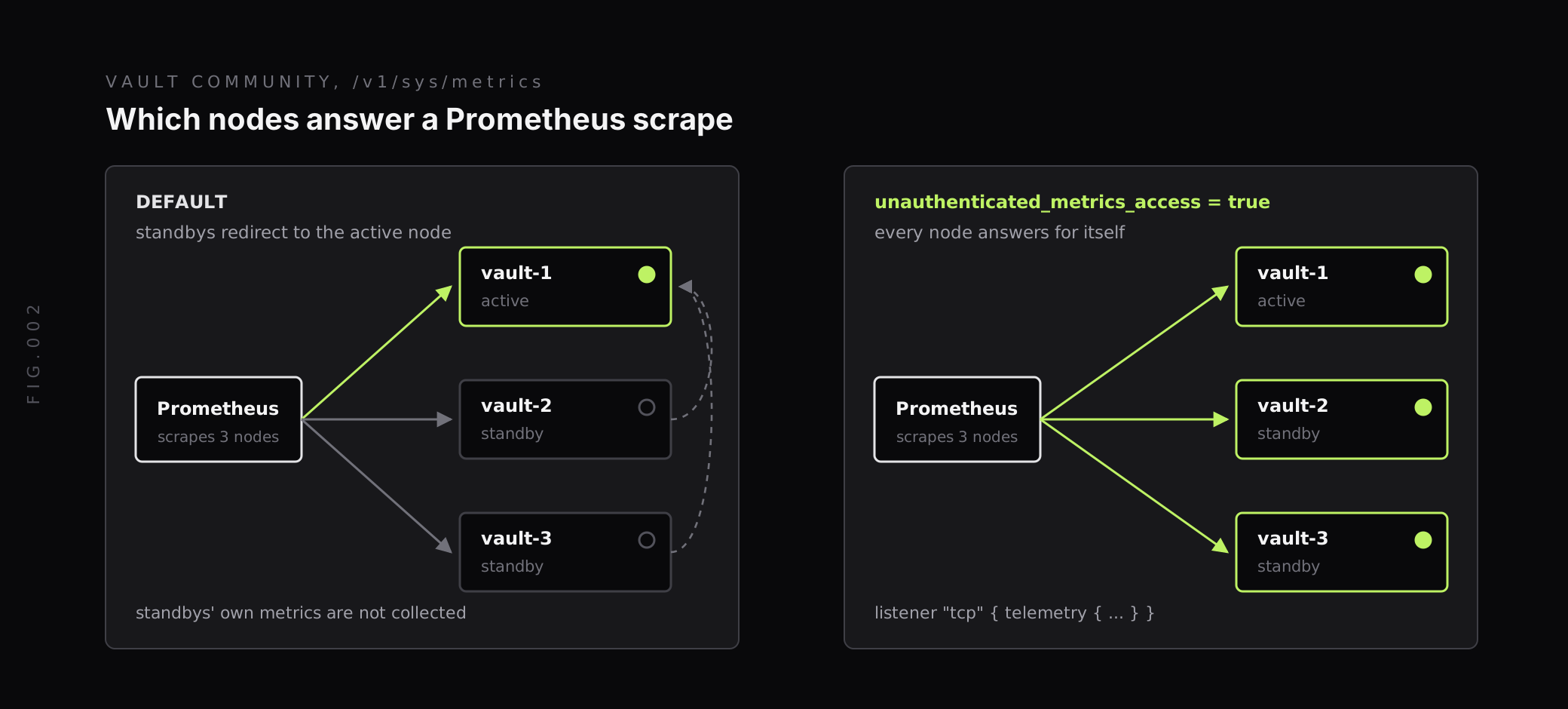
The docs state that the /v1/sys/metrics endpoint “is only accessible on active nodes and automatically disabled on standby nodes.” They add that “Standby nodes will never forward a request to /v1/sys/metrics to the leader node.” With unauthenticated access disabled, Vault Enterprise standbys try to serve the request, and Vault Community standbys redirect it to the leader. On Community, that means scraping all three nodes does not give you the standbys’ own memory, goroutine and request numbers.
The fix is a listener setting:
listener "tcp" { telemetry { unauthenticated_metrics_access = true }}With it enabled, each standby responds with its own metrics. The trade-off is that anyone who can reach the listener can read /v1/sys/metrics without a token, so keep the port reachable only from your scrapers.
Which Vault metrics should you alert on?
HashiCorp’s Vault key metrics page groups the important signals into core, usage, storage, audit, resource and replication metrics. These are the ones to start with:
| Metric | What it tells you | What to watch for |
|---|---|---|
vault.core.handle_request | Request throughput and workload | A sudden drop, which the docs say “may indicate connectivity problems” with clients |
vault.core.handle_login_request | Login response time | A rise without a matching rise in tokens issued |
vault.core.leadership_lost | How long a server led before losing leadership | Consistently low values, which mean high leadership turnover |
vault.core.leadership_setup_failed | Standbys failing to take over | Any spike; check the leader election lock |
vault.expire.num_leases | Outstanding leases | Unexpected growth, or a sudden drop that can mean dynamic secrets are slow to serve |
vault.expire.num_irrevocable_leases | Leases Vault could not revoke | A rising count, which the docs flag as an operational or security risk |
vault.audit.log_request_failure and vault.audit.log_response_failure | Audit device write failures | Any unusual increase |
vault.runtime.sys_bytes | Memory used by the Vault process | More than 90 percent of host memory |
vault.runtime.gc_pause_ns | Go garbage collection pauses | More than 5 seconds of pause per minute |
Leases deserve a note. The docs recommend “setting the shortest possible TTL for leases”, and a lease without a TTL defaults to 32 days. A slow, steady climb in vault.expire.num_leases is often an application creating leases faster than they expire.
Why do Vault audit failures matter so much?
Vault blocks on its audit devices. HashiCorp’s blocked audit devices tutorial says: “Vault can stop responding to requests until it can write to the audit device.” A full disk under a file audit device or an unreachable socket target can stop every client, so treat any increase in vault.audit.log_request_failure as a page. The same tutorial recommends enabling redundant audit devices to improve availability.
How do you collect Consul metrics with Prometheus?
Consul’s Prometheus output is off by default. The Consul telemetry configuration reference says prometheus_retention_time enables Prometheus export only when the value is greater than 0s, and 0s is the default. It recommends a value of at least twice your scrape interval.
telemetry { prometheus_retention_time = "60s" disable_hostname = true}Consul serves metrics at /v1/agent/metrics, and the endpoint needs a token with agent:read. One detail is easy to miss: the docs note that “using ?format=prometheus in the metrics path does not work,” because the ? is escaped. Pass the format as a parameter instead:
scrape_configs: - job_name: "consul" metrics_path: "/v1/agent/metrics" params: format: ["prometheus"] authorization: credentials_file: /etc/prometheus/consul-token static_configs: - targets: [ "consul-server-1:8500", "consul-server-2:8500", "consul-server-3:8500", ]Scrape client agents too, especially if you run Consul’s service mesh, since the consul.client.rpc metrics come from the agents that make the calls. Envoy sidecar telemetry is a separate topic covered in our guide to service mesh observability.
Which Consul metrics matter most?
The Consul agent telemetry docs list the key metrics with clear thresholds:
| Metric | What to watch for |
|---|---|
consul.autopilot.healthy | Alert if it is 0, meaning one or more servers are unhealthy |
consul.raft.leader.lastContact | A healthy cluster stays under 200ms |
consul.raft.state.candidate and consul.raft.state.leader | candidate should be 0 and leader greater than 0; anything else points to flapping leadership |
consul.raft.commitTime | Deviations of more than 50% from the previous hour’s baseline |
consul.runtime.sys_bytes | More than 90% of system memory, since Consul keeps all its data in memory |
consul.runtime.total_gc_pause_ns | Warning above 2 seconds per minute, critical above 5 seconds per minute |
consul.raft.thread.main.saturation | Steady-state saturation should be under 50% |
consul.client.rpc.exceeded and consul.client.rpc.failed | Any count above 0, which means requests are being rate limited or failing |
On frequent leader elections, the docs say they “would likely indicate network issues between the Consul servers.” A leadership alert built from consul.raft.state.candidate will usually fire before applications notice slow service discovery.
How do you collect Nomad metrics with Prometheus?
Add a telemetry block to every Nomad server and client and restart the agents. This is the block from HashiCorp’s Nomad Prometheus tutorial:
telemetry { collection_interval = "1s" disable_hostname = true prometheus_metrics = true publish_allocation_metrics = true publish_node_metrics = true}prometheus_metrics defaults to false, and so do publish_allocation_metrics and publish_node_metrics. Without the last two you get scheduler and server metrics but no per-allocation CPU and memory. The Nomad telemetry docs also say to keep collection_interval less than or equal to your scrape interval, and warn that Nomad’s Prometheus client keeps metrics in memory unless scraped, so only enable it if Prometheus is collecting.
Nomad’s /v1/metrics endpoint needs no ACL token:
scrape_configs: - job_name: "nomad" metrics_path: "/v1/metrics" params: format: ["prometheus"] static_configs: - targets: ["nomad-server-1:4646", "nomad-client-1:4646", "nomad-client-2:4646"]Which Nomad metrics show scheduler and client health?
From the Nomad metrics reference:
| Metric | Description from the docs |
|---|---|
nomad.nomad.blocked_evals.total_blocked | Count of evals in the blocked state for any reason (cluster resource exhaustion or quota limits) |
nomad.nomad.broker.total_unacked | Evaluations dispatched for processing but incomplete |
nomad.nomad.plan.queue_depth | Number of scheduler Plans waiting to be evaluated |
nomad.nomad.plan.submit | Time to submit a scheduler Plan. Higher values cause lower scheduling throughput |
nomad.nomad.heartbeat.active | Number of active heartbeat timers. Each timer represents a Nomad Client connection |
nomad.raft.leader.lastContact | Time since last contact to leader. General indicator of Raft latency |
nomad.client.allocations.pending | Number of allocations pending (received by the client but not yet running) |
nomad.client.allocs.failed | Number of failed allocations |
nomad.client.unallocated.memory | Total amount of memory free for the scheduler to allocate to tasks |
Blocked evaluations are the clearest capacity signal. When total_blocked rises while unallocated.memory falls, jobs are waiting for room that the cluster does not have. A drop in heartbeat.active means clients have stopped checking in, which you want to see before their allocations are marked lost.
What should you watch across all three tools?
A few signals repeat across the stack, and it helps to put them on one dashboard.
- Raft leadership: Consul and Nomad servers use Raft, and so does Vault with integrated storage. Leader contact time and leadership changes on any of them point to network or disk trouble on the servers.
- Go runtime memory and GC: Vault and Consul both document a 90 percent of host memory threshold for
runtime.sys_bytesand a 5 seconds per minute ceiling for GC pauses. - Storage latency: Vault exposes backend latency as
vault.<STORAGE>.get,.put,.listand.delete. The docs suggest alerting when these slow down, because clients feel storage delays directly. - Cardinality: Nomad’s
nomad.client.allocs.*metrics carry labels such asalloc_id,job,task_groupandtask, so a busy cluster creates new series with every deployment. Vault caps gauge label cardinality withmaximum_gauge_cardinality(default 500) and leavesadd_lease_metrics_namespace_labelsoff by default because it “can lead to a large-cardinality metric.”
If allocation metrics push your Prometheus too hard, you can scrape only selected metrics or drop labels you do not query. Our guide to managing high cardinality metrics in Prometheus covers the trade-offs.
Metrics are only half of it. Vault’s audit log is the record of who read which secret, and Consul and Nomad server logs carry the reasons behind a leader election. Ship them to the same place as the metrics so an alert on consul.raft.state.candidate leads straight to the log lines from the minute it fired.
How does Last9 fit with HashiCorp stack monitoring?
We take the same Prometheus metrics you scrape from Vault, Consul and Nomad, through Prometheus remote write or the OpenTelemetry Collector, so you keep your existing scrape jobs and tokens.
- One place for the stack: Vault, Consul and Nomad metrics sit next to the services that depend on them, so a slow secret read or a blocked evaluation lines up with the latency it caused.
- Allocation-level detail: we keep high-cardinality labels with no sampling, at 20M series per metric per day by default, so
alloc_idandtasklabels from Nomad can stay. - Ingest controls: our Control Plane lets you drop, remap, redact, forward and aggregate metrics, logs and traces at ingest, for example aggregating per-allocation metrics up to the job for long-term retention.
- Alerting: the thresholds in this guide map directly to alert rules, such as
consul_autopilot_healthy == 0or a rate ofvault_audit_log_request_failureabove zero.
Start with leadership, audit and scheduling signals
Monitoring Vault, Consul and Nomad comes down to three setup steps per tool: turn on Prometheus output, scrape the right path with the right token, and make sure every node answers for itself. Then alert on what HashiCorp’s docs call out: Raft leadership and commit time everywhere, audit failures and leases in Vault, Autopilot health and RPC limits in Consul, and blocked evaluations in Nomad.
Get the Vault standby setting and the Consul format parameter right on day one, since both fail quietly. When you want these metrics, the logs behind them and the services they support in one view, Last9 works with the Prometheus setup you already have.
FAQ
How do I monitor HashiCorp Vault?
Enable the telemetry stanza in the Vault server config, then scrape /v1/sys/metrics with Prometheus using a Vault token that has read and list capabilities on that path. Alert on vault.core.handle_request throughput, audit log failures, lease counts, leadership changes, storage backend latency and Go runtime memory. Enable at least two audit devices, because Vault can stop responding to requests when it cannot write to its audit device.
What is the Prometheus endpoint for Consul metrics?
Consul serves Prometheus metrics at /v1/agent/metrics with format=prometheus, but only after you set telemetry.prometheus_retention_time to a value greater than 0s. The default is 0s, which leaves it off. The endpoint needs a token with agent:read. In the Prometheus scrape config, set metrics_path to /v1/agent/metrics and pass format as a parameter, because ?format=prometheus in the metrics path does not work.
How do I enable Prometheus metrics in Nomad?
Add a telemetry block to each Nomad server and client config with prometheus_metrics = true, then restart the agents. Metrics are served at /v1/metrics?format=prometheus and need no ACL. Set publish_allocation_metrics and publish_node_metrics to true if you want per-allocation and per-node resource metrics, since both default to false.
Why does Prometheus only get metrics from the active Vault node?
The /v1/sys/metrics endpoint is only accessible on active nodes and is disabled on standby nodes by default. On Vault Community, a standby redirects the request to the leader, so you do not get the standby’s own metrics. Set unauthenticated_metrics_access = true in the listener’s telemetry block so each standby responds with its own metrics.
What are the most important Consul metrics to alert on?
HashiCorp lists consul.autopilot.healthy (alert if it is 0), consul.raft.leader.lastContact (healthy clusters stay under 200ms), consul.raft.state.candidate and consul.raft.state.leader for leadership changes, consul.raft.commitTime for transaction timing, consul.runtime.sys_bytes for memory, consul.raft.thread.main.saturation (steady state under 50%) and consul.client.rpc.exceeded for rate-limited RPCs.
Which Nomad metrics show that jobs cannot be scheduled?
Watch nomad.nomad.blocked_evals.total_blocked, which counts evaluations blocked by cluster resource exhaustion or quota limits, along with nomad.nomad.plan.queue_depth for plans waiting to be evaluated and nomad.client.unallocated.memory for free memory the scheduler can still hand out. A rising blocked count with low unallocated memory usually means the cluster needs more capacity.


