


Service mesh observability is the telemetry a mesh gives you about traffic between services: request rate, errors, latency, bytes and connections for every call, recorded by the proxies without changes to application code. Istio, Linkerd and plain Envoy each expose it differently, with different metric names, labels and defaults.
The mesh doesn’t give you everything for free. Distributed tracing still needs your applications to forward trace headers, Istio’s ambient mode reports only TCP metrics unless you add a waypoint proxy, and the Prometheus instances bundled with both Istio and Linkerd keep only six hours of data.
This guide covers what each mesh reports, which labels matter, what ambient mode changes, how tracing works in a mesh, how to keep mesh metrics at production scale, and which alerts to set. Details come from the Istio, Linkerd and Envoy documentation as of October 2026.
What does service mesh observability cover?
A mesh puts a proxy in the path of every request between services. That proxy sees each request and response, so it can count them, time them and record their status. Mesh telemetry falls into four groups:
- Request metrics: rate, errors and latency per source and destination workload, the golden signals for every service-to-service call.
- Connection metrics: TCP bytes and connections, which is all you get for non-HTTP traffic.
- Proxy internals: retries, timeouts, circuit breaker overflows and outlier ejections, from the Envoy or Linkerd proxy itself.
- Trace spans: the proxy can emit a span per hop, but joining spans into one trace depends on the application.
On top of that sits the mesh’s own health: the control plane, certificate issuance and proxy configuration, which need monitoring of their own.
Which metrics does Istio generate?
The Istio standard metrics reference lists the service-level metrics Istio proxies export. For HTTP, HTTP/2 and gRPC traffic:
| Metric | Type | What it measures |
|---|---|---|
istio_requests_total | Counter | Every request handled by an Istio proxy |
istio_request_duration_milliseconds | Histogram | Request duration |
istio_request_bytes | Histogram | HTTP request body sizes |
istio_response_bytes | Histogram | HTTP response body sizes |
istio_request_messages_total | Counter | gRPC messages sent from a client |
istio_response_messages_total | Counter | gRPC messages sent from a server |
For TCP traffic, Istio generates istio_tcp_sent_bytes_total, istio_tcp_received_bytes_total, istio_tcp_connections_opened_total and istio_tcp_connections_closed_total.
The labels are where the value is. The ones you’ll query most:
reporter:sourcewhen the client proxy or a gateway reported the request,destinationwhen the server proxy did.source_workload,destination_workloadand their namespaces: who called whom.destination_serviceanddestination_canonical_service: the service that received the request.response_code: the HTTP status, present only on HTTP metrics.response_flags: extra detail from the proxy about the response or connection, using Envoy’s response flag codes.connection_security_policy:mutual_tlswhen mTLS was used, reported from the destination side.source_clusteranddestination_cluster: set from the cluster name at install time, for multi-cluster meshes.
response_flags is easy to overlook. Envoy’s response flags record why a proxy failed a request itself, for example an upstream overflow or no healthy upstream, which separates proxy rejections from application errors.
Why do Istio request counts look doubled?
When a request goes from one sidecar to another, both proxies handle it, so both count it: once with reporter="source" and once with reporter="destination". A query that sums istio_requests_total without filtering on reporter counts each mesh-internal request twice.
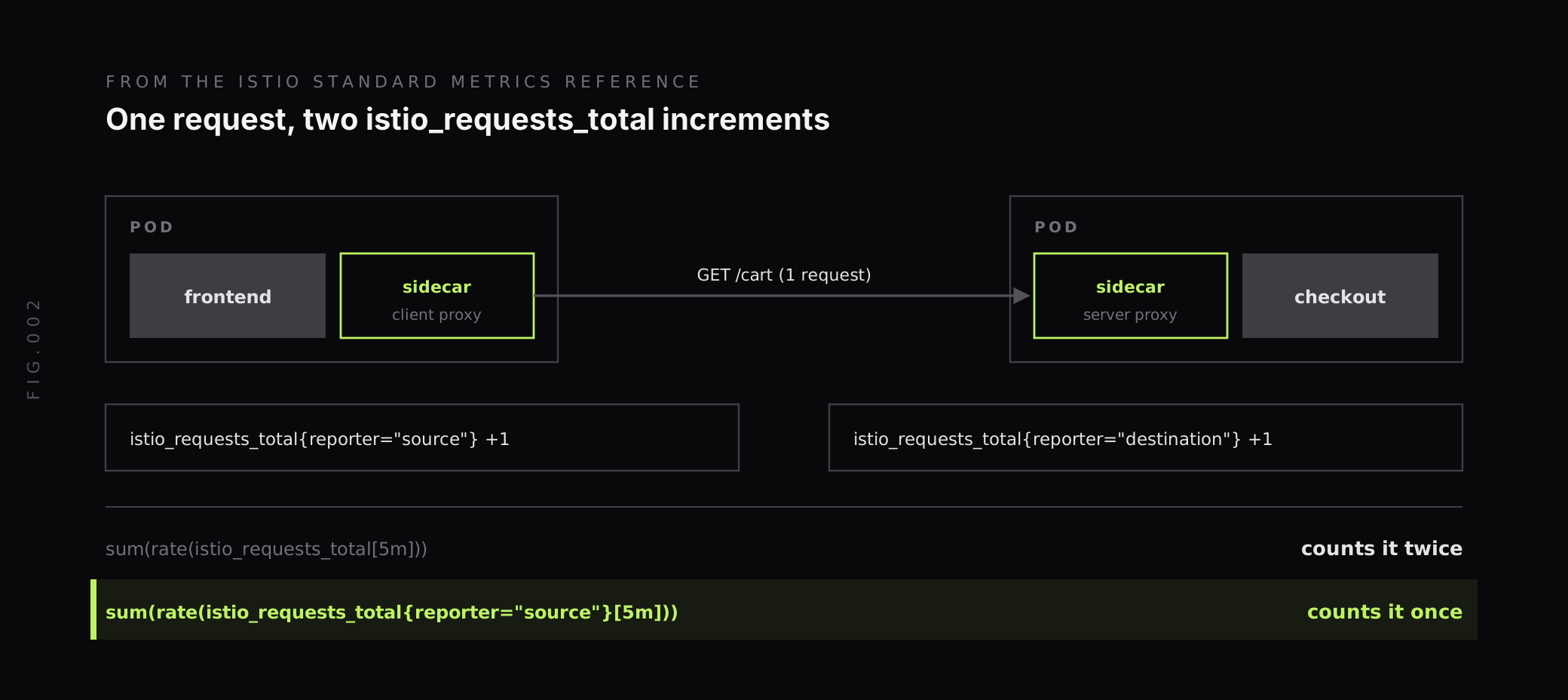
Pick one reporter per query and use it consistently. reporter="source" measures requests from the caller’s side. Use reporter="destination" when you want what the server saw, or when the caller is outside the mesh.
Request rate and p95 latency by destination service, from the source side:
sum by (destination_canonical_service, destination_workload_namespace) (  rate(istio_requests_total{reporter="source"}[5m]))
histogram_quantile(0.95,  sum by (le, destination_canonical_service) (    rate(istio_request_duration_milliseconds_bucket{reporter="source"}[5m])  ))
Envoy stats are minimal by default
Under every Istio sidecar and waypoint is an Envoy proxy, and Envoy keeps far more statistics than the Istio standard metrics. Istio’s Envoy statistics docs say that, by default, Istio configures Envoy to record a minimal set of statistics to reduce proxy CPU and memory use. The default collection keys are cluster_manager, listener_manager, server and cluster.xds-grpc.
That means the Envoy stats most useful during an incident, such as retries, timeouts and outlier ejections, aren’t recorded until you ask for them with proxyStatsMatcher. This is the example from the Istio docs, and the proxy needs a restart to pick it up:
apiVersion: install.istio.io/v1alpha1kind: IstioOperatorspec: meshConfig: defaultConfig: proxyStatsMatcher: inclusionRegexps: - ".*outlier_detection.*" - ".*upstream_rq_retry.*" - ".*upstream_cx_.*" inclusionSuffixes: - "upstream_rq_timeout"The Istio docs also warn that Envoy statistic names depend on how Istio builds the Envoy configuration, and strongly recommend checking them in a canary environment before upgrading Istio if dashboards or alerts depend on them.
Which Envoy metrics matter in a mesh?
Whether Envoy runs under Istio, another mesh or on its own, its cluster statistics describe each upstream it sends traffic to. These are rooted at cluster.<name>.:
| Statistic | Type | What it tells you |
|---|---|---|
upstream_rq_total | Counter | Total requests to the upstream |
upstream_rq_time | Histogram | Request time in milliseconds |
upstream_rq_timeout | Counter | Requests that timed out waiting for a response |
upstream_rq_retry | Counter | Request retries |
upstream_rq_retry_overflow | Counter | Requests not retried because of circuit breaking or the retry budget |
upstream_rq_pending_overflow | Counter | Requests that overflowed the connection pool or circuit breaking and failed |
upstream_cx_active | Gauge | Active connections |
upstream_cx_connect_fail | Counter | Connection failures |
outlier_detection.ejections_active | Gauge | Hosts currently ejected |
Two of these explain errors that request metrics alone don’t. A rising upstream_rq_retry count means the mesh is hiding failures by retrying them, which also multiplies load on a struggling service. Any upstream_rq_pending_overflow means the circuit breaker is rejecting requests before they reach the application.
The Envoy docs also note that the upstream_rq_<*xx> counters only count final responses, after retries. A service can return many 503s that the caller never sees because a retry succeeded.
For the history and design of Envoy itself, see our Envoy vs HAProxy comparison.
What does Istio ambient mode change?
Ambient mode removes the sidecar. In its place, Istio runs a per-node L4 proxy called ztunnel and, optionally, an L7 waypoint proxy per namespace or service. The ambient mode overview says ztunnel “does not terminate workload HTTP traffic or parse workload HTTP headers”.
That has a direct effect on telemetry. Istio’s ztunnel troubleshooting page says that if a service only uses the ztunnel secure overlay, the Istio metrics reported are only the L4 TCP metrics: istio_tcp_sent_bytes_total, istio_tcp_received_bytes_total, istio_tcp_connections_opened_total and istio_tcp_connections_closed_total. The full set of Istio and Envoy metrics comes back when traffic goes through a waypoint proxy.
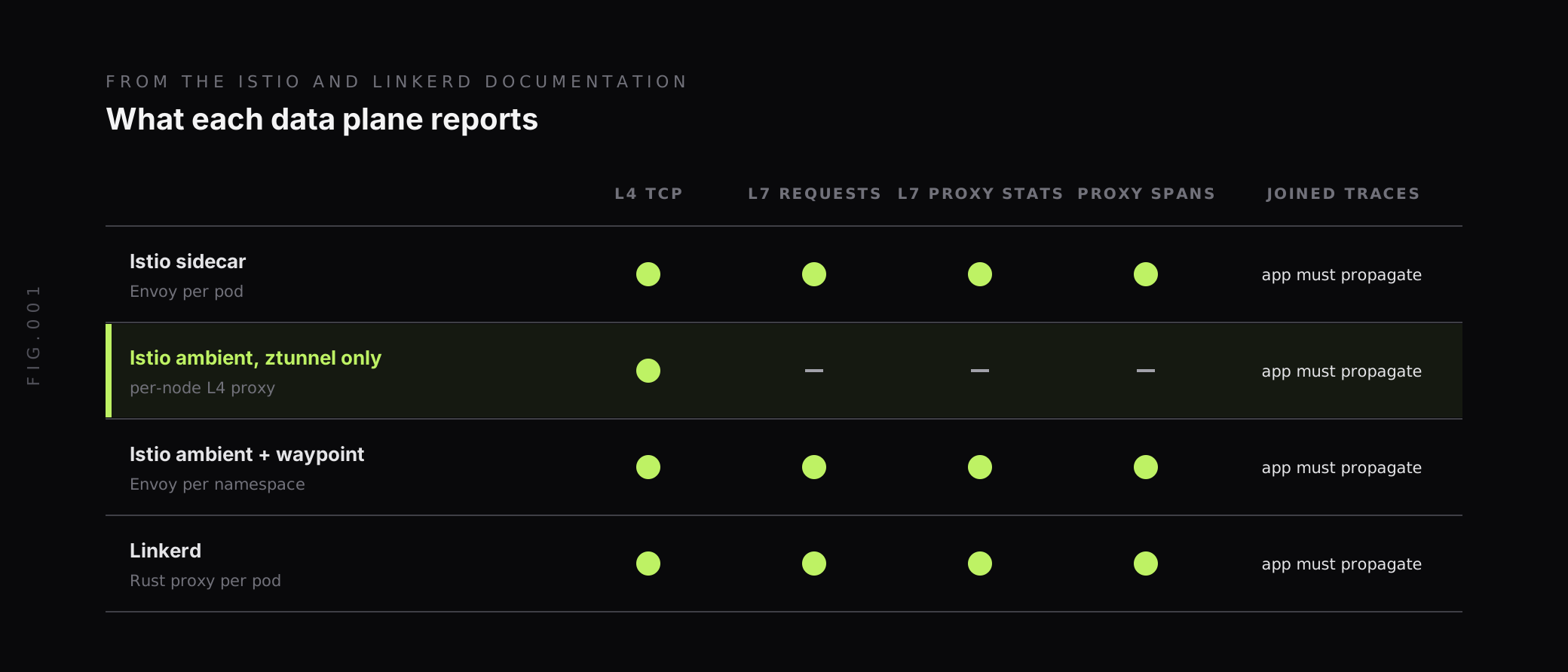
In practice, a namespace moved from sidecars to ambient without a waypoint loses istio_requests_total and istio_request_duration_milliseconds. Dashboards and alerts built on them go quiet rather than red. Before migrating, list which services need L7 metrics and give them a waypoint, or move their request metrics to application instrumentation.
Which metrics does Linkerd expose?
Each Linkerd proxy exposes Prometheus metrics at /metrics on its metrics port, :4191 by default. The Linkerd proxy metrics reference lists them. The core protocol-level metrics:
request_total: requests the proxy has received, incremented when the request stream begins.response_total: responses, incremented when the response stream ends.response_latency_ms: a histogram of response latency, measured as time to first byte.route_request_total,route_response_latency_msandroute_response_total: the same at the route level, withdstandrt_routelabels.tcp_open_totaland related TCP metrics for connection-level traffic.
Protocol-level metrics carry direction (inbound or outbound) and tls, and outbound metrics also carry authority. response_total adds classification, which is success or failure based on the gRPC status if present and the HTTP status otherwise. That makes Linkerd’s error rate one query:
sum by (deployment) (rate(response_total{direction="inbound", classification="failure"}[5m]))/sum by (deployment) (rate(response_total{direction="inbound"}[5m]))Two details catch people out. Latency is time to first byte, so a service that sends headers quickly and streams a slow body looks fast. And Linkerd’s metrics carry a pod_template_hash label that, per the Linkerd docs, changes during redeploys and rolling restarts, so every deploy starts a new set of series. Aggregate it away in recording rules before long-term storage.
Linkerd’s June 2026 release, 2.20, added inbound request volume and status metrics and request and response duration histograms, and continued work on OpenTelemetry semantic convention compliance. Check the metric names in your version before building dashboards on them.
Does a service mesh give you distributed tracing?
Partly. Both meshes can emit spans from their proxies, but neither can join those spans into one trace on its own.
Istio’s distributed tracing overview says: “Applications must propagate this information in HTTP headers, so that when proxies send spans, the backend can join them together into a single trace.” Each application has to copy headers from every incoming request to the outgoing requests it triggers. All applications should forward x-request-id, traceparent and tracestate, plus the B3 headers if you use Zipkin.
Linkerd’s distributed tracing docs say that, unlike most of its features, distributed tracing “requires both code changes and configuration”. When a Linkerd proxy sees a tracing header in a proxied HTTP request, it emits a span for the time spent in the proxy.
The proxy can’t propagate context by itself because it only sees the request entering and leaving the application. It has no way to know which outgoing call belongs to which incoming one. That link exists only inside the application, which is why OpenTelemetry instrumentation in your services is still needed. Our guide to OpenTelemetry context propagation covers how that works.
For Istio, configure an OpenTelemetry provider in MeshConfig and enable it with the Telemetry API. This sets a sampling rate and sends proxy spans to an OpenTelemetry Collector:
apiVersion: telemetry.istio.io/v1kind: Telemetrymetadata: name: mesh-default namespace: istio-systemspec: tracing: - providers: - name: otel-tracing randomSamplingPercentage: 10The sampling rate takes values from 0.0 to 100.0. Istio’s sampling docs give the example that 0.05 traces 5 requests out of every 10,000.
How do you keep mesh metrics at production scale?
Mesh metrics have a cardinality problem built in. istio_requests_total carries source and destination workload, namespace, service, version, response code and flags on every series, and each proxy adds its own pod and instance labels at scrape time. Across hundreds of services and pods, that multiplies quickly.
Both projects say the bundled Prometheus isn’t for production. Istio’s observability best practices say the quick-start Prometheus is intentionally configured with a 6-hour retention window. Linkerd’s exporting metrics guide says the linkerd-viz extension only keeps metrics for 6 hours and doesn’t persist data across restarts.
Istio recommends hierarchical federation with recording rules that aggregate across pods and instances. The first rule in its example looks like this:
groups: - name: "istio.recording-rules" interval: 5s rules: - record: "workload:istio_requests_total" expr: | sum without(instance, kubernetes_namespace, kubernetes_pod_name) (istio_requests_total)The same idea works without federation:
- Aggregate pod-level labels away before long-term storage, with recording rules or an OpenTelemetry Collector processor.
- Drop labels you don’t query. Istio’s Telemetry API can remove metric dimensions with
tagOverridesandoperation: REMOVEundermetrics[].overrides. - Scrape proxies directly with the OpenTelemetry Collector. Linkerd’s own post on Linkerd metrics with OpenTelemetry shows a Collector Prometheus receiver scraping proxies by their
linkerd-admincontainer port, without linkerd-viz. - Keep Envoy stats targeted. Add only the
proxyStatsMatcherpatterns you alert on.
For more on label budgets, see our guide to managing high cardinality metrics in Prometheus.
Which alerts should you set for a service mesh?
Start with the golden signals per service, then add the proxy signals that explain them:
- Error rate per destination service from
istio_requests_totalwithresponse_code=~"5.."and one reporter, or Linkerd’sclassification="failure". - p95 or p99 latency per destination service from
istio_request_duration_millisecondsorresponse_latency_ms. - Retry rate from
upstream_rq_retry, so retries can’t hide a failing service for long. - Circuit breaker overflow from
upstream_rq_pending_overflowabove zero. - Outlier ejections from
outlier_detection.ejections_activeabove zero for a service with few replicas. - mTLS gaps from
connection_security_policyvalues other thanmutual_tlson destination-reported traffic, if you require mTLS. - Missing L7 metrics for services that should have them, which catches an ambient migration without a waypoint.
For the services that matter most, turn the error and latency alerts into SLOs. Our guide to error budgets covers how to set burn rate alerts.
How does Last9 fit with service mesh observability?
Istio, Linkerd and Envoy all expose Prometheus metrics, so they reach Last9 the same way as the rest of your cluster: through our Kubernetes cluster monitoring setup or any Prometheus remote write or OpenTelemetry Collector pipeline. Proxy spans and application traces arrive over OTLP, so mesh spans and your services’ own spans land in the same trace when headers propagate.
Last9 handles 20M series per metric per day by default, with no sampling, so source and destination workload labels can stay on mesh metrics instead of being aggregated away on day one. Our Control Plane lets you drop, remap, redact, forward and aggregate metrics, logs and traces at ingest, which is where pod_template_hash, unused Istio labels and per-pod Envoy stats can be trimmed without touching mesh config.
For the wider cluster view, see our guide to Kubernetes monitoring metrics, and our comparison of service mesh offerings if you’re still choosing a mesh.
Know what your mesh measures and what it doesn’t
A service mesh is the cheapest way to get request rate, errors and latency for every service-to-service call. It’s also easy to over-trust. Request counts double without a reporter filter, Envoy’s most useful stats are off by default, ambient mode without a waypoint has no HTTP metrics, Linkerd’s latency is time to first byte, and no mesh can join traces without the application’s help.
Before an incident, filter Istio queries by reporter, enable the Envoy stats you alert on, check which namespaces have a waypoint, propagate trace headers in every service, and move mesh metrics out of the 6-hour bundled Prometheus. When you want mesh metrics, proxy spans and application telemetry in one place, Last9 takes Prometheus and OpenTelemetry data as it is.
FAQ
What is service mesh observability?
Service mesh observability is the telemetry a service mesh produces about traffic between services: request counts, error rates, latency, bytes and connections, recorded by the mesh proxies without changes to application code. It also covers the mesh’s own health, such as the control plane and proxy configuration, and the trace spans the proxies emit when applications propagate trace headers.
What metrics does Istio generate?
For HTTP, HTTP/2 and gRPC traffic, Istio generates istio_requests_total, istio_request_duration_milliseconds, istio_request_bytes and istio_response_bytes, plus gRPC message counters. For TCP traffic it generates istio_tcp_sent_bytes_total, istio_tcp_received_bytes_total, istio_tcp_connections_opened_total and istio_tcp_connections_closed_total. Labels include reporter, source and destination workload, destination service, response code and response flags.
Does a service mesh give you distributed tracing automatically?
Not fully. Istio and Linkerd proxies can emit spans, but Istio’s documentation says applications must propagate trace headers such as traceparent and tracestate from each incoming request to the outgoing requests it triggers. Linkerd’s documentation says distributed tracing requires both code changes and configuration. Without propagation, each hop shows up as a separate trace.
What does Istio ambient mode change for observability?
In ambient mode, the per-node ztunnel proxy handles L4 traffic and does not parse HTTP. If a service only uses ztunnel, Istio reports only the L4 TCP metrics. HTTP request metrics, access logging and tracing need a waypoint proxy, which exports the full set of Istio traffic metrics.
What metrics does Linkerd expose?
Each Linkerd proxy exposes Prometheus metrics on port 4191 at /metrics, including request_total, response_total and the response_latency_ms histogram, with labels such as direction and tls, plus authority on outbound metrics. The response_total metric adds a classification label of success or failure. Linkerd measures response latency as time to first byte.
Why do Istio request counts look doubled?
When two sidecars handle a request, both report it: the client proxy with reporter set to source and the server proxy with reporter set to destination. Summing istio_requests_total without filtering on reporter counts each request twice. Filter on one reporter: source for the caller’s view, or destination for what the server saw.


