

A shared dashboard becomes production infrastructure the moment people use it during an incident. If everyone is an Editor, a stray panel resize, threshold change, or saved time range can change what the next responder sees.
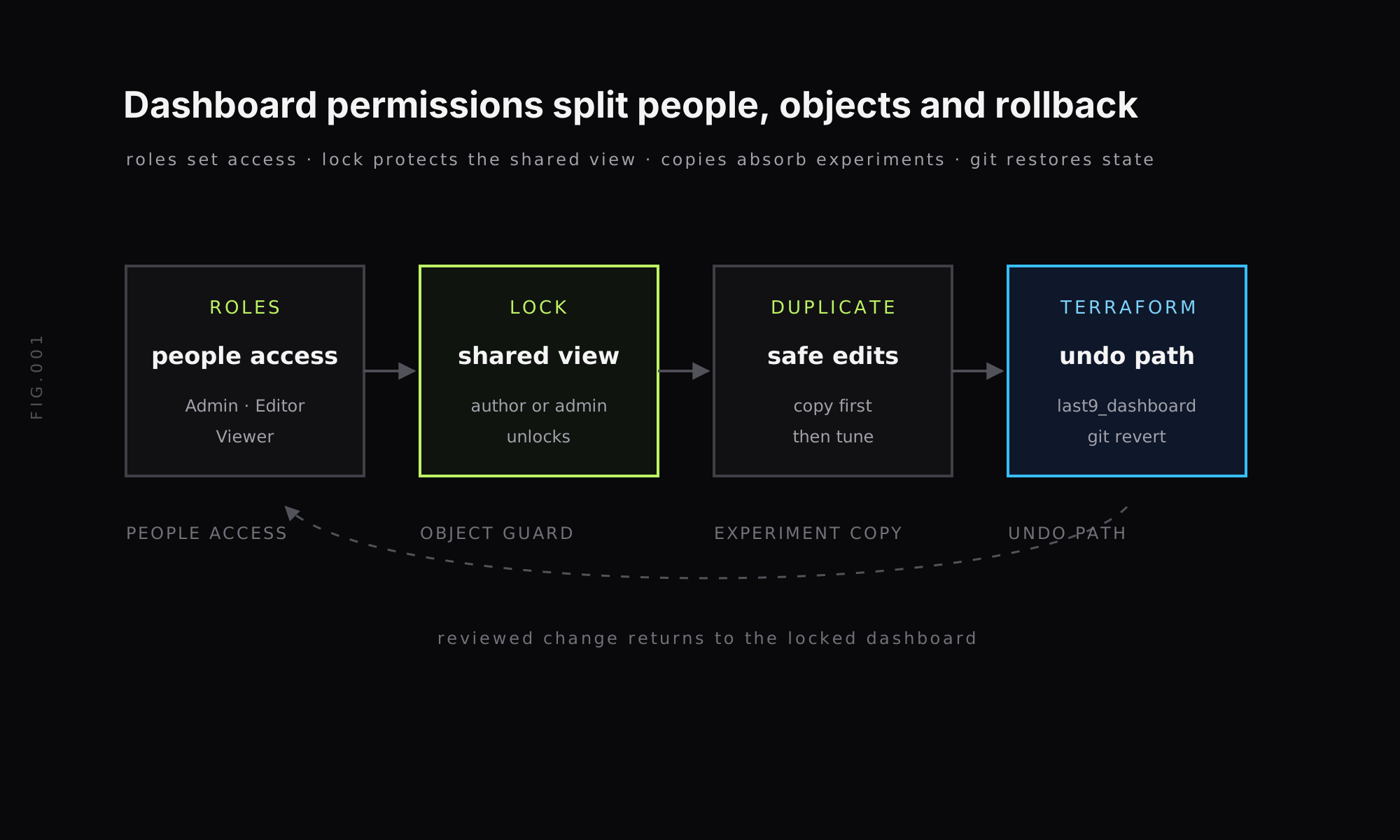
Dashboard permissions solve this at two levels: who can edit anything, and which dashboard should stay stable. In Last9, use roles for people, locks for shared dashboard objects, duplicate copies for risky edits, and Terraform when a dashboard needs a reviewable rollback path.
Why shared dashboards get edited by accident
The failure mode is boring and common. A platform team builds a service-health dashboard. Dozens of engineers use it. Someone opens it during an incident, changes the percentile or panel layout to answer a local question, and saves the change back to the shared view.
The mistake is rarely malice. It is usually a permissions model doing too much with one control. If the only choices are Viewer and Editor, teams often keep engineers as Editors because they need to create alerts, inspect dashboards, or tune other resources. That does not mean every shared dashboard should accept every edit.
A safer pattern separates people access from dashboard protection:
- Use roles to decide what a teammate can do across the organization.
- Use a dashboard lock to protect one shared dashboard from accidental edits.
- Use Duplicate to experiment without touching the original.
- Use Infrastructure as Code when dashboard changes need review, history, and rollback.
That last point matters. A UI lock prevents accidental writes. It is not a substitute for change review when the dashboard is part of your on-call workflow.
Dashboard permissions in Last9: Admin, Editor and Viewer
Last9 has three user roles: Admin, Editor and Viewer. The Users docs define the broad permissions for each role.
| Role | Use it for | Dashboard impact |
|---|---|---|
| Admin | Organization owners and platform operators | Full access, including user management and sensitive settings |
| Editor | Engineers who create or modify resources | Can create, edit and delete standard resources, including dashboards |
| Viewer | Read-only users | Can browse dashboards and metrics but cannot save edits |
Editor is the default role for new users joining an organization. That is reasonable for teams that expect engineers to own their observability resources, but it creates pressure on shared dashboards. If you demote everyone to Viewer, they lose the ability to create and tune the resources they own. If everyone stays Editor, one important dashboard remains writable by many people.
That is why roles should not be your only dashboard-control mechanism. A role is for a person. A lock is for one dashboard.
Open source Grafana has a similar tension: its open-source edition does not include the enterprise role-based access control features that make fine-grained access easier. Last9 documents this in the Viewer note for embedded Grafana: viewers can interact with the UI, but their edits are not saved.
Copy a dashboard before you tweak it
Copying is the low-friction guardrail. If you want to test a new percentile, add an infrastructure section, or change a saved time range, duplicate the dashboard first and work on the copy.
The Dashboards docs document the dashboard list: it shows Name, Author and Last updated, and the row menu lets you duplicate or delete a dashboard. The lock dashboard changelog also adds Duplicate to the dashboard page menu; it copies the saved version and opens the copy.
Use this pattern for changes that are exploratory:
- Open the shared dashboard.
- Use Duplicate from the dashboard menu or list row menu.
- Rename the copy so its purpose is clear.
- Change panels, thresholds, variables or the saved time range on the copy.
- Promote the change back only after someone reviews the result.
Grafana users will recognize the same habit. Grafana documents dashboard creation, sharing and JSON flows in its dashboard docs and share dashboards docs. The copy itself is only the start. The governance question is what prevents the original from changing while people experiment.
Read-only dashboard: lock one dashboard instead of changing roles
Last9 dashboard lock mode is a released feature. The Nov 17 changelog documents the behavior:
- Lock and Unlock appear after Edit in the dashboard menu and in the row menu of the dashboards list.
- Only the dashboard’s author or an admin can use them.
- Other editors see the item disabled.
- A locked dashboard shows a lock icon after its name.
- The lock tooltip names who can unlock it.
Use a lock when the dashboard is a shared reference: service health, business-critical API status, deployment readiness, or an incident room view. Editors still keep their normal role elsewhere. The lock protects one dashboard object.
This is different from turning a user into a Viewer. Viewer is broad and read-only across the platform. A dashboard lock is narrow: it leaves an engineer’s general editor access intact while stopping accidental changes to the shared dashboard.
A practical naming pattern helps too. Keep one locked dashboard with a name such as payments / golden signal / shared, then let engineers duplicate it into payments / p90 experiment / alice or payments / infra-correlation / nov-incident. The names make intent visible before anyone opens the dashboard.
Dashboard rollback: use Terraform and git for the reviewable path
Dashboard version history is a familiar idea if you use Grafana. Grafana documents dashboard version history and restore flows in its version history docs.
In Last9, the reviewable rollback path is Infrastructure as Code. The Terraform provider docs list last9_dashboard as a resource for dashboards across metrics, logs and traces. That gives you the workflow most platform teams already trust for production configuration:
resource "last9_dashboard" "checkout_shared" { # Dashboard definition managed in version control.}The exact resource schema belongs in the Terraform Registry docs linked from our provider page, but the operating model is straightforward:
- Store the dashboard definition in git.
- Review dashboard changes as pull requests.
- Apply the change with Terraform.
- If a change breaks the shared view, run
git revertandterraform apply.
That path gives you the audit trail that matters for production dashboards: the diff, reviewer, commit, deploy time and rollback commit. For day-to-day experimentation, duplicate the dashboard. For the shared view that responders depend on, manage it as code.
Last9 also has an Audit Trail for supported configuration changes. The docs list logins, tokens, alerting, Control Plane and user actions, with admin-only access and CSV export. Use it for the resource types it documents, and use Terraform history for dashboard rollback.
A governance pattern for shared dashboards
You do not need a complicated permissions tree for every dashboard. Most teams can start with a smaller rule set:
| Job | Control | When to use it | Source |
|---|---|---|---|
| Set broad access | Admin, Editor, Viewer | Teammate needs organization-wide permissions | Users docs |
| Protect one dashboard | Lock dashboard | Shared view should not change by accident | Lock dashboard changelog |
| Try a risky edit | Duplicate | Engineer wants to test panels, percentiles or layout | Dashboards docs |
| Undo an edit | last9_dashboard plus git revert | Dashboard definition needs review and rollback | Terraform provider docs |
| Review supported configuration activity | Audit Trail | Admin needs to inspect documented resource changes | Audit Trail docs |
That pattern also keeps the Grafana comparison honest. Grafana is still the dashboarding interface many teams know, and its docs cover copy, share, role and version-history flows. Last9 fits when dashboards sit beside high-cardinality telemetry, Last9-native roles, dashboard locks, duplicate workflows and Terraform-managed configuration. If you are comparing the stack-level tradeoffs, our Last9 vs Grafana page covers the broader differences.
Start with the dashboard people use during incidents. Lock a shared view that many editors open. Duplicate before tuning panels or percentiles. Put production dashboards under Terraform.
FAQ
How do I stop editors from accidentally changing a shared dashboard?
Use role-based access for broad permissions, then lock the specific shared dashboard. In Last9, the dashboard author or an admin can lock or unlock a dashboard, and other editors see the menu item disabled.
Do I need per-dashboard roles to protect one dashboard?
Not always. Per-dashboard roles are one way to model ownership, but a dashboard lock is often simpler when editors should keep editing other resources and only one dashboard needs protection.
How do I roll back a dashboard change in Last9?
The reviewable rollback path is Infrastructure as Code. Manage the dashboard with the Last9 Terraform provider’s last9_dashboard resource, review changes in git, and use git revert plus terraform apply to restore a known-good definition.
How do you copy a dashboard in Grafana?
Grafana supports duplication through its dashboard UI and JSON-based export or import flows. Use Grafana’s dashboard documentation for exact menu steps, then treat the copy as a new dashboard with its own lifecycle.


