

The Prometheus Blackbox Exporter checks your endpoints from the outside. It sends HTTP, HTTPS, DNS, TCP, ICMP or gRPC requests to a target and reports the result as Prometheus metrics, with probe_success telling you whether the check passed. You run it as a separate service on port 9115, define probe types as modules in blackbox.yml, and point Prometheus at its /probe endpoint using relabeling.
This guide covers installation, module configuration, the scrape config that trips most people up, the metrics worth alerting on, and the timeout rules that cause most false alarms. Configuration details come from the official blackbox_exporter repository.
What is the Prometheus Blackbox Exporter?
The Blackbox Exporter is an official Prometheus exporter for blackbox probing. Its README describes it as a tool that “allows blackbox probing of endpoints over HTTP, HTTPS, DNS, TCP, ICMP and gRPC.”
Most Prometheus exporters are whitebox tools. node_exporter reads CPU and memory from the host, and an application exposes its own request counters. The Blackbox Exporter works the other way. It knows nothing about the service’s internals and only sees what a client sees: did the request succeed, how long did it take, and what did the response look like.
That makes it the standard Prometheus answer to questions like these:
- Is the public API returning 200 right now?
- When does the TLS certificate on the login page expire?
- Does the internal DNS name still resolve?
- Can this host reach the database port?
A service can look healthy in its own metrics while users cannot reach it because of DNS, a load balancer, a firewall rule or an expired certificate. External probes catch that class of failure. For a broader look at outside-in testing, see our guide to synthetic monitoring.
How does the Blackbox Exporter work?
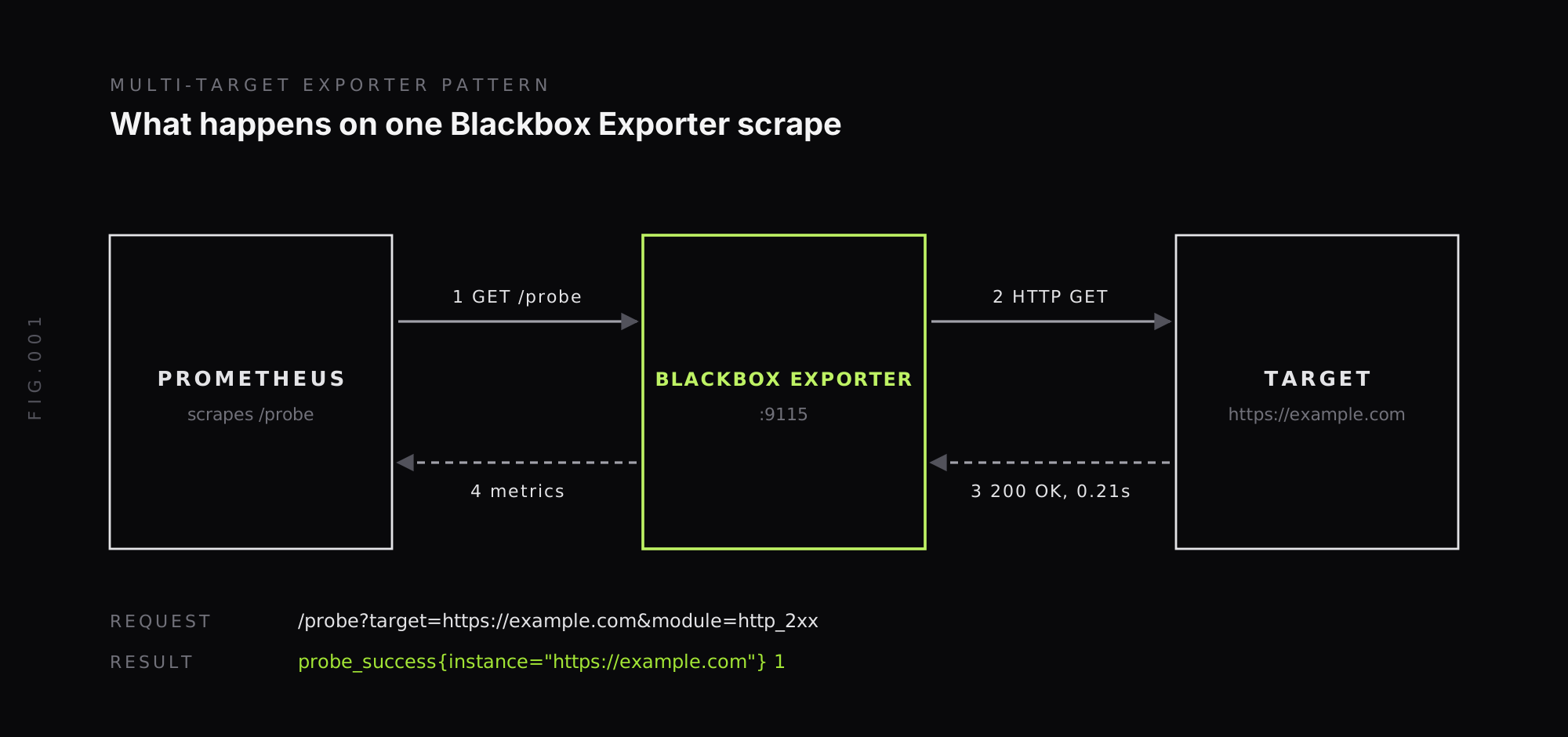
The Blackbox Exporter uses what Prometheus calls the multi-target exporter pattern. It does not monitor a fixed list of targets. Prometheus tells it what to probe on every scrape.
Each scrape is an HTTP request to the exporter’s /probe endpoint with two query parameters:
target: the endpoint to check, such ashttps://example.comorexample.com:443module: the name of a probe definition inblackbox.yml, such ashttp_2xx
For example, http://localhost:9115/probe?target=google.com&module=http_2xx makes the exporter send an HTTP request to google.com, check the response against the http_2xx module, and return metrics for that one probe. Prometheus stores those metrics with the target’s name as the instance label, so each probed endpoint gets its own series.
How do you install the Blackbox Exporter?
The exporter ships as a single binary and a container image. Pick the option that matches where Prometheus runs.
Docker. This follows the README’s example, which mounts a config directory and passes the config file. The port is mapped as 9115:9115 so the exporter is reachable at localhost:9115:
docker run --rm \ -p 9115:9115 \ --name blackbox_exporter \ -v $(pwd):/config \ quay.io/prometheus/blackbox-exporter:latest --config.file=/config/blackbox.ymlKubernetes with Helm. The Prometheus community maintains a chart:
helm repo add prometheus-community https://prometheus-community.github.io/helm-chartshelm install blackbox prometheus-community/prometheus-blackbox-exporterIf you run the Prometheus Operator, its Probe custom resource can define blackbox targets as Kubernetes objects instead of hand-written scrape configs.
Binary. Download a release for your platform from the GitHub releases page and run ./blackbox_exporter --config.file=blackbox.yml. The default config file name is blackbox.yml.
Once it is running, open http://localhost:9115 to see recent probe results. Add &debug=true to any /probe URL to get the full probe log instead of metrics, which is the fastest way to find out why a probe fails.
How do you configure Blackbox Exporter modules?
A module is a named probe definition. Each module sets a prober (http, tcp, dns, icmp or grpc), an optional timeout, and options for that prober. Here is a blackbox.yml that covers the common cases:
modules:  http_2xx:    prober: http    timeout: 5s    http:      valid_status_codes: [] # empty means any 2xx      method: GET      preferred_ip_protocol: ip4      fail_if_not_ssl: false
  https_strict:    prober: http    timeout: 5s    http:      fail_if_not_ssl: true      fail_if_body_not_matches_regexp:        - "status.*ok"      preferred_ip_protocol: ip4
  tcp_connect:    prober: tcp    timeout: 5s
  dns_a_record:    prober: dns    timeout: 5s    dns:      query_name: "example.com"      query_type: "A"      valid_rcodes:        - NOERROR
  icmp_ping:    prober: icmp    timeout: 5s    icmp:      preferred_ip_protocol: ip4
A few defaults from the configuration reference matter in practice:
valid_status_codesdefaults to any 2xx response.methoddefaults toGET.preferred_ip_protocoldefaults toip6. On networks without IPv6, set it toip4so probes do not depend on IPv6 resolution or on falling back from it.- The DNS prober’s
query_typedefaults toANY, andvalid_rcodesdefaults toNOERROR.
Body checks (fail_if_body_matches_regexp and fail_if_body_not_matches_regexp) are what turn an uptime check into a real health check. A page can return 200 while showing an error message, and a regex on the body catches that.
ICMP needs extra permissions. On Linux, the exporter needs the CAP_NET_RAW capability, a user inside net.ipv4.ping_group_range, or root. Windows needs administrator rights, and BSD needs root. In a container, add NET_RAW to the security context if ICMP probes fail with permission errors.
How do you configure Prometheus to scrape the Blackbox Exporter?
The scrape config is the part that confuses most people, because the targets you list are not the addresses Prometheus connects to. Here is the relabeling setup from the official README:
scrape_configs: - job_name: "blackbox" metrics_path: /probe params: module: [http_2xx] static_configs: - targets: - http://prometheus.io - https://prometheus.io relabel_configs: - source_labels: [__address__] target_label: __param_target - source_labels: [__param_target] target_label: instance - target_label: __address__ replacement: 127.0.0.1:9115The three relabel rules do three separate jobs:
- Copy the target into the
targetparameter.__address__holds each URL fromtargets. Copying it to__param_targetmakes Prometheus add?target=<url>to the scrape request. - Keep the target as the instance label. Without this rule, every series would carry the exporter’s address as
instance, and you could not tell which endpoint failed. - Point the scrape at the exporter. Replacing
__address__with the exporter’s host and port makes Prometheus connect to the Blackbox Exporter instead of the target itself.
The Prometheus guide to the multi-target exporter pattern walks through why each rule is needed. Use one scrape job per module, so HTTP targets, TCP targets and DNS targets each get the right probe.
Which Blackbox Exporter metrics should you watch?
Every probe returns probe_success and probe_duration_seconds. The HTTP prober adds more detail:
| Metric | What it tells you |
|---|---|
probe_success | 1 if the probe passed every check in the module, 0 if not |
probe_duration_seconds | Total time the probe took, in seconds |
probe_http_status_code | HTTP status code of the final response |
probe_http_duration_seconds | Time per phase: resolve, connect, tls, processing, transfer |
probe_ssl_earliest_cert_expiry | Unix timestamp of the earliest expiry across the certificate chain |
probe_http_redirects | Number of redirects followed |
probe_http_ssl | 1 if the final redirect used SSL |
probe_failed_due_to_regex | 1 if a body regex check caused the failure |
probe_dns_lookup_time_seconds | Time spent resolving the target name |
probe_http_duration_seconds is the most useful metric for latency problems, because it shows which phase got slow. A spike in resolve points at DNS, a spike in tls points at the handshake or certificate chain, and a spike in processing means the server itself took longer to respond.
What alert rules should you set for the Blackbox Exporter?
Three rules cover most needs. Add them to a Prometheus rules file and route them through Alertmanager:
groups:  - name: blackbox    rules:      - alert: EndpointDown        expr: probe_success == 0        for: 2m        labels:          severity: critical        annotations:          summary: "{{ $labels.instance }} has failed probes for 2 minutes"
      - alert: CertificateExpiringSoon        expr: probe_ssl_earliest_cert_expiry - time() < 86400 * 14        for: 10m        labels:          severity: warning        annotations:          summary: "TLS certificate for {{ $labels.instance }} expires in under 14 days"
      - alert: EndpointSlow        expr: avg_over_time(probe_duration_seconds[5m]) > 1        for: 10m        labels:          severity: warning        annotations:          summary: "{{ $labels.instance }} probes average over 1 second"
The for clause on EndpointDown matters. A single failed probe is often a network blip between the exporter and the target, and paging on it trains people to ignore the alert. Two minutes of consecutive failures is a common starting point. Tune it to your scrape interval.
How does the Blackbox Exporter decide a probe’s timeout?
Timeouts cause more false alarms than anything else in a Blackbox Exporter setup, and the rule is not obvious from the config file. The exporter’s source code sets the probe timeout like this:
- Prometheus sends its scrape timeout in the
X-Prometheus-Scrape-Timeout-Secondsheader. If the header is missing, the exporter assumes 120 seconds. - The exporter subtracts the
--timeout-offsetflag, which defaults to 0.5 seconds, so it can report a result before Prometheus gives up. - If the module sets a
timeoutthat is shorter than that limit, the module timeout wins. Otherwise the probe gets the scrape timeout minus the offset.
With Prometheus’s default 10 second scrape timeout, a module with timeout: 5s gets 5 seconds. A module with timeout: 15s gets only 9.5 seconds, because the scrape limit is lower. The module setting cannot extend a probe past what Prometheus will wait for.
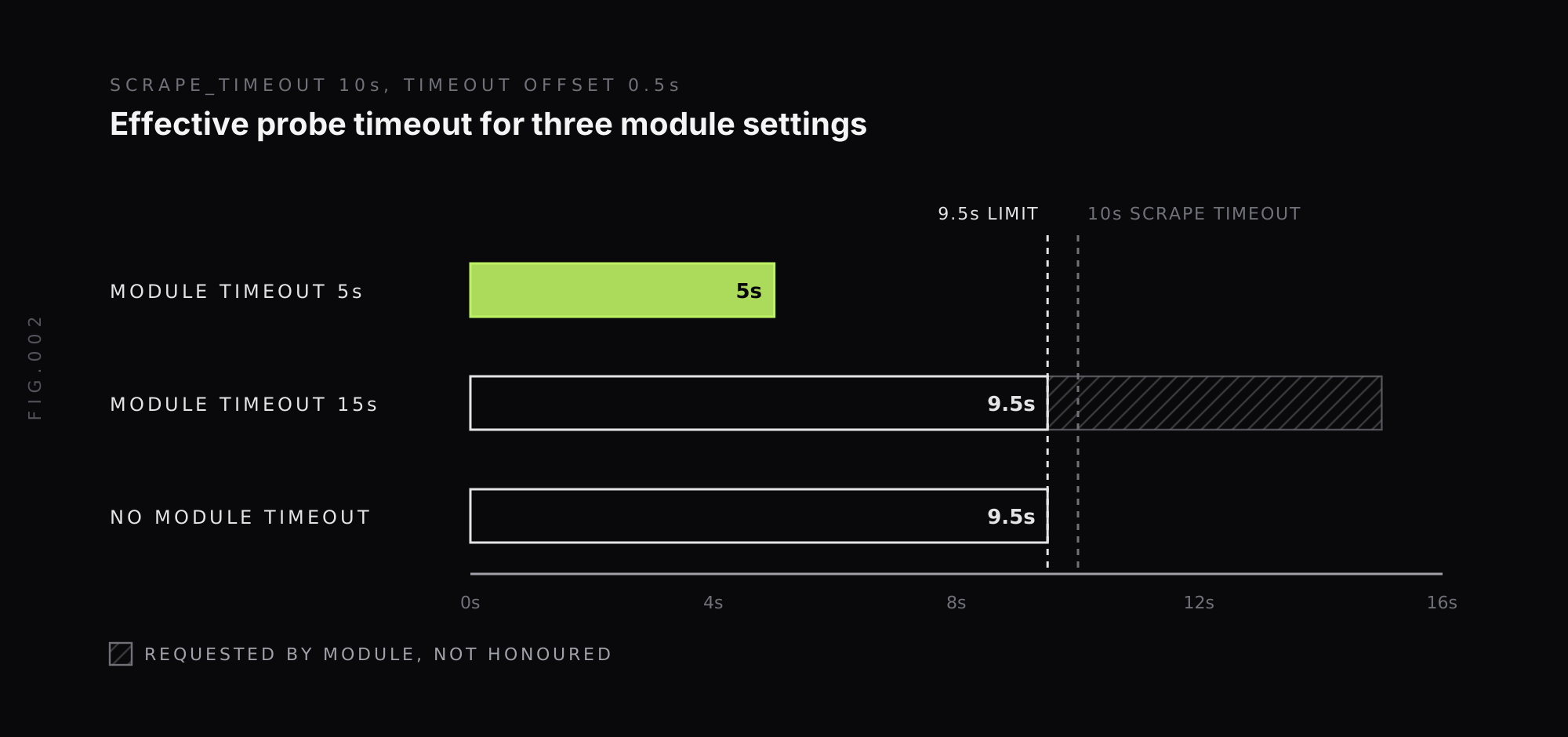
In practice, set each module’s timeout a little below the job’s scrape_timeout, and raise scrape_timeout on the job if a slow endpoint needs more time. Leaving the module timeout unset means every probe can run for nearly the full scrape window, which hides slow endpoints until they cross the limit.
What are the limits of the Blackbox Exporter?
The Blackbox Exporter is simple and reliable, but it has limits to plan around.
One vantage point per exporter. A probe only shows whether the endpoint is reachable from where the exporter runs. An exporter inside your VPC can report success while users in another region cannot connect. Running exporters in several regions, each with a region label, gives a wider view.
Checks are single requests. The HTTP prober sends one request per probe. Multi-step flows such as logging in and then loading a dashboard need a browser-based or scripted synthetic tool.
No link to the backend. When a probe fails, the metric says that it failed and which phase was slow. It does not say which service, query or deployment caused it. That connection has to come from traces and logs.
How does Last9 fit with the Blackbox Exporter?
Last9 is Prometheus-compatible, so metrics from the Blackbox Exporter can be sent to Last9 through Prometheus remote write and queried with PromQL, alongside the rest of your metrics. Existing alert rules like the ones above keep working.
For teams that want checks without running exporters, Last9 Synthetic Monitoring runs HTTPS checks from US East, Mumbai and Singapore. Each check run records DNS, TCP connect, TLS, time to first byte and download timings as an OpenTelemetry trace span. That puts a failed check one click away from its trace, and you can build alerts on synthetic latency with the same queries you use for application spans.
Where to start with the Blackbox Exporter
The Blackbox Exporter covers a gap that internal metrics leave open: whether users can reach your service at all. Setup comes down to three pieces. Modules in blackbox.yml define how to probe. Relabeling in the Prometheus scrape config tells the exporter what to probe. Alert rules on probe_success and probe_ssl_earliest_cert_expiry tell you when something breaks.
Start with an HTTP module for your public endpoints and a certificate expiry alert, set module timeouts below the scrape timeout, and add TCP and DNS checks for the dependencies that have failed before. When a failed probe needs to be traced back to the service behind it, Last9 records each synthetic check run as a trace span next to your metrics, logs and traces.
FAQ
What is the Prometheus Blackbox Exporter?
The Prometheus Blackbox Exporter is an official Prometheus project that probes endpoints from the outside over HTTP, HTTPS, DNS, TCP, ICMP and gRPC. Instead of reading metrics from inside an application, it sends a request to a target, measures what comes back, and exposes the result as Prometheus metrics such as probe_success and probe_duration_seconds. It is used for uptime checks, SSL certificate expiry alerts and endpoint latency monitoring.
What port does the Blackbox Exporter use?
The Prometheus Blackbox Exporter listens on port 9115 by default. Probes are triggered through the /probe endpoint on that port, for example http://localhost:9115/probe?target=example.com&module=http_2xx, and the exporter’s own metrics are served on /metrics.
What is the difference between blackbox and whitebox monitoring?
Whitebox monitoring collects metrics from inside a system, such as request counts, queue depth or garbage collection time exposed by the application or an exporter like node_exporter. Blackbox monitoring tests a system from the outside the way a user would, by sending a request and checking the response. The Prometheus Blackbox Exporter does blackbox monitoring, and most teams run it alongside whitebox metrics rather than instead of them.
How do I alert on SSL certificate expiry with the Blackbox Exporter?
The Blackbox Exporter’s HTTP prober exposes probe_ssl_earliest_cert_expiry for HTTPS targets, a Unix timestamp of the earliest expiry in the certificate chain. A Prometheus alert rule such as probe_ssl_earliest_cert_expiry - time() < 86400 * 14 fires when any certificate on a probed endpoint expires within 14 days. The probed URL must use HTTPS for the metric to be present.
Why does my Blackbox Exporter probe time out?
A Blackbox Exporter probe times out when the target does not respond within the effective probe timeout. The exporter uses the shorter of the module’s timeout setting and the Prometheus scrape timeout minus a 0.5 second offset, so a 10 second scrape timeout gives at most 9.5 seconds. Probes can also fail when the exporter prefers IPv6, its default, on a network without it. Setting preferred_ip_protocol to ip4 in the module avoids that.
Can the Blackbox Exporter monitor from multiple locations?
The Prometheus Blackbox Exporter probes from wherever it runs, so one exporter gives one vantage point. To check an endpoint from several regions, teams run one exporter per region and add a region label to each scrape job, or use a synthetic monitoring service that runs checks from multiple locations.


