


The afternoon our ClickHouse ingest hit 400 million rows a minute, nothing crashed. That was the problem.
Inserts that normally finish in milliseconds started taking 40 to 50 seconds. Around 160 merges ran at once. A backlog of roughly 2,000 insert and merge operations stacked up. Materialized-view queries quietly hit the memory limit and got cancelled, one after another. And through all of it ClickHouse kept accepting writes, kept answering most queries, and never fell over. It just got slow in a dozen small ways that added up to a bad afternoon.
That is the thing about ClickHouse and high cardinality: it does not fail the way you expect, when you expect. It swallows workloads that would flatten other systems, looks healthy for weeks, then hands you the bill at query time, usually long after everyone moved on and declared victory.
We run ClickHouse in production to store high-cardinality logs & traces data at Last9, so we have paid that bill more than once. This is the operator's account of how cardinality actually bites ClickHouse, what the failure looks like with real numbers, and the specific changes we made to keep queries fast.
For the cross-engine version of this argument, our earlier deep-dive on how Prometheus and ClickHouse handle scale lays out the core difference: Prometheus pays for cardinality at write time, ClickHouse pays at query time. If your pain is on the metrics side, managing high cardinality in Prometheus is the companion piece. This post is the ClickHouse half, in detail.
The failure timeline
High cardinality in ClickHouse follows a predictable arc.
Week one. You point a high-cardinality workload at ClickHouse. Ingest is fine. Inserts are fast, compression looks great, dashboards are snappy. The same workload that pins a Prometheus instance barely registers. Everyone concludes ClickHouse is the answer.
Week three. Queries start timing out. Or OOMing. Or both. Nothing changed in the schema. What changed is that the table got big, the set of distinct values kept growing, and the query patterns that were cheap on a small table are now scanning or aggregating across far more data than they used to.
The reason this surprises people is that ClickHouse decouples the two costs that other systems bundle. Ingest cost is about writing rows. Query cost is about reading and aggregating them. A column being high-cardinality barely affects the write path, so ingest stays healthy and hides the problem. It shows up only when a query has to group by that column, filter on it, or scan the wide rows it lives in.
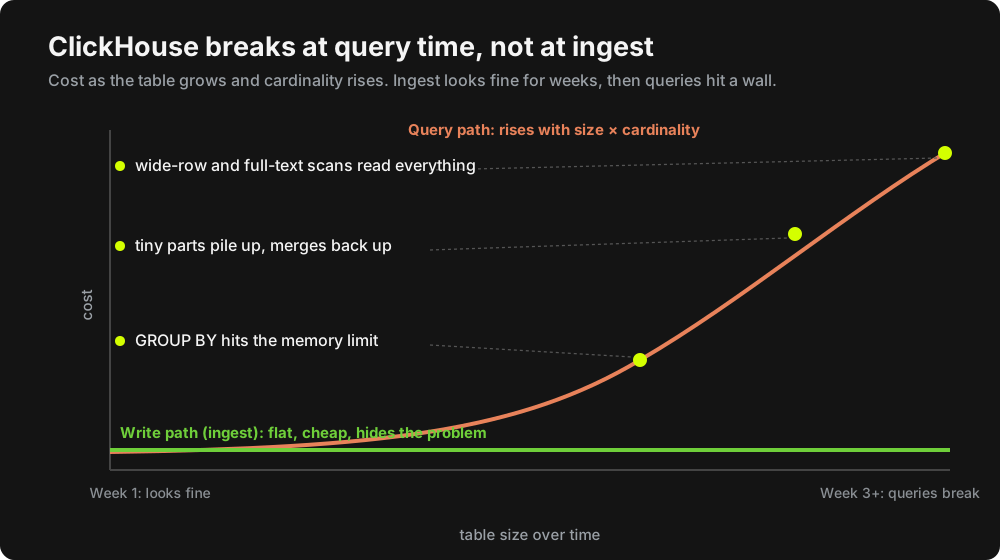
Why cardinality bites ClickHouse at query time
Three distinct things go wrong, and they have different fixes. Worth keeping them separate.
1. Memory at aggregation
GROUP BY on a high-cardinality column builds a hash table of distinct groups in memory, one per aggregation thread, then merges them. Low-cardinality groupings stay small. Group by something with millions of distinct values across billions of rows and those hash tables grow fast.
What happens next depends on your settings. If max_bytes_before_external_group_by is set, and it is on by default on ClickHouse Cloud, ClickHouse spills the aggregation to disk and finishes, slower but alive. If it is not set, the query keeps building in memory until it hits max_memory_usage (per query) and gets cancelled so it does not take the server down. Either way the root cause is the same: an aggregation over a column with far more distinct values than the author expected. The fix is to lower the cardinality of what you group on, or give the query somewhere to spill.
2. Part explosion
ClickHouse stores data as immutable parts and merges them in the background. Anything that forces many tiny parts creates a backlog of merges, and merge pressure degrades both ingest and queries.
The sharpest version of this we have seen came from a materialized view. The MV grouped by (key, Timestamp) at full second resolution. At second granularity, almost every event produced a new group, so the MV target received thousands of tiny parts per hour. The fix was to lower the cardinality of the grouping key itself: drop Timestamp from the GROUP BY, or bucket it with toStartOfHour(Timestamp). Same data, far fewer distinct groups, far fewer parts.
The lesson generalizes: high cardinality in a GROUP BY, including a timestamp at fine resolution, is a part-explosion risk, not just a query-memory risk.
3. Wide-row and full-text scans
The other failure mode is reading too much. A query that has to scan a high-cardinality text column, like a raw log Body, reads enormous amounts of data because that column does not compress well, and a filter on it cannot prune any granules: Body is not part of the sort key, so the primary index has nothing to skip on.
Concretely, on one of our logs tables a five-minute all-logs window read 15,715,820 rows and 45.71 GB and took 4.57 seconds. A bare count() over the same window returned in 0.050 seconds. Same time range, three orders of magnitude difference, because the first query pulled the wide rows including Body and the second only touched the sort key.
It gets worse with tiered storage. We move data older than a day to S3 via TTL. Once a full-text Body scan has to go over the network to S3, those queries get dramatically slower. We have watched log-search queries blow straight through a three-minute timeout (elapsed 180018 ms, maximum: 180000 ms) with dozens of queries running concurrently, a single query reading billions of rows, and a LIKE/position() scan across a Body column that the index could not help with.
What it looks like under real load
The slow build-up is one thing. A traffic spike compresses the whole timeline into an afternoon.
During a recent spike on a large sports-streaming workload, ingest jumped to roughly 400 million rows per minute, about twice the expected traffic, pushing well past the cluster's steady-state write throughput. Under that load the system did several things at once, all cardinality-adjacent:
- Batch sizes collapsed. Steady-state log batches of around 500K rows fell to about 37K rows each, with roughly 30 times more inserts per hour. Smaller batches mean more parts, which means more merges.
- Merges piled up. Around 160 merges ran concurrently, with an insert and merge backlog peaking near 2,000 queued items.
- Individual inserts slowed to 40 to 50 seconds each.
- Materialized-view queries hit the memory limit and were cancelled. Again, by design: the server protected itself rather than falling over.
None of these are bugs. They are what happens when cardinality and volume rise together and the schema was not shaped to absorb it. The spike did not break ClickHouse. It surfaced the cardinality decisions that were already latent in the schema.
The mitigations we actually use
Here is what keeps these tables fast in production. None of it is exotic. The discipline is in applying it before the table gets big, not after.
Design the sort key around your real queries
The ORDER BY key is the single highest-leverage decision, because it controls both compression and what the primary index can skip. We benchmarked sort-key variants on an identical 17.27M-row trace dataset:
ORDER BY (ServiceName, Timestamp)produced the smallest table at 751.95 MiB.ORDER BY (Timestamp, ServiceName)came in larger at 818.88 MiB.- That is about an 8 percent spread on storage, with smaller but real differences in insert cost and query latency across the variants.
This was a deliberately small dataset, so treat the absolute numbers as directional, not proof at scale. Service-leading plus a raw timestamp gave the best compression and fast service-scoped queries. The catch: trace-id lookups had to touch every granule under every sort key, because TraceId is not in the sort key, so the primary index could not prune. That is a cardinality decision too, and it points straight at the next tool.
Add bloom filters for high-cardinality lookups
When you need point lookups on a high-cardinality column that is not in the sort key, a bloom filter is the fix, not a bigger machine. We add a tokenbf_v1 index on text columns we search, like Body, and query them with hasToken() instead of LIKE.
-- Token bloom filter on the column you actually search
ALTER TABLE otel.logs
  ADD INDEX idx_body Body TYPE tokenbf_v1(32768, 3, 0) GRANULARITY 1;

-- Use hasToken() so the index can prune; LIKE '%...%' cannot use it
SELECT Timestamp, ServiceName, Body
FROM otel.logs
WHERE hasToken(Body, 'OutOfMemory')
  AND Timestamp >= now() - INTERVAL 1 HOUR;
The effect is visible in EXPLAIN indexes = 1. With the token bloom filter in place, a search for a token that was not present pruned every granule:
Skip
  Name:        idx_body
  Description: tokenbf_v1 GRANULARITY 1
  Parts:       0/2
  Granules:    0/2146
Every granule eliminated before reading the Body data at all. The engine still reads the small index and mark files to evaluate the filter, and for parts on S3 those come from S3 too, but it skips fetching the large Body column for every pruned granule. That is the difference between dragging billions of rows of log text over the network and fetching a handful of index files. (That 0/2146 is a clean no-match case; a real match prunes most granules, not all.)
Coarsen high-cardinality grouping keys
If a GROUP BY or a materialized view groups on something with runaway cardinality, lower the cardinality of the key. Bucketing a timestamp is the common case. We chose five-minute buckets on one ingest path specifically because second-resolution timestamps carry too much cardinality, which hurt insert performance and exploded part counts. Coarser time buckets, fewer distinct groups, healthier merges.
-- Anti-pattern: second-resolution Timestamp in the GROUP BY.
-- Almost every event is its own group, so the MV target gets thousands
-- of tiny parts per hour.
GROUP BY key, Timestamp

-- Fix: coarsen the time key. Same rollup, far fewer distinct groups.
GROUP BY key, toStartOfHour(Timestamp)
Promote hot Map keys to typed columns
Storing attributes in a Map is flexible but slow to query: reading one key forces ClickHouse to read the full keys and values arrays of that map column for every row it scans, not just the one key you asked for. For attributes you filter or group on often, promote them out of the map into a typed column. We materialized deployment.environment into its own Environment LowCardinality(String) column for exactly this reason. Promoting frequently-queried fields out of Map(...) into typed columns is a standard performance win on these tables.
-- Promote a hot attribute out of the Map into a typed, low-cardinality column
ALTER TABLE otel.traces
  ADD COLUMN Environment LowCardinality(String)
  MATERIALIZED ResourceAttributes['deployment.environment']
  CODEC(ZSTD(1));
A missing map key materializes as the default (an empty string here), so queries can filter on Environment directly without touching the whole ResourceAttributes map.
This pairs directly with knowing which columns deserve LowCardinality in the first place. We covered that decision in ClickHouse LowCardinality: when it helps and when it hurts, including why wrapping a genuinely high-cardinality column like a trace id makes things worse, not better.
Read only the columns you need
Because ClickHouse is columnar, SELECT * on a wide table is a self-inflicted wound. The 45.71 GB versus 0.050-second example earlier is the whole argument. Select the columns the query actually needs, and a lot of cardinality pain never materializes because you never read the expensive columns.
What we would tell someone starting today
If you are putting high-cardinality observability data into ClickHouse, assume the table will be large in a month and design for the query, not the insert.
- Pick the
ORDER BYkey from your real query patterns, service or tenant first, time second. - Decide column types deliberately.
LowCardinalityfor bounded columns, plain types for genuinely unbounded ones, and measure when unsure. - Add
tokenbf_v1bloom filters to any high-cardinality text column you will search. - Keep grouping keys, including timestamps in materialized views, as coarse as the use case allows.
- Promote frequently-queried
Mapkeys into typed columns. - Never
SELECT *a wide table in a hot path.
The cheapest way to internalize all of this is to try it on a throwaway instance before it matters. Our walkthrough on setting up ClickHouse with Docker Compose gets you a local table you can load with a representative sample and benchmark two sort keys against, which is exactly how the numbers above were produced.
The recurring theme: ClickHouse will happily accept high-cardinality data at ingest and let you discover the cost at query time. The teams that stay fast are the ones that make the cardinality decisions up front, while the table is still small enough that changing them is cheap.
We ended up baking a lot of this discipline into how Last9 stores telemetry, mostly because we got tired of running the loop by hand. But none of the failure modes above are specific to us. They are inherent to ClickHouse at high cardinality, and the mitigations work whether or not you ever touch our product.
FAQ
Why does ClickHouse handle high cardinality at ingest but slow down later?
ClickHouse separates ingest cost from query cost. A high-cardinality column barely affects the write path, so inserts stay fast and the problem stays hidden. The cost appears at query time, when a query groups by, filters on, or scans the high-cardinality data, and the table has grown large enough for that work to be expensive.
What actually breaks in ClickHouse under high cardinality?
Three things, with different fixes. Aggregations build large in-memory hash tables and can hit the per-server memory limit and get cancelled. Fine-grained grouping keys create many tiny parts and a merge backlog. Scans of high-cardinality text columns like a raw log body read huge amounts of data, especially once older data has moved to object storage.
How do I make trace-id or other high-cardinality lookups fast in ClickHouse?
Add a tokenbf_v1 bloom-filter index on the column and query it with hasToken() rather than LIKE. The bloom filter lets ClickHouse eliminate granules before reading the data column, so a search for an absent token skipped every granule in our EXPLAIN plan and avoided pulling the large text column from object storage. The small index and mark files are still read to evaluate the filter.
Does high cardinality cause too many parts in ClickHouse?
It can, indirectly. A GROUP BY or materialized view that groups on a high-cardinality key, including a timestamp at second resolution, produces many distinct groups and therefore many small parts. That drives a merge backlog that slows ingest and queries. Coarsening the grouping key, for example bucketing the timestamp, reduces the part count.
How does the ORDER BY key affect high-cardinality tables?
The sort key controls compression and what the primary index can skip. In our benchmark on identical data, a service-leading key compressed best and made service-scoped queries fast, while lookups on a column outside the sort key stayed slow until we added a bloom filter. Choose the sort key from your real query patterns.
Should I store observability attributes in a Map or as columns?
Use a Map for flexibility, but promote the attributes you filter or group on frequently into typed columns. Reading one map key still reads the whole keys and values arrays of that map column, so a typed column like LowCardinality(String) for something like environment is faster for hot query paths.


