

CI/CD observability means recording telemetry from your build and deployment pipelines the same way you do for production services: a trace per pipeline run, a span for every job and step, metrics for duration, queue time, results and runner capacity, and a marker for every deploy. The goal is to answer why a pipeline is slow or failing, not only whether it went green.
CI systems show you a list of runs and a console log per job. That works for one failing build. It doesn’t tell you that p95 build time doubled over a month, that half of it is spent waiting for a runner, or that a third of your red builds were the CI platform failing rather than the code.
This guide covers the OpenTelemetry CI/CD semantic conventions, how to trace GitHub Actions and Jenkins runs, which metrics to track, how to separate code failures from CI system errors, and how to connect each deployment, including ArgoCD syncs, to the production telemetry that follows it.
What does CI/CD observability cover?
A pipeline is a distributed system with its own queue, workers and dependencies. Observability for it covers four layers:
- Pipeline runs: each run as a trace, with jobs, stages and steps as spans, so you can see where the time goes.
- Queue and capacity: time spent waiting before execution starts, and how many runners are busy, available or offline.
- Results: success, failure, error, timeout, cancellation and skip, counted per pipeline and per task, plus retries that pass on a later attempt.
- Deployments: a marker for each release, tied to the service and environment it changed, so production regressions point back to a commit.
The first three tell you how healthy the delivery process is. The fourth connects it to the thing users notice. Our guide to DORA metrics covers how deployment frequency, lead time and change failure rate build on the same data.
What are the OpenTelemetry CI/CD semantic conventions?
OpenTelemetry has a CI/CD special interest group, and its work is now part of the semantic conventions. The CNCF announcement notes that the first CI/CD attributes appeared in semantic conventions v1.27.0. The spans and metrics are now at Release Candidate status, a step before stable.
The conventions define two spans:
- Pipeline run: one span with kind
SERVERper run. Its name should be{action} {pipeline}, for exampleBUILD Build and Test, or just{action}when the pipeline name is missing or high cardinality.cicd.pipeline.resultis required. - Pipeline task run: one span with kind
INTERNALper task in the run, withcicd.pipeline.task.name,cicd.pipeline.task.run.id,cicd.pipeline.task.run.resultandcicd.pipeline.task.run.url.fullrequired.
They also define five CI/CD metrics:
| Metric | Type | What it measures |
|---|---|---|
cicd.pipeline.run.duration | Histogram (s) | Run duration by pipeline, state and result |
cicd.pipeline.run.active | UpDownCounter | Runs currently active, by state |
cicd.worker.count | UpDownCounter | Workers by state: available, busy, offline |
cicd.pipeline.run.errors | Counter | Errors in pipeline runs, such as compile and test failures |
cicd.system.errors | Counter | Errors in CI/CD system components, such as the controller, scheduler or agent |
The cicd.pipeline.run.state attribute is what makes the duration metric useful. A run moves through three states:
pending: from the triggering event until execution starts, which covers time in a queue, provisioning agents and creating run resources.executing: the run’s tasks, such as build and test.finalizing: from when execution finishes, for example while run resources are cleaned up.
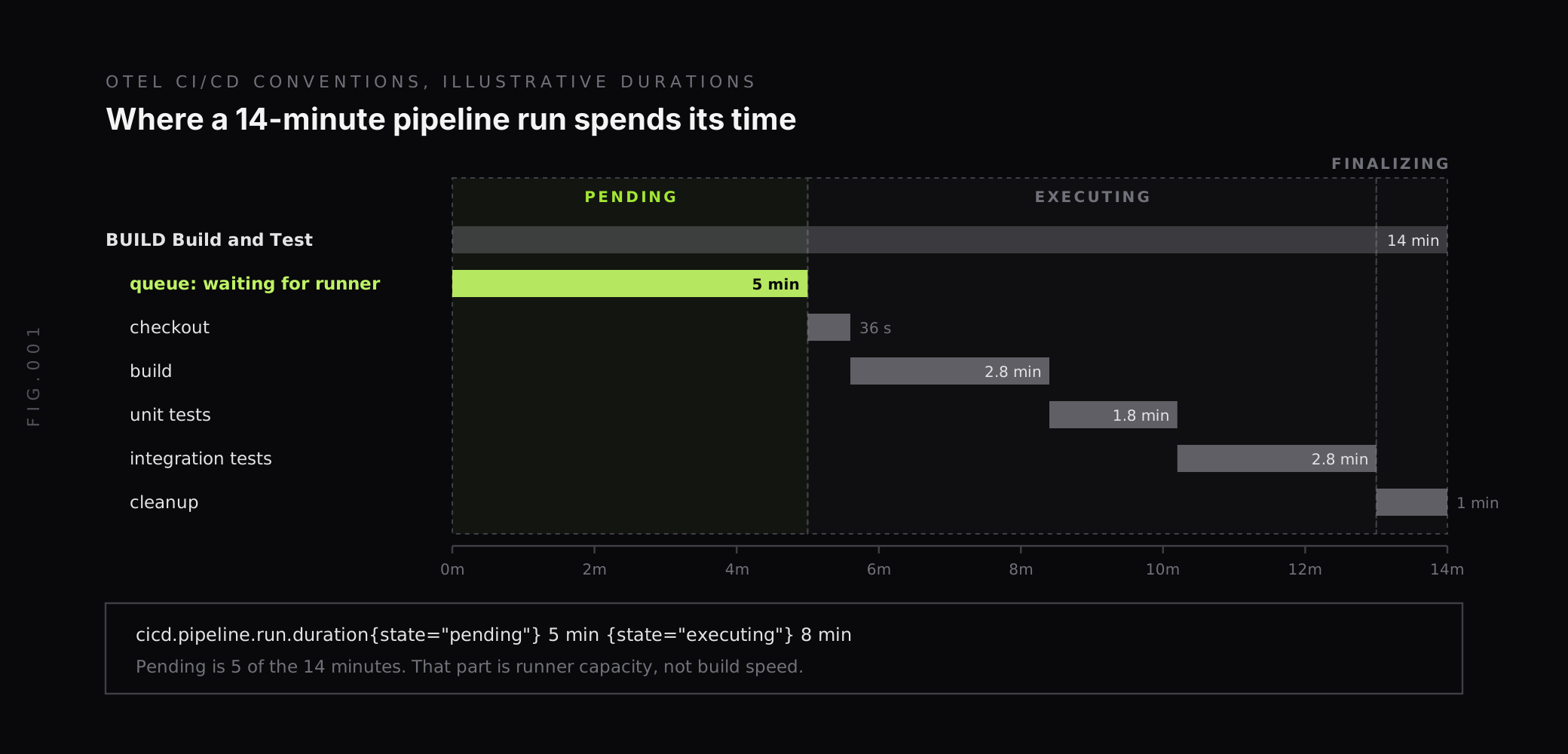
Splitting duration by state separates two different problems. A slow executing state is a build or test problem for the team that owns the code. A slow pending state means runs are waiting for capacity, which no amount of build optimization fixes.
Why separate failures from errors?
The conventions define six well-known values for cicd.pipeline.result, and two of them are easy to confuse:
failure: the run didn’t finish successfully, for example because of a compile error or a failing test. The conventions note that such failures are usually detected by non-zero exit codes of the tools the pipeline ran.error: the run failed because of an error in the CI/CD system, for example the worker being killed.
The others are success, timeout, cancellation and skip.
Showing all of these as one red status sends the wrong people to investigate. A failing test belongs to the team that wrote the code. A killed runner, an expired credential or a full disk on the build host belongs to whoever runs the CI platform, and it can fail every team’s builds at once.
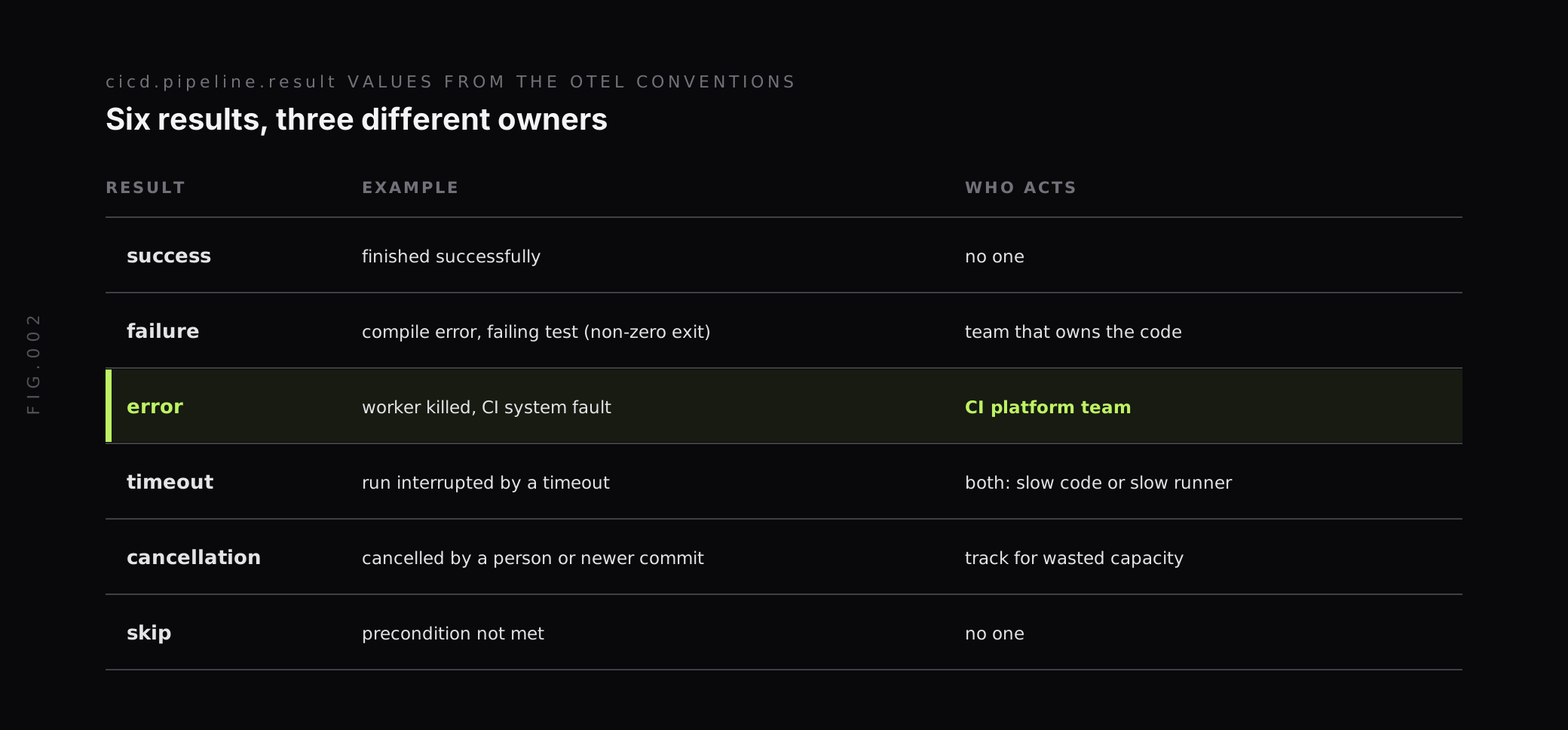
The two error counters follow the same split. cicd.pipeline.run.errors counts errors in pipeline runs, such as compile and test failures. cicd.system.errors counts errors in components of the CI/CD system itself. Alert on them separately and route them to different owners.
How do you trace GitHub Actions?
The OpenTelemetry Collector’s GitHub receiver does two things. It scrapes version control metrics from GitHub repositories and organizations through the GraphQL and REST APIs, and it serves a webhook endpoint that receives GitHub Actions events and converts them into traces. It’s at alpha stability for both traces and metrics.
For traces, the receiver processes the workflow_run and workflow_job webhook events. Its README says each workflow or job, along with its steps, is converted into trace spans. The span set includes a queue span for each job, which captures the time the job waited for a runner.
A minimal webhook configuration, based on the README example:
receivers:  github:    webhook:      endpoint: 0.0.0.0:19418      path: /events      health_path: /health      secret: ${env:GITHUB_WEBHOOK_SECRET}      service_name: github-actions    scrapers:      scraper:        github_org: your-org
service:  pipelines:    traces:      receivers: [github]      processors: [batch]      exporters: [otlphttp]
The receiver listens on localhost:8080 by default; this example binds 0.0.0.0 so GitHub can reach it. The README is explicit that the webhook endpoint should be secured with a secret and a web application firewall or similar protection, and the receiver can also require specific headers on every request.
Link your own spans to the workflow trace
Trace and span IDs from the receiver are deterministic. The trace ID and root span ID come from github.run_id and github.run_attempt, and job, step and queue span IDs come from the job’s check_run_id, with step IDs also using the step’s name: field. This scheme sits behind the receiver.githubreceiver.UseCheckRunID feature gate, which is on by default from v0.151.0. That means a command inside a step can compute the same TRACEPARENT and emit child spans that land in the workflow’s trace, for example timing each test suite or each docker push.
The README includes a shell helper for this and one requirement: step names must be unique within a job, because duplicate names produce the same span ID. GitHub doesn’t enforce that, though the receiver logs a warning when it sees duplicates.
Metrics from the same receiver
The scraper side emits VCS metrics defined in the same conventions, including vcs.change.count, vcs.change.duration, vcs.change.time_to_approval and vcs.change.time_to_merge. The README describes these as leading indicators for the DORA metrics. The default collection interval is 30 seconds, and the README recommends 300 seconds.
How do you trace Jenkins pipelines?
Jenkins has an OpenTelemetry plugin that exports pipeline traces and Jenkins health metrics over OTLP, and can also send build logs, once it’s configured at the controller level. Every job and pipeline then follows the same setup with no per-job changes. Our guide to instrumenting Jenkins with OpenTelemetry walks through installing the plugin, pointing it at an OpenTelemetry Collector and reading stage-level traces.
The questions are the same as for GitHub Actions: which stage dominates runtime, where failures cluster, and how long builds wait for an agent. Jenkins adds one more: controller and agent health. When pending time rises across every pipeline at once, the cause is usually the CI system rather than any one build.
Which CI/CD metrics should you track?
Start with the metrics that change who acts:
| Signal | Source | What a change means |
|---|---|---|
| Run duration p50 and p95, by pipeline | cicd.pipeline.run.duration with state="executing" | Slower builds or tests |
| Pending time p95 | cicd.pipeline.run.duration with state="pending", or queue spans | Not enough runners, or runners starting slowly |
| Result counts, by pipeline | cicd.pipeline.result | Rising failures, errors or timeouts |
| Active runs | cicd.pipeline.run.active | Backlog building up |
| Runner states | cicd.worker.count by available, busy, offline | Capacity lost or saturated |
| Retries that pass | run attempt greater than 1 with success | Flaky tests or flaky infrastructure |
| System errors | cicd.system.errors | The CI platform itself is failing |
With the default Prometheus name translation, dots become underscores and the unit adds a _seconds suffix, so p95 pending time by pipeline looks like this:
histogram_quantile( 0.95, sum by (le, cicd_pipeline_name) ( rate(cicd_pipeline_run_duration_seconds_bucket{cicd_pipeline_run_state="pending"}[1h]) ))Check the metric and label names your instrumentation emits before building on them. The conventions are at Release Candidate, and tools adopt them at different speeds.
Keep labels bounded. Pipeline name, result, state and runner pool make good labels. Run IDs, commit SHAs and branch names belong on spans, where they’re useful for one investigation without multiplying series. For more on label budgets, see our guide to managing high cardinality metrics in Prometheus.
Flaky runs need their own signal
A test that fails and then passes on retry shows up as success on the final result. GitHub’s run attempt number, which the receiver uses to build trace IDs, is the clue: a successful run with an attempt number above 1 means something failed first. Count those per pipeline and per job. A rising count is often the first sign of flaky tests or an unreliable dependency, long before builds start failing outright.
How do you connect deployments to production?
The most useful CI/CD signal for an on-call engineer isn’t build time. It’s knowing which release landed right before latency went up.
The pattern is a deployment marker: an event sent from the pipeline when a deploy starts and when it finishes, carrying the service name, environment and commit SHA. When those values match the labels on your application telemetry, a dashboard can draw each deploy as a vertical line on latency, error rate and throughput charts.
Three common places to send them from:
- GitHub Actions: a step at the end of the deploy job, with
if: always()so failed deploys are marked too. - Jenkins: a pipeline step before and after the deploy stage, or a post-build action for Freestyle jobs.
- ArgoCD: the notifications controller can call a webhook when a sync starts and when it finishes, which covers GitOps deploys that never run in a CI job.
Markers with a start and a stop are worth the extra step. A rollout that takes 20 minutes can cause a regression at minute 15, and a single point-in-time marker at the end hides that.
How does Last9 fit with CI/CD observability?
We take pipeline traces and CI/CD metrics over OTLP, so GitHub receiver output, Jenkins plugin traces and your own step-level spans land next to application telemetry from the same OpenTelemetry Collector.
For deployments, our Change Events API records each release, and we ship integrations that send them from the pipeline:
- The GitHub Actions integration is a
last9/deployment-marker-actionstep that sendsstartandstopevents, separately or together, and by default attachesgithub_sha,github_actor,github_ref,github_run_idandgithub_repository. - The Jenkins integration is a plugin with a
last9DeploymentMarkerpipeline step and Freestyle job options. It attaches SCM and build metadata such asscm.commit_sha,jenkins.build_numberandjenkins.build_duration_ms, and API failures never fail your build. - The ArgoCD integration uses ArgoCD’s built-in notification controller to send markers when an application syncs, with no operator or sidecar.
When a marker’s service_name matches your APM service name and its deployment_environment matches the environment you are viewing, each deploy appears as an overlay on that service’s latency, error rate and APDEX charts. Events are also queryable with PromQL through the last9_change_events metric, so deploy frequency and failure correlation can live in the same dashboards and alerts as everything else.
We handle 20M series per metric per day by default and keep high-cardinality labels with no sampling. Our Control Plane lets you drop, remap, redact, forward and aggregate metrics, logs and traces at ingest, which is where step-level spans from noisy pipelines can be trimmed without changing workflows.
Measure where pipeline time goes
A pipeline that only reports green or red hides most of what matters: queue time, the difference between a failing test and a dying runner, retries that turn failures into passes, and the link between a deploy and the regression that follows.
Start with a trace per run, a duration metric split by pending and executing, results that keep failure and error apart, runner counts by state, and a deployment marker with start and stop on every release. When you want pipeline traces, deploy markers and production telemetry in one place, Last9 takes OpenTelemetry data as it is.
FAQ
What is CI/CD observability?
CI/CD observability is the practice of recording telemetry from build and deployment pipelines: a trace per pipeline run with spans for each job and step, metrics for run duration, queue time, results and runner capacity, and markers that tie each deployment to the production telemetry that follows it. It answers why a pipeline is slow or failing, not only whether it passed.
Does OpenTelemetry support CI/CD pipelines?
Yes. The OpenTelemetry semantic conventions include CI/CD spans and metrics, currently at Release Candidate status. They define a pipeline run span and a pipeline task run span, results such as success, failure, error, timeout, cancellation and skip, and metrics such as cicd.pipeline.run.duration, cicd.pipeline.run.active, cicd.worker.count, cicd.pipeline.run.errors and cicd.system.errors.
How do you trace GitHub Actions with OpenTelemetry?
The OpenTelemetry Collector’s GitHub receiver serves a webhook endpoint that receives workflow_run and workflow_job events and turns each workflow, job and step into trace spans. Trace and span IDs are deterministic, derived from the run ID, run attempt and check run ID, so commands inside a step can emit child spans by generating a matching TRACEPARENT. The receiver is at alpha stability for traces and metrics.
What is the difference between a pipeline failure and a pipeline error?
In the OpenTelemetry CI/CD conventions, failure means the pipeline run did not finish successfully because of something like a compile error or a failing test, usually detected by a non-zero exit code. Error means the run failed because of a problem in the CI/CD system itself, such as a worker being killed. Failures belong to the team that owns the code; errors belong to whoever runs the CI platform.
Which CI/CD metrics should you monitor?
Track pipeline run duration by pipeline at p50 and p95, time spent pending before execution starts, run results split into failure, error, timeout and cancellation, the number of active runs, runner counts by state such as busy, available and offline, and retries that pass on a later attempt. Add deployment frequency and change failure rate from deployment markers.
How do you connect deployments to production metrics?
Send a deployment marker or change event from the pipeline when a deploy starts and finishes, with the service name, environment and commit SHA. When those values match the labels on your application telemetry, dashboards can overlay each deployment on latency, error rate and throughput charts, so a regression can be tied to the release that caused it.


