

A security team gets a request to approve a vendor-managed observability backend inside the company’s own cloud account. The data-residency answer looks easy: the data stays in your account. The review is not easy, because someone outside your organisation now operates software next to your workloads.
What does a data residency review for observability in your own cloud cover? Three questions: what access the vendor holds in your account, which side can open network connections, and where sensitive fields are removed before storage. For each one, this post separates what Last9 documents publicly from what you should get in writing during the design review. Where the docs are silent, we say so.
What a security review of observability in your own cloud covers
Data residency is a location requirement: telemetry is stored and processed in a region, a country or an account you control. Data sovereignty adds who can compel or access that data. Running the backend in your own account helps with the first and shapes the second, but neither is settled by where the servers sit.
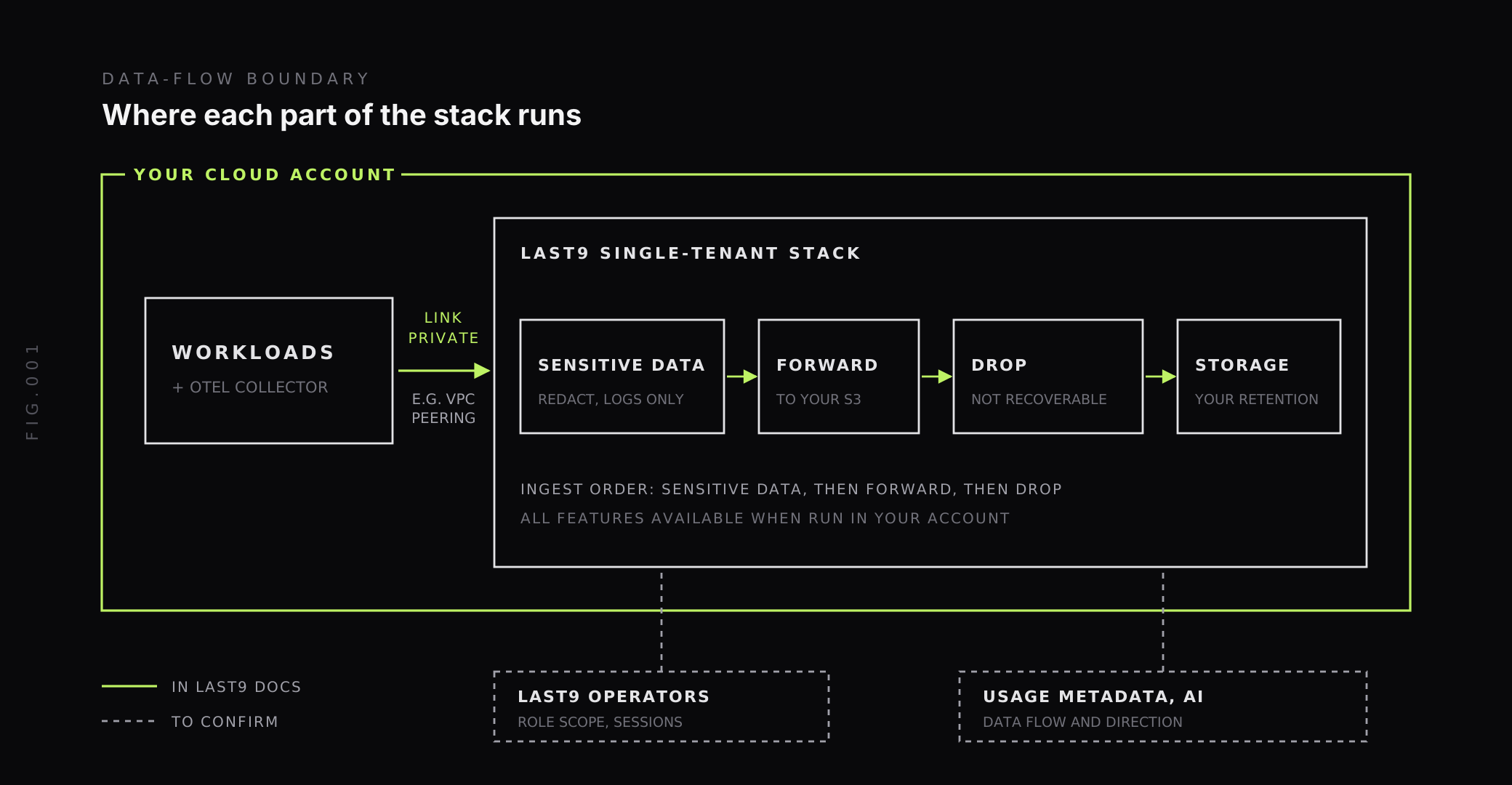
Last9 documents that it runs single-tenant in your own cloud account (AWS or GCP), in any region, and manages it for you. The docs also say all features, including retention settings, are available in that setup. That gives you the location. It does not yet tell you who can reach in, so most of the review is about access.
| Question | What Last9 documents | What to confirm |
|---|---|---|
| Where does the data live? | Single-tenant, in your AWS or GCP account, any region | Nothing further for location |
| What can the vendor do in the account? | Managed by Last9 | Role, actions, resources, session length |
| Who opens connections? | Telemetry can stay on your private network, for example over VPC peering | Connection direction in a BYOC deployment |
| Where is PII removed? | Control Plane redacts at ingestion, for logs | Coverage for metrics and traces |
Single tenant vs multi tenant: what changes when the stack runs in your account
In a multi-tenant SaaS backend, your telemetry sits in a shared system the vendor owns, and the vendor’s controls are the only controls. In a single-tenant deployment in your account, the storage sits under your account’s IAM, logging and cloud bill. Your existing audit tooling sees it. Your team can inspect network paths with the same tools it uses for everything else.
The tradeoff is operational. Last9 manages the deployment, so a person outside your org holds some form of access. The security question moves from “where does the vendor keep my data?” to “what exactly can the vendor’s operators do in my account, and how would I know?” Treat that as the centre of the review.
What access should the vendor hold in your account?
Ask for the access in a form your IAM team can review. Six details cover it:
- The principal: which account or identity assumes the role.
- The actions the role allows, as a policy document, not a description.
- The resources those actions apply to, scoped by ARN or tag.
- How the role is assumed, and whether it requires an external ID.
- The maximum session length.
- Where each assumption shows up in your CloudTrail.
For reference, this is the shape of a cross-account trust policy with an external ID. The account ID is the AWS documentation’s example value, and the policy is an illustration of the pattern, not Last9’s BYOC role.
{ "Version": "2012-10-17", "Statement": [ { "Effect": "Allow", "Principal": { "AWS": "arn:aws:iam::111122223333:root" }, "Action": "sts:AssumeRole", "Condition": { "StringEquals": { "sts:ExternalId": "<random-string-you-generate>" } } } ]}The external ID guards against a confused-deputy mistake, where a third party is tricked into using its role against an account it should not touch. The AWS documentation on external IDs explains the mechanism.
Last9’s public docs show this pattern for a different feature. The AWS STS role tutorial sets up a cross-account role, optionally with an external ID, so Last9 can discover CloudWatch resources. It attaches the AWS-managed CloudWatchReadOnlyAccess and SecurityAudit policies and recommends a one-hour session unless your policy allows three. That is read-only access for discovery. The exact role, actions and session length for a BYOC deployment are not in the public docs, so request them as a policy document.
Which side can open connections? VPC peering and network direction
The Last9 FAQ says telemetry does not have to cross the open internet: because Last9 runs in your own cloud account, it can stay on your private network, for example over VPC peering. When data does cross the internet, the FAQ says it is sent securely.
A peering connection is a networking link between two VPCs. It is not one-way on its own, as the AWS description of VPC peering makes clear. Which side can start a connection comes from route tables, security groups and network ACLs. So “unidirectional” is a property of how a deployment is configured, and you can test it.
Last9 does not publicly document connection direction for BYOC. Ask which side initiates each flow: telemetry in, operator access, usage metadata out. Then verify with your own security group rules and flow logs, not the diagram.
Where PII is removed: PII redaction at ingestion
The strongest place to remove PII is before it is stored. Last9’s Control Plane has a Sensitive Data feature that scans telemetry at ingestion, with no code changes or redeploys. You choose scan rules for email addresses, phone numbers and credit card numbers. Each rule either redacts the match, replacing it with asterisks, or takes no action. You can also attach labels such as redacted: true to matching samples, for filtering and alerts.
Two limits matter for a review. Sensitive Data supports logs only today, so metrics and traces need other controls. And it detects three pattern types, so a customer ID, an API key or a name in free text is outside it.
For those, use controls closer to the source. The OpenTelemetry Collector redaction guide covers attribute processors that mask or delete fields in the pipeline before export. Treat span attributes as a code-review item too, since traces are not covered.
Controlling data egress: drop, forward and what leaves the account
Two more Control Plane rules shape what is kept. Per the ingestion docs, rules apply in a fixed order: sensitive data is scanned first, then matching data is forwarded, then matching data is dropped. Redaction therefore runs before data is forwarded to your own bucket.
- Drop discards telemetry you do not want to store. The docs warn that dropped data is not ingested and cannot be recovered.
- Forward sends matching telemetry straight to AWS S3 without storing it in Last9, using an IAM AssumeRole into your bucket. The docs suggest it for compliance data that needs long-term storage but is rarely queried.
Provider egress is a separate topic. Data that leaves a cloud provider’s network is outbound data transfer, and AWS, Azure and Google Cloud bill for it, as we cover in multi-cloud monitoring. Running the stack in your account keeps telemetry from crossing a provider boundary to reach a vendor. It does not remove the cost of sending data between your own regions or clouds.
Last9’s own flows also belong on the list: support access, usage metadata and AI features. The public docs do not describe them, so ask for the data-flow diagram and the sub-processor list.
A one-page vendor security assessment checklist
Use this table as the core of a third-party risk assessment or security questionnaire. “Documented” means a public Last9 doc backs the answer. “To confirm” means get it in writing before sign-off.
| Control | Question to ask | Evidence to request | Status |
|---|---|---|---|
| Isolation | Is the stack single-tenant in my account? | Deployment description | Documented |
| IAM scope | Which role, actions and resources does Last9 hold? | Policy JSON, trust policy | To confirm |
| Session audit | Can I see every assumption of the role? | CloudTrail sample | To confirm |
| Network direction | Which side opens each connection? | Route tables, security groups | To confirm |
| Private connectivity | Does telemetry stay off the public internet? | VPC peering design | Documented for VPC peering; PrivateLink or Private Service Connect to confirm |
| PII redaction | Is PII removed before storage? | Sensitive Data rules | Documented for logs; metrics and traces to confirm |
| Encryption | In transit and at rest, with whose keys? | Encryption statement | To confirm |
| Retention and deletion | Can I set and verify retention? | Retention settings | Documented: retention settings available in your account |
| Break-glass access | How does support get in, and who approves it? | Access procedure | To confirm |
| Sub-processors | Which third parties see usage metadata or AI inputs? | Sub-processor list | To confirm |
| Compliance reports | Which attestations, and what period? | Reports | Documented for SOC 2 Type II |
Compliance reports and data residency requirements: what they do and don’t cover
Last9 is SOC 2 Type II certified and supports SSO and access controls. A SOC 2 report covers Last9’s controls: how it manages access, changes and incidents in the systems it operates. It does not cover how your account is configured. Your residency requirements still depend on your region choice, your network rules and the role you grant.
Ask for the current report and its period, then read the sections on access management and subservice organisations. If your policy needs other attestations, such as ISO 27001, HIPAA or PCI DSS, ask for the current evidence for each instead of relying on a web page.
When this model is the wrong fit
Running a vendor-managed backend in your account does not suit every constraint. If policy forbids any third-party operator access to the environment, or the network is fully air-gapped, you need a stack your own team operates. The build vs buy breakdown lists what owning it costs in people and time.
It also matters which telemetry the option covers. Datadog’s BYOC option, for example, covers logs only, according to our Datadog comparison. Last9 runs single-tenant in your own cloud account for metrics, logs and traces. Check coverage by signal before you assume the deployment model answers the whole question.
Bring the three questions to the design review
Put these in front of Last9 and any other vendor: what access it holds and how you audit it, which side opens connections, and where PII is removed. Last9’s docs answer the location, redaction and ordering parts. Two items need written answers before sign-off: the exact scope of the BYOC role, and the direction of each connection.
To walk through your account setup with our team, schedule a demo.
FAQ
What is bring-your-own-cloud observability?
Bring-your-own-cloud (BYOC) observability means the observability backend runs inside your own cloud account instead of in the vendor’s. With Last9, it runs single-tenant in your AWS or GCP account, in any region, and Last9 manages it. Your telemetry stays under your account’s controls, logging and cloud bill.
What access does a BYOC vendor need in my cloud account?
Ask for it as a policy document: the principal, allowed actions, resources, how the role is assumed, the session length and where it appears in CloudTrail. Last9’s public docs show a cross-account STS role with an external ID for CloudWatch discovery, but the exact role for a BYOC deployment is not published, so request it in writing.
Does telemetry have to cross the public internet?
No. Last9’s FAQ says that because it runs in your own cloud account, telemetry can stay on your private network, for example over VPC peering. When data does cross the internet, it is sent securely. Which side can open connections is set by your route tables and security groups, so test it.
How is PII handled before it is stored?
Last9’s Control Plane Sensitive Data feature scans logs at ingestion for email addresses, phone numbers and credit card numbers. Matches are redacted, replaced with asterisks, or left unchanged and labelled. Rules apply before forward and drop rules. No code changes or redeploys are needed.
Which telemetry types does Last9 redaction cover?
Logs only today. For metrics and traces, remove sensitive values from metrics labels and span attributes at the source or in an OpenTelemetry Collector processor.
Is Last9 SOC 2 certified and can I run it in my own account?
Yes to both. Last9 is SOC 2 Type II certified, and it runs single-tenant in your own cloud account (AWS or GCP), in any region, with Last9 managing it. A SOC 2 report covers Last9’s controls, not your account configuration, so review both.


