

Azure Functions monitoring combines two sources. Platform metrics such as Function Execution Count, Http Server Errors, Response Time, Memory working set and instance count go to Azure Monitor. Execution logs, traces and dependencies go to Application Insights or, with OpenTelemetry mode, to any OTLP endpoint.
What you can see depends on your hosting plan: the platform metrics aren’t available on Linux Consumption. Two defaults trip teams up. Application Insights sampling is on by default at 20 telemetry items per second per host, and a log level above Information hides execution records.
This guide covers what to monitor, how hosting plans change it, which metrics matter, why executions go missing, how to send telemetry with OpenTelemetry, and which alerts to set first. Details come from Microsoft’s Azure Functions documentation as of October 2026.
What should you monitor in Azure Functions?
A function app is a set of functions that share a host, a plan and a scale controller. Watch five things:
- Executions: how many ran, per function and per instance.
- Failures: failed executions, exceptions and HTTP 5xx responses.
- Duration: how long executions take, and how close they get to the timeout.
- Scale: how many instances are running, and how close you are to the plan’s maximum.
- The trigger source: queue length, Service Bus active messages or Event Hubs consumer lag. These live on the source resource, not on the function app, and they tell you when functions are falling behind.
The last one is easy to miss. A function app can show no errors while a queue grows for hours, because the functions are healthy but too slow or too few.
How does the hosting plan change monitoring?
Azure Functions runs on several hosting plans, and each one changes timeouts, scale limits and which metrics exist. Microsoft’s scale and hosting page lists these limits:
| Plan | Default timeout | Max timeout | Max instances | Cold start |
|---|---|---|---|---|
| Flex Consumption | 30 min | Unbounded | 1,000 per function group | Improved; always ready instances optional |
| Premium | 30 min | Unbounded | Windows 100, Linux 20 to 100 | Avoided with always ready instances |
| Dedicated (App Service) | 30 min | Unbounded (needs Always On) | 10 to 30, 100 in ASE | Minimal, because the host runs continuously |
| Container Apps | 30 min | Unbounded | 300 to 1,000 | Depends on minimum replicas |
| Consumption (legacy) | 5 min | 10 min | Windows 200, Linux 100 | Scales to zero, some startup latency |
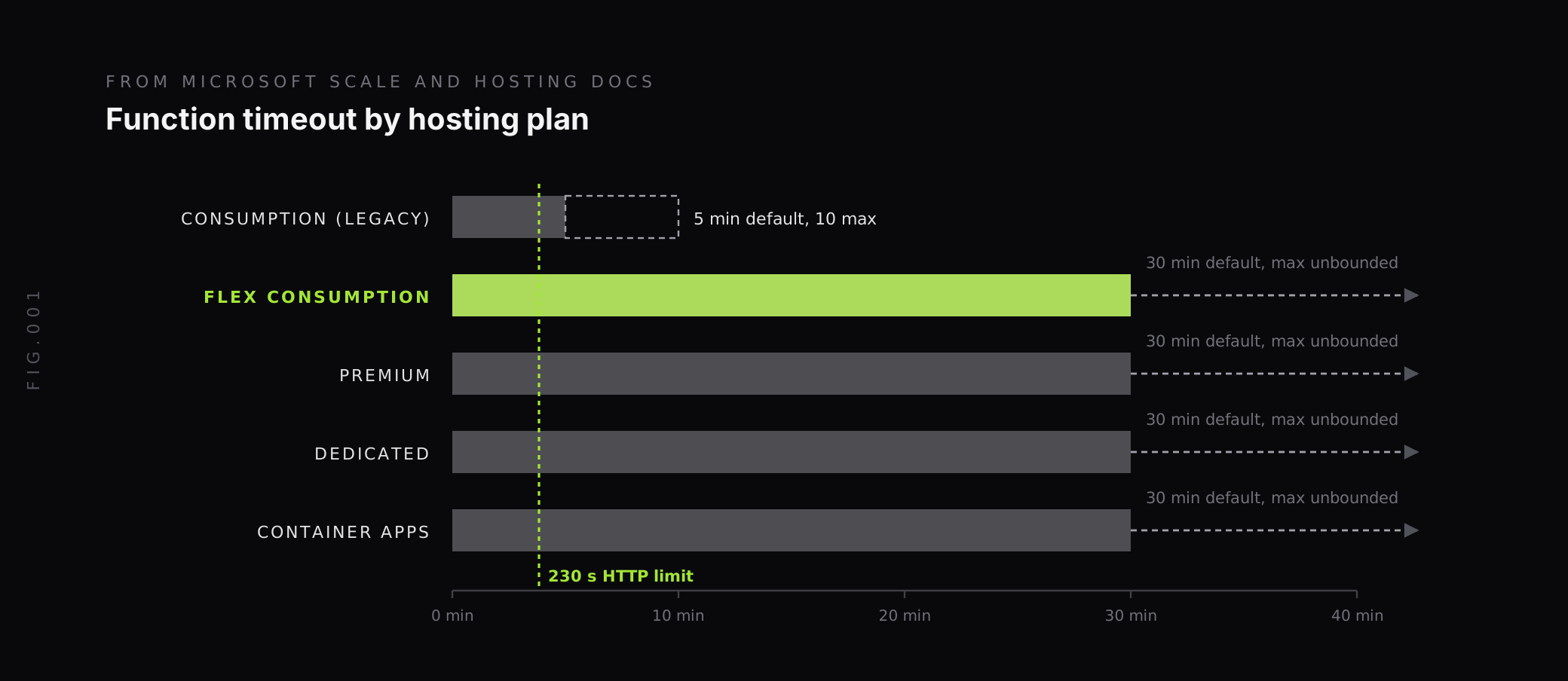
Three details matter for monitoring:
- Linux Consumption has no platform metrics. Microsoft’s monitoring reference says the Microsoft.Web/sites metrics “aren’t available when your function app runs on Linux in a Consumption plan.” That plan is retiring on September 30, 2028, and apps still on the end-of-life v3 runtime there stopped running after September 30, 2026.
- HTTP functions have a hard limit. Regardless of the timeout setting, “230 seconds is the maximum amount of time that an HTTP triggered function can take to respond to a request.”
- Flex Consumption limits are per function group. Its 1,000-instance maximum applies to on-demand instances in each function group, not to the app as a whole, and doesn’t include always ready instances.
Which Azure Functions metrics matter?
These platform metrics are emitted at a one-minute grain, and all of them except instance count can be split by an Instance dimension:
| Metric | API name | What it tells you |
|---|---|---|
| Function Execution Count | FunctionExecutionCount | Executions per minute (not supported for Premium and Dedicated plans on Linux) |
| Function Execution Units | FunctionExecutionUnits | Execution units, which drive cost on consumption plans |
| On Demand Function Execution Count | OnDemandFunctionExecutionCount | Executions on on-demand instances (Flex Consumption only) |
| Always Ready Function Execution Count | AlwaysReadyFunctionExecutionCount | Executions on always ready instances (Flex Consumption only) |
| Http Server Errors | Http5xx | Requests with a 5xx status code |
| Requests | Requests | Total HTTP requests |
| Response Time | HttpResponseTime | Time to serve requests, in seconds |
| Memory working set | MemoryWorkingSet | Memory used by the app |
| Automatic Scaling Instance Count | InstanceCount | Instances the app is running on |
Use Response Time rather than Average Response Time, which Microsoft marks as deprecated. On Flex Consumption, the docs note the instance count “is emitted every 30 seconds, and given Flex Consumption scales out and in fast, the number will be an aggregate of all new instances the app used in this time period,” so read it as instances used, not instances running at one moment.
For cost on Flex Consumption, Microsoft gives the conversion: On Demand Function Execution Units divided by 1,024,000 is execution time in GB-seconds. That makes the units metric a direct way to watch spend per function app.
Platform metrics don’t include per-function failure counts or durations. Those come from execution telemetry in Application Insights or your OpenTelemetry backend.
Why are some executions missing from Application Insights?
Two defaults cause most “my function ran but I can’t see it” questions.
Sampling is on by default. The host.json reference lists isEnabled as true and maxTelemetryItemsPerSecond as 20 by default, with no types excluded, and the limit is a target for each server host. Microsoft’s monitoring configuration page explains that when executions exceed the threshold, “Application Insights starts to randomly ignore some of the incoming executions.” A busy app can drop many of its execution records, while the platform metrics still count every one.
To keep every execution and exception, exclude those types from sampling in host.json:
{ "logging": { "applicationInsights": { "samplingSettings": { "isEnabled": true, "maxTelemetryItemsPerSecond": 20, "excludedTypes": "Request;Exception" } } }}Log levels hide execution records. Execution results are written by the Host.Results category at Information level. Microsoft warns that “If you filter at Warning or higher, you don’t see any of this data.” The Host.Aggregator category writes counts and averages of invocations every 30 seconds or 1,000 results, whichever comes first, and it also needs Information or lower.
Microsoft’s recommended baseline keeps the default at Warning and lowers only the categories that carry execution data:
{ "logging": { "fileLoggingMode": "debugOnly", "logLevel": { "default": "Warning", "Host.Aggregator": "Trace", "Host.Results": "Information", "Function": "Information" } }}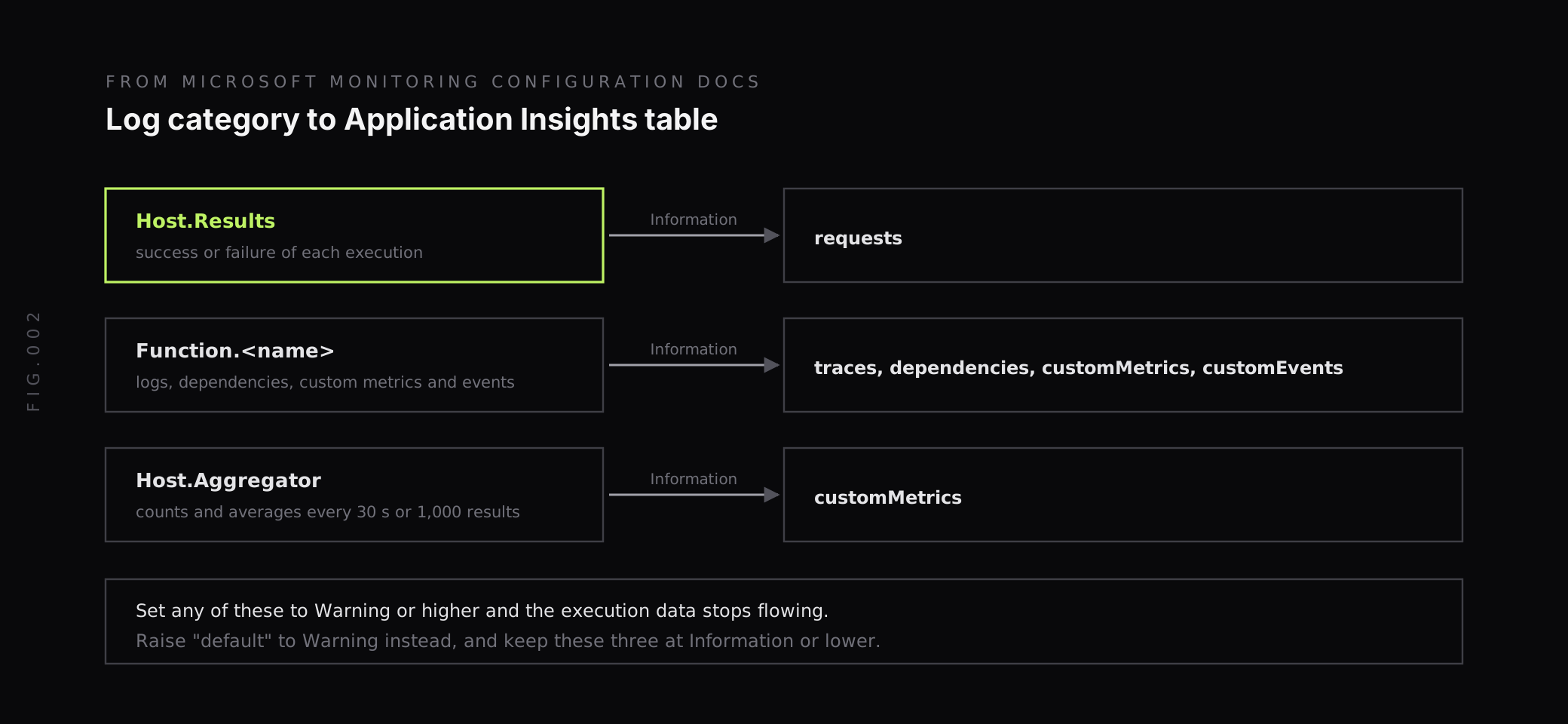
How do you send Azure Functions telemetry with OpenTelemetry?
Azure Functions can emit OpenTelemetry instead of Application Insights’ own format. Add one line to host.json:
{ "version": "2.0", "telemetryMode": "OpenTelemetry"}Two processes produce telemetry. The host process is the Functions runtime, which emits request traces, initialization logs and runtime health. The worker process runs your code in its language and needs its own OpenTelemetry setup, using packages Microsoft lists for C# isolated worker, Java, JavaScript and TypeScript, PowerShell, Python and Go. Filters in host.json apply only to the host, so filter worker logs with language-specific OpenTelemetry settings.
Where the data goes depends on your app settings. If you configure both Application Insights and an OTLP exporter, Microsoft says data “is sent to both endpoints.” For an OTLP backend, set the standard OpenTelemetry exporter settings, OTEL_EXPORTER_OTLP_ENDPOINT and OTEL_EXPORTER_OTLP_HEADERS, as described in the OpenTelemetry SDK configuration docs.
Know the trade-offs before you switch:
- OpenTelemetry isn’t supported for C# in-process apps, so migrate to the isolated worker first.
- The portal’s Recent function invocation view works only when telemetry goes to Azure Monitor.
- Portal log streaming isn’t supported in OpenTelemetry mode.
- The
logging.applicationInsightssection of host.json, including the sampling settings above, no longer applies.
Which alerts should you set for Azure Functions?
Start with failures and backlog, then add latency and capacity. Thresholds are starting points to tune:
| Alert | Source | Condition |
|---|---|---|
| Failed executions | Execution telemetry (requests with success false) | Above zero for 5 minutes, or above 1 percent of executions |
| HTTP errors | Http5xx | Above zero for 5 minutes |
| Slow responses | HttpResponseTime | Above your target for 10 minutes |
| Near the HTTP limit | Execution duration | Any HTTP execution above 200 seconds |
| Near the timeout | Execution duration | Executions above 80 percent of functionTimeout |
| Trigger backlog | Queue length, active messages or consumer lag on the source | Growing for 15 minutes |
| Scale ceiling | InstanceCount | Above 80 percent of the plan maximum |
| Memory | MemoryWorkingSet | Approaching the instance memory size |
The backlog alert usually fires first in a real incident. When a downstream database slows down, executions take longer, the queue grows, and the app scales out until it hits the plan limit. Errors often come last.
Our guide to Prometheus Alertmanager covers routing and grouping if your Azure metrics end up in a Prometheus-compatible backend.
How does Last9 fit with Azure Functions monitoring?
There are two paths into Last9, and most teams use both:
- Platform metrics: our Azure Monitor metrics integration runs the OpenTelemetry Collector’s Azure Monitor receiver, which polls the Azure Monitor REST API every 5 minutes with a read-only service principal that has the Monitoring Reader role. It needs no Event Hubs or Diagnostic Settings changes, and it picks up metrics for every resource in the subscription and resource groups you configure, so the function app and the queues or Event Hubs that trigger it arrive together.
- Execution telemetry: set
telemetryModeto OpenTelemetry, configure the worker’s OpenTelemetry SDK, and point the OTLP exporter settings at the endpoint and authorization header from the Last9 integrations page.
With both in one place, a growing queue, rising response times and the traces of the slow executions sit side by side. Last9 handles 20M series per metric per day by default, with no sampling, so per-function and per-instance labels can stay. Our Control Plane lets you drop, remap, redact, forward and aggregate metrics, logs and traces at ingest.
For the rest of your Azure estate, see our guides to Azure observability and AKS monitoring, and our guide to AWS Lambda with OpenTelemetry if you run serverless on both clouds.
Check the plan, the sampling and the backlog
Azure Functions gives you two views that need to agree. Platform metrics count every execution, response and instance, but only on plans that emit them, which rules out Linux Consumption. Execution telemetry gives per-function detail, but it’s sampled by default and disappears entirely if the log level is set too high.
Before an incident, confirm which plan each app runs on, exclude Request and Exception from sampling or move to OpenTelemetry, keep Host.Results at Information, and alert on trigger backlog as well as errors. When you want function metrics, queue metrics and traces together, Last9 takes Azure Monitor metrics and OpenTelemetry data in one place.
FAQ
How do you monitor Azure Functions?
Azure Functions sends platform metrics such as Function Execution Count, Http Server Errors, Response Time, Memory working set and instance count to Azure Monitor, and sends execution logs, traces and dependencies to Application Insights or any OpenTelemetry endpoint. Monitor executions, failures, duration, scale and memory per function app, watch the backlog on the trigger source, and alert on failures and slow responses.
Why are some Azure Functions executions missing from Application Insights?
Application Insights sampling is enabled by default in the Functions host, with a default maximum of 20 telemetry items per second applied per host. When executions exceed that rate, some are dropped from the telemetry at random. Excluding the Request and Exception types from sampling in host.json keeps every execution and exception. Setting the Host.Results category below Information also hides execution records.
Can Azure Functions send telemetry with OpenTelemetry?
Yes. Setting telemetryMode to OpenTelemetry in host.json makes the Functions host emit OpenTelemetry, and the language worker needs its own OpenTelemetry setup. Data goes to Application Insights, an OTLP endpoint, or both, depending on the app settings you configure. OpenTelemetry isn’t supported for C# in-process apps, and portal log streaming isn’t available in this mode.
Which Azure Functions metrics are not available on the Consumption plan?
Microsoft’s monitoring reference says the Microsoft.Web/sites platform metrics aren’t available when a function app runs on Linux in a Consumption plan. The Linux Consumption plan is retiring on September 30, 2028, and Microsoft recommends migrating to the Flex Consumption plan, which adds metrics such as On Demand Function Execution Count and Always Ready Function Execution Count.
What is the timeout for Azure Functions?
The Consumption plan defaults to 5 minutes and allows up to 10. Flex Consumption, Premium, Dedicated and Container Apps default to 30 minutes and can be unbounded. Whatever the plan, an HTTP-triggered function has at most 230 seconds to respond to a request, so long work behind an HTTP trigger should move to a queue or Durable Functions.
Which Azure Functions alerts should you set?
Start with failed executions or Http Server Errors above zero, Response Time above your target, instance count approaching the plan maximum, memory working set approaching the instance limit, and the backlog of the trigger source such as queue length or Event Hubs consumer lag. Add alerts for executions close to the function timeout.


