

The mismatch nobody warns you about
You deploy a chatbot. You wire up OpenTelemetry. You start seeing spans.
And then a user reports a bad response, and you realize you cannot answer the simplest question: what was the full conversation that led here?
Each HTTP request to your LLM backend produces one trace with one trace_id. A ten-turn user session produces ten unrelated traces. Standard OTel — even with the GenAI semantic conventions — gives you excellent per-call telemetry: token counts, model name, latency, finish reason. It does not give you the concept of a conversation, a workflow, or a cost per session.
This is not a limitation of OTel. It is a mismatch in granularity. OTel models request-scoped causality. LLM applications need session-scoped context. last9-genai bridges that gap as an OTel extension — not a replacement.
This post is a technical walkthrough of what the SDK does, how it does it, and the design decisions behind it.
Three gaps in standard OTel GenAI instrumentation
If you have read the Last9 guide to LLM observability architecture, you know the pillars: traces for request flow, metrics for aggregates, logs for payload content. Standard OTel GenAI instrumentation covers the trace layer well. Three things fall through:
Gap 1 — No automatic conversation threading
Trace abc123 → turn 1: "What's the weather in SF?"Trace def456 → turn 2: "Will I need an umbrella?"Trace ghi789 → turn 3: "What about tomorrow?"These are causally related but trace_id is different for each. Each HTTP request is a new root span; the OpenAI child span within it is a different trace from the previous turn’s.
The OTel GenAI spec does define gen_ai.conversation.id — marked “Conditionally Required when available.” The gap is that opentelemetry-instrumentation-openai-v2 does not set it automatically. You have to pass it yourself on every call, and threading it across multiple HTTP requests (the normal case for a chatbot) requires a propagation mechanism the spec does not prescribe. You are stuck manually correlating timestamps and user IDs — or building the propagation yourself.
Gap 2 — No cost tracking
The GenAI semconv gives you gen_ai.usage.input_tokens and gen_ai.usage.output_tokens. It does not give you gen_ai.usage.cost. Cost requires knowing your pricing, multiplying by token counts, and attaching the result as a span attribute so your observability backend can aggregate it. That logic has to live somewhere — and today it typically lives in a custom post-processing script that is out of band from your traces.
Gap 3 — OpenAI prompts are not collected as span events
This one surprises almost every engineer the first time.
You install opentelemetry-instrumentation-openai-v2. You set OTEL_INSTRUMENTATION_GENAI_CAPTURE_MESSAGE_CONTENT=true. You make an OpenAI API call. You look at your spans in the observability backend. Prompts and completions are missing.
This is not a bug in your setup. It is a deliberate design choice in how the upstream package emits content — and understanding it is essential to knowing what last9-genai actually fixes.
What opentelemetry-instrumentation-openai-v2 actually does
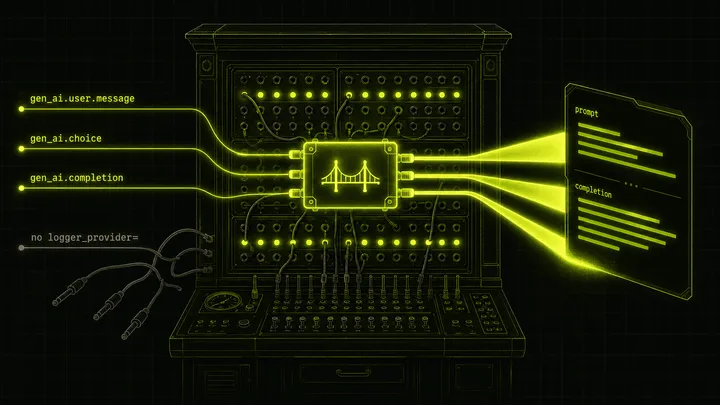
The upstream instrumentor patches the OpenAI client. For every chat completion call, it converts each input message to a LogRecord and emits it via logger.emit():
# opentelemetry-instrumentation-openai-v2/src/.../utils.py (upstream)def message_to_event(message, capture_content):    role    = get_property_value(message, "role")    content = get_property_value(message, "content")
    body = {}    if capture_content and content:        body["content"] = content
    return LogRecord(        event_name=f"gen_ai.{role}.message",   # "gen_ai.user.message", etc.        attributes={GenAIAttributes.GEN_AI_SYSTEM: "openai"},        body=body if body else None,    )
For completions, same pattern:
def choice_to_event(choice, capture_content): # ... builds body with finish_reason, message content, tool_calls ... return LogRecord( event_name="gen_ai.choice", attributes=attributes, body=body, )The instrumentation then calls logger.emit(message_to_event(message, ...)). This goes into the OTel LoggerProvider pipeline — not onto the span. The span itself gets only structural attributes: model name, token counts, finish reason, response ID. No prompt text. No completion text.
A note on the spec: the current OTel GenAI semantic conventions (status: Development) define gen_ai.input.messages and gen_ai.output.messages as opt-in span attributes. The opentelemetry-instrumentation-openai-v2 package predates this and implements an older event model — emitting content as named log records (gen_ai.user.message, gen_ai.choice) rather than span attributes. This is a spec/implementation lag, not a deliberate divergence. Either way, the practical result is the same: dashboards that read span attributes — including Last9’s LLM dashboard — see no content without a bridge.
The two failure modes
Failure mode 1: OTEL_INSTRUMENTATION_GENAI_CAPTURE_MESSAGE_CONTENT not set
Even if you have the log-to-span bridge wired correctly, the content body is empty if this env var is false (the default). The LogRecord is emitted with body=None. The bridge has nothing to promote. Set it to true, or use install(capture_content=True) which sets it automatically via os.environ.setdefault(...).
Failure mode 2: OpenAIInstrumentor wired to a different LoggerProvider
This is the subtler trap. If you call:
OpenAIInstrumentor().instrument() # no logger_provider=the instrumentor routes log records to whatever the current OTel global LoggerProvider is — which may be a NoOpLoggerProvider if you have not set one, or a different provider instance than the one your bridge is listening on. The bridge listens on a specific LoggerProvider. If the records go elsewhere, the bridge never fires.
Correct wiring:
OpenAIInstrumentor().instrument(logger_provider=logger_provider)# ^^^^^^^^^^^^^^^^^^^^^^^^^^^^^^^^^^^# must be the SAME instance the bridge is oninstall() handles this automatically. If you wire manually, this is the step most engineers miss.
The problem: most observability dashboards — including Last9’s LLM dashboard — read span attributes. If prompts and completions flow only through the log pipeline without a bridge, they never appear in your span view. This is one of the most confusing silent failures in LLM instrumentation.
Architecture: how last9-genai extends OTel
your app └── install() ├── TracerProvider │ └── Last9SpanProcessor ← gap 1 + gap 2 │ └── (your OTLP exporter) └── LoggerProvider └── Last9LogToSpanProcessor ← gap 3Two custom processors. One for context enrichment and cost. One for the log-to-span bridge.
The log-to-span bridge
The signal flow without the bridge:
client.chat.completions.create(messages=[...]) → opentelemetry-instrumentation-openai-v2 patch → for each message: logger.emit(LogRecord(event_name="gen_ai.user.message", body={...})) → LoggerProvider pipeline → LogRecordExporter (OTLP logs, if configured) → NOTHING on the span → span gets: model, tokens, finish_reason → span does NOT get: prompt text, completion textDashboard reads span attributes → empty.
The bridge inserts a LogRecordProcessor that intercepts those log records and writes them back onto the active span before they continue through the pipeline.
Last9LogToSpanProcessor implements LogRecordProcessor. When opentelemetry-instrumentation-openai-v2 emits a log record for a prompt message or completion, this processor intercepts it and writes it back onto the currently active span.
# log_processor.pyGEN_AI_PROMPT_EVENTS = {    "gen_ai.system.message": "system",    "gen_ai.user.message":   "user",    "gen_ai.assistant.message": "assistant",    "gen_ai.tool.message":   "tool",}GEN_AI_CHOICE_EVENT = "gen_ai.choice"
def on_emit(self, log_record: ReadWriteLogRecord) -> None:    event_name = getattr(log_record.log_record, "event_name", None)    if event_name != GEN_AI_CHOICE_EVENT and event_name not in GEN_AI_PROMPT_EVENTS:        return
    span = trace.get_current_span()    ctx = span.get_span_context()    if not ctx.is_valid or not span.is_recording():        return
    # accumulate messages for this span, then write flat + indexed attrs    with self._lock:        state = self._state.setdefault(ctx.span_id, {"prompts": [], "completions": []})        ...        self._set_prompt_flat(span, state["prompts"])      # gen_ai.prompt (JSON array)        self._set_prompt_indexed(span, idx, entry, body)   # gen_ai.prompt.{i}.role / .content
With the bridge, the signal flow becomes:
client.chat.completions.create(messages=[...]) → opentelemetry-instrumentation-openai-v2 patch → logger.emit(LogRecord(event_name="gen_ai.user.message", body={"content": "..."})) → Last9LogToSpanProcessor.on_emit() → trace.get_current_span() ← the active OpenAI span → span.set_attribute("gen_ai.prompt", '[{"role":"user","content":"..."}]') → span.set_attribute("gen_ai.prompt.0.role", "user") → span.set_attribute("gen_ai.prompt.0.content", "...") → span.add_event("gen_ai.content.prompt", {...}) → continues to LogRecordExporter (unchanged) → span now has: model, tokens, finish_reason, prompt text, completion textDashboard reads span attributes → content visible.
The processor maintains per-span state keyed by span_id (a plain int under a threading.Lock). As each log event arrives it accumulates messages and rewrites the flat gen_ai.prompt / gen_ai.completion attributes on the active span, plus indexed variants (gen_ai.prompt.0.role, gen_ai.prompt.0.content, etc.) for compatibility with AgentOps and Traceloop-style consumers.
When the span ends, Last9SpanProcessor.on_end() calls self.log_processor.cleanup_span(ctx.span_id) to release the accumulated state. Without this, per-span dictionaries accumulate indefinitely.
For this to work, OpenAIInstrumentor must be initialized with the same LoggerProvider that the bridge listens on:
OpenAIInstrumentor().instrument(logger_provider=logger_provider)If you call OpenAIInstrumentor().instrument() without logger_provider=, it routes log events to a different provider and the bridge never sees them. install() handles this automatically; the manual wiring path documents it explicitly.
contextvars-based propagation
The conversation and workflow tracking is built on Python’s contextvars module. Each piece of context (conversation ID, workflow ID, user ID, agent name, etc.) is a ContextVar:
_conversation_id: ContextVar[Optional[str]] = ContextVar("conversation_id", default=None)_workflow_id: ContextVar[Optional[str]] = ContextVar("workflow_id", default=None)_user_id: ContextVar[Optional[str]] = ContextVar("user_id", default=None)Context managers set the variable, yield, and restore the previous value in finally:
@contextmanagerdef conversation_context(conversation_id: str, user_id: Optional[str] = None, ...): prev_conv_id = _conversation_id.get() prev_user_id = _user_id.get() try: _conversation_id.set(conversation_id) if user_id is not None: _user_id.set(user_id) yield finally: _conversation_id.set(prev_conv_id) _user_id.set(prev_user_id)Last9SpanProcessor.on_start() calls get_current_context() and stamps whatever is set into the span while it is still mutable.
Why contextvars and not, say, thread-local storage?
- Thread-safe: each thread has its own context copy.
- Async-safe:
asynciopropagatescontextvarsinto tasks spawned inside a context. Aconversation_contextblock correctly tags all coroutines created within it, including those running on different event loop iterations. - Scope-based: the
finallyblock restores state. No risk of leaking a conversation ID into a subsequent request when the same thread handles both.
This is the same mechanism OTel’s own context propagation uses internally. If you have read the distributed tracing with OTel guide, the context.attach() / context.detach() pattern is the lower-level version of what these context managers wrap.
The on_start / on_end immutability constraint
OTel’s SpanProcessor interface has two hooks:
| Hook | Receives | Mutable? |
|---|---|---|
on_start(span, parent_context) | Span | Yes — set_attribute works |
on_end(span) | ReadableSpan | No — read-only view |
This split is a deliberate SDK design choice (see OTel API vs SDK). It prevents processors from modifying spans after they have been handed off to exporters.
For last9-genai, this creates a constraint:
- Context attributes (conversation ID, workflow ID, agent name) must be set in
on_start(). They come fromcontextvars, which are set before the span is created. - Cost must be computed in
on_end()— you need token counts, which only appear in the response, after the span ends. ButReadableSpanhas noset_attribute. Cost cannot be written back onto the span from the processor alone.
The SDK handles this in two ways:
@observedecorator: cost is computed inside the function wrapper, while the span is still open and mutable. The decorator callsspan.set_attribute(GenAIAttributes.USAGE_COST_USD, cost.total)directly.- Workflow aggregator:
on_end()extracts token counts, computes cost, and accumulates it in an in-memory workflow tracker keyed by workflow ID. This powers workflow-level cost rollups without touching the span.
The install() API
Six objects need to be wired correctly for everything to work:
TracerProviderLast9SpanProcessor(attached to the tracer provider)LoggerProviderLast9LogToSpanProcessor(attached to the logger provider)OTEL_INSTRUMENTATION_GENAI_CAPTURE_MESSAGE_CONTENT=true(env var)OpenAIInstrumentor().instrument(logger_provider=...)(same instance)
Getting any of these wrong produces a silent failure. install() collapses all six into one call:
from last9_genai import installfrom opentelemetry.sdk.trace.export import BatchSpanProcessorfrom opentelemetry.exporter.otlp.proto.grpc.trace_exporter import OTLPSpanExporter
handle = install()handle.tracer_provider.add_span_processor(BatchSpanProcessor(OTLPSpanExporter()))
install() is intentionally not magic: it does not add an exporter. You wire the exporter yourself. This keeps the SDK backend-agnostic — the OTLP exporter can point at Last9, Datadog, Honeycomb, or your own collector.
The return value is an InstallHandle dataclass:
@dataclassclass InstallHandle:    tracer_provider: TracerProvider    logger_provider: LoggerProvider    span_processor:  Last9SpanProcessor    log_processor:   Last9LogToSpanProcessor
    def shutdown(self) -> None: ...
Teams with existing providers can pass them in rather than creating new ones:
handle = install( tracer_provider=my_existing_provider, logger_provider=my_existing_logger_provider, set_global=False,)set_global=False skips the trace.set_tracer_provider() call so your existing global is not replaced. This is the escape hatch for service meshes or frameworks that initialize OTel before application code runs.
Use cases
Multi-turn conversation tracking
from last9_genai import install, conversation_contextfrom openai import OpenAI
handle = install()# ... wire OTLP exporter ...
client = OpenAI()
def handle_turn(messages: list, conversation_id: str, user_id: str) -> str:    with conversation_context(conversation_id=conversation_id, user_id=user_id):        response = client.chat.completions.create(            model="gpt-4o-mini",            messages=messages,        )        return response.choices[0].message.content
Every span created inside conversation_context automatically carries:
gen_ai.conversation.id = "thread-abc123"user.id = "user-456"You can now query your observability backend for all spans where gen_ai.conversation.id = "thread-abc123" and reconstruct the full session — even though each turn is a separate HTTP request and a separate trace.
For LangChain and LangGraph applications, the same context managers work. Wrap your chain.invoke() or graph.invoke() call inside conversation_context and all child spans — including those created by LangChain’s internal OTel instrumentation — inherit the conversation ID. See LangChain observability setup for how LangChain’s callback system integrates with OTel spans.
RAG pipeline cost attribution
from last9_genai import install, conversation_context, workflow_context, ModelPricing
handle = install(    custom_pricing={        "gpt-4o":                  ModelPricing(input=2.50, output=10.0),        "text-embedding-3-small":  ModelPricing(input=0.02, output=0.0),    })
def answer_query(user_id: str, query: str) -> str:    conv_id = generate_conversation_id(user_id)
    with conversation_context(conversation_id=conv_id, user_id=user_id):        with workflow_context(workflow_id=f"rag-{uuid4()}", workflow_type="rag"):            docs      = embed_and_retrieve(query)   # embedding call            reranked  = rerank(docs, query)          # rerank LLM call            answer    = generate(reranked, query)    # generation LLM call            return answer
All three spans get:
gen_ai.conversation.id = "conv-abc"user.id = "user-456"workflow.id = "rag-xyz"workflow.type = "rag"gen_ai.usage.cost = 0.000234 ← per-call cost on each spanYou can now filter by workflow.type = "rag" and compute average cost per RAG query, p95 cost, or which queries exceeded your per-call budget.
Multi-agent handoffs
from last9_genai import conversation_context, agent_context
with conversation_context(conversation_id=session_id, user_id=user_id):    with agent_context(agent_name="triage-bot", agent_id="triage-v2"):        intent = classify_intent(user_message)
    # Hand off to specialist agent    with agent_context(agent_name="billing-bot", agent_id="billing-v1"):        response = handle_billing_query(user_message, intent)
Each agent’s spans carry gen_ai.agent.name and gen_ai.agent.id per the OTel GenAI semantic conventions. Spans from both agents share the same gen_ai.conversation.id, so you can see the full handoff sequence in a single query.
Note: if you use a framework like AutoGen or the OpenAI Agents SDK, those frameworks set gen_ai.agent.* attributes on their own invoke_agent spans. Last9SpanProcessor.on_start() sets them first, but the framework may overwrite them in the span body. agent_context still correctly tags all LLM call and tool call child spans, which is usually what you want.
FastAPI integration
For web applications, conversation IDs typically come from session state or request headers. See FastAPI + OpenTelemetry for how to wire the OTel middleware — last9-genai sits on top of whatever tracing FastAPI already has:
from fastapi import FastAPI, Requestfrom last9_genai import install, conversation_context
handle = install()# ... wire OTLP exporter ...
app = FastAPI()
@app.post("/chat")async def chat(request: Request, body: ChatRequest):    conversation_id = request.headers.get("X-Conversation-Id", str(uuid4()))    user_id = request.state.user_id
    with conversation_context(conversation_id=conversation_id, user_id=user_id):        reply = await llm_handler(body.message)
    return {"reply": reply, "conversation_id": conversation_id}
The conversation_context block works correctly in async handlers because asyncio propagates contextvars into awaited coroutines.
The @observe decorator
For functions that call LLMs directly (rather than through auto-instrumented SDKs), @observe creates a span and extracts token usage and cost from the response:
from last9_genai import observe, ModelPricing
@observe(    tags=["production"],    metadata={"category": "customer_support"},)def call_claude(prompt: str) -> str:    response = anthropic_client.messages.create(        model="claude-sonnet-4-5",        max_tokens=1024,        messages=[{"role": "user", "content": prompt}],    )    return response.content[0].text
category in metadata is promoted to user.category on the span for the Last9 LLM dashboard filter. Use underscores for multi-word values: "data_analysis" renders as “data analysis” in the UI.
Span attributes reference
| Attribute | Source | Notes |
|---|---|---|
gen_ai.conversation.id | conversation_context | Primary grouping key across traces |
gen_ai.conversation.turn_number | conversation_context | Optional; set manually |
user.id | conversation_context | Propagated to all child spans |
workflow.id | workflow_context | Groups multi-step pipelines |
workflow.type | workflow_context | Filterable dimension: "rag", "chat", etc. |
gen_ai.agent.name | agent_context | OTel GenAI semconv |
gen_ai.agent.id | agent_context | OTel GenAI semconv |
gen_ai.prompt | Last9LogToSpanProcessor | JSON array; bridged from log record |
gen_ai.completion | Last9LogToSpanProcessor | JSON array; bridged from log record |
gen_ai.prompt.{i}.role | Last9LogToSpanProcessor | Indexed; AgentOps/Traceloop compat |
gen_ai.usage.cost | @observe / Last9SpanProcessor | USD; calculated from token counts |
gen_ai.l9.span.kind | @observe | llm / tool / chain / agent |
What it does not do (yet)
Honest accounting:
- Anthropic auto-instrumentation:
install()auto-wires OpenAI viaopentelemetry-instrumentation-openai-v2. There is no equivalent upstream package for Anthropic. Use@observefor Anthropic calls, or theanthropic_integration.pyexample in the repo. - Tool call content capture:
execute_toolspan attributes (tool arguments and results) are tracked as span events but not yet promoted onto parent spans. Phase 2 work. - Python 3.14 + wrapt:
opentelemetry-instrumentation-openai-v22.3b0 is broken againstwrapt>=2.0(kwarg renamed). Pinwrapt<2until the upstream package ships a fix. - The OTLP headers whitespace edge case: if you configure auth headers manually and see 401s, see this guide on OTLP header formatting — trailing whitespace in header values is a known footgun with the Python OTel exporter.
Getting started
pip install last9-genai opentelemetry-exporter-otlp-proto-grpcfrom last9_genai import installfrom opentelemetry.sdk.trace.export import BatchSpanProcessorfrom opentelemetry.exporter.otlp.proto.grpc.trace_exporter import OTLPSpanExporter
handle = install()handle.tracer_provider.add_span_processor( BatchSpanProcessor(OTLPSpanExporter()))Required environment variables:
export OTEL_SERVICE_NAME=my-llm-appexport OTEL_EXPORTER_OTLP_ENDPOINT=https://otlp.last9.ioexport OTEL_EXPORTER_OTLP_HEADERS="Authorization=Basic <base64-credentials>"Source and examples: github.com/last9/python-ai-sdk
Summary
OTel gives you request-scoped causality. LLM applications need session-scoped context. last9-genai fills three gaps:
- Conversation threading —
contextvars-based propagation stamps every span with a conversation ID, enabling cross-trace session queries. - Cost tracking — token counts plus your pricing equals
gen_ai.usage.costas a first-class span attribute. - Log-to-span bridge —
Last9LogToSpanProcessorintercepts GenAI log events fromopentelemetry-instrumentation-openai-v2and writes prompts and completions onto the active span, where dashboards can actually read them.
None of this requires replacing your existing OTel stack. Add the two processors, keep your existing providers and exporters, and start querying at conversation and workflow granularity.


