


Database indexing is the single most effective way to speed up read queries. An index on a column lets the database skip full table scans and jump directly to the rows it needs, similar to how a book’s index lets you find a topic without reading every page.
This guide covers how indexes work under the hood, the main index types, when to add them, and when they hurt more than they help.
What is database indexing?
Database indexing creates a separate data structure (usually a B-tree) that maps column values to row locations, letting the database find rows without scanning the entire table. An index on a 10-million-row table can reduce query time from seconds to milliseconds. The tradeoff: every insert, update, or delete must also update the index.
What Is a Database Index?
A database index is a data structure (usually a B-tree or hash table) that the database maintains alongside your table data. It maps column values to their physical row locations, so the database can locate rows without scanning the entire table.
Without an index, a query like this forces a sequential scan:
SELECT * FROM orders WHERE customer_id = 12345;If the orders table has 10 million rows, the database reads all 10 million to find matches. With an index on customer_id, it looks up the value in the B-tree and follows a pointer directly to the matching rows. The difference is often 100x or more in query time.
How Database Indexing Works
Most relational databases use B-tree indexes by default. Here’s what happens when you create one:
CREATE INDEX idx_orders_customer ON orders (customer_id);- The database reads every
customer_idvalue from the table - It builds a balanced tree structure where each node contains sorted key values and pointers
- Leaf nodes point to the actual row locations on disk (or in pages)
- The tree stays balanced as you insert, update, or delete rows
When a query filters on customer_id, the database traverses the B-tree from root to leaf. For a table with 10 million rows, this typically takes 3-4 page reads instead of thousands.
The cost of writes
Indexes are not free. Every INSERT, UPDATE, or DELETE on an indexed column requires updating both the table and the index. For write-heavy workloads, too many indexes can tank performance. A table with 15 indexes means 15 extra structures to maintain on every write.
Types of Database Indexes
B-tree index
The default in PostgreSQL, MySQL, and most relational databases. B-tree indexes handle equality checks (=), range queries (BETWEEN, <, >), sorting (ORDER BY), and prefix matching (LIKE 'abc%').
-- Works well with B-treeSELECT * FROM users WHERE created_at BETWEEN '2026-01-01' AND '2026-02-01';SELECT * FROM users WHERE email = 'user@example.com';SELECT * FROM users ORDER BY created_at DESC LIMIT 10;Hash index
Optimized for exact equality lookups only. Faster than B-tree for = comparisons, but useless for range queries or sorting. PostgreSQL supports hash indexes natively; MySQL’s InnoDB does not (it uses a hash-based adaptive index internally but you can’t create one explicitly).
-- Good fit for hash indexSELECT * FROM sessions WHERE session_id = 'abc123';Clustered vs non-clustered index
This is a distinction that matters in SQL Server, MySQL (InnoDB), and PostgreSQL (with CLUSTER):
Clustered index: The table data itself is stored in the order of the index. Each table can have only one clustered index because the rows can only be physically sorted one way. In InnoDB, the primary key is always the clustered index.
Non-clustered index: A separate structure that contains the indexed columns plus a pointer back to the full row. You can have many non-clustered indexes per table. Lookups require an extra step (the “bookmark lookup”) to fetch the full row from the table.
Practical impact: if most of your queries filter by created_at, a clustered index on that column means range scans read contiguous disk pages. A non-clustered index on the same column requires random I/O to fetch each row.
Composite (multi-column) index
An index on two or more columns. Column order matters:
CREATE INDEX idx_orders_status_date ON orders (status, created_at);This index helps queries that filter on status alone, or status + created_at together. It does not help queries that filter only on created_at (the second column). This is the “leftmost prefix” rule.
Partial index
An index that covers only a subset of rows. Useful when you frequently query a small fraction of the table:
-- PostgreSQL: only index active usersCREATE INDEX idx_active_users ON users (email) WHERE is_active = true;This produces a smaller index that’s faster to scan and cheaper to maintain.
Covering index
An index that includes all columns a query needs, so the database never reads the actual table. In PostgreSQL, use INCLUDE:
CREATE INDEX idx_orders_covering ON orders (customer_id) INCLUDE (total, created_at);Now a query selecting customer_id, total, and created_at can be answered entirely from the index. This eliminates the bookmark lookup.
When to Add an Index (and When Not To)
Add an index when:
- A column appears frequently in
WHERE,JOIN, orORDER BYclauses - The column has high selectivity (many distinct values relative to total rows)
- Queries on that column are slow and show up in slow query logs
- You need to enforce uniqueness (
UNIQUE INDEX)
Skip the index when:
- The table is small (under ~10K rows). Sequential scans are fast enough.
- The column has low selectivity (e.g., a boolean
is_activecolumn with only two values) - The table is write-heavy and you’re already maintaining many indexes
- The query returns a large percentage of the table’s rows. At some point, a sequential scan is faster than thousands of random index lookups.
Finding missing indexes
Most databases expose query execution stats. In PostgreSQL:
-- Find sequential scans on large tables (potential missing indexes)SELECT relname, seq_scan, seq_tup_read, idx_scanFROM pg_stat_user_tablesWHERE seq_scan > 100ORDER BY seq_tup_read DESCLIMIT 10;In MySQL:
-- Find queries without index usageSELECT * FROM sys.statements_with_full_table_scansORDER BY no_index_used_count DESCLIMIT 10;Monitoring Index Performance
Indexes can degrade over time. Bloated indexes, unused indexes eating write performance, and missing indexes causing slow queries are all problems that show up in production, not in development.
What to watch:
- Slow query logs: Queries that suddenly get slower may indicate index fragmentation or a missing index after a schema change. Both PostgreSQL and MySQL expose detailed slow query logging you can enable without a restart
- Index hit ratio: In PostgreSQL,
pg_stat_user_indexesshows how often each index is actually used. Ifidx_scanis zero for months, the index is dead weight - Write amplification: Track insert/update latency alongside index count. If write latency climbs after adding indexes, you’ve hit the tradeoff
Ship your database metrics and slow query logs to an observability platform so you can correlate index performance with application-level latency. If a deploy adds a new query pattern that bypasses your indexes, you want to catch it from the spike in p99 latency, not from a customer complaint.
For a broader view of database performance beyond indexing, see our database optimization guide.
See Every Database in Your Cloud from One Place
Most teams run five or six different databases across dev, staging, and production, and nobody has a single view of all of them. When a query starts timing out, the first question is always “which database is this hitting?” followed by “who owns that service?”
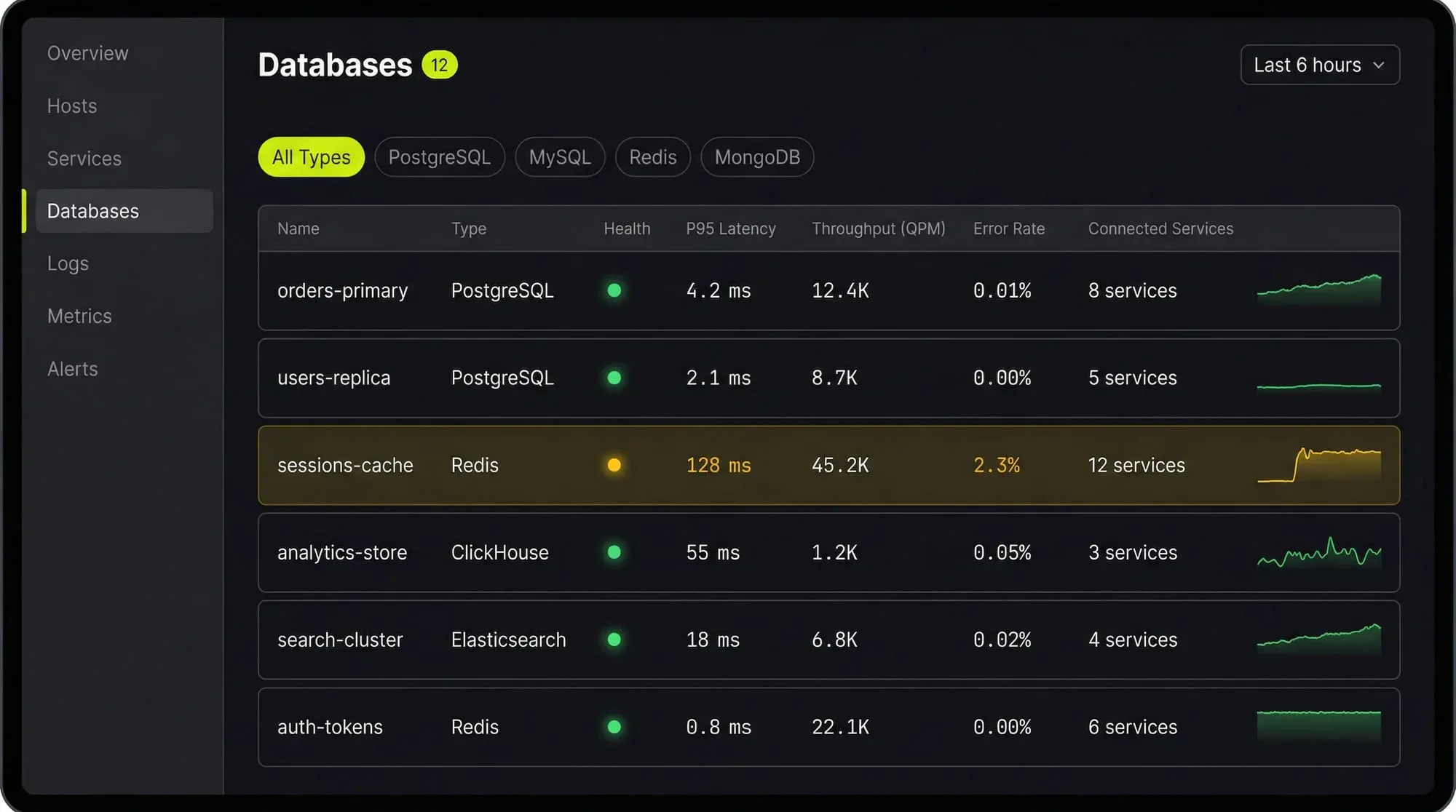
Last9’s Discover Databases gives you that single view. It automatically detects every database in your cloud (PostgreSQL, MySQL, MongoDB, Redis, Elasticsearch, and more) and shows them alongside the services that talk to them and the infrastructure they run on. You get:
- Every database, one screen: No more hunting through AWS consoles, Kubernetes dashboards, and team wikis to figure out what databases exist and who owns them
- Service-to-database mapping: See which services call which databases, so when a database is slow you immediately know the blast radius
- Infrastructure context: CPU, memory, disk, and connection pool metrics for the underlying host or pod, right next to query performance
- Traces to queries: Click from a slow API endpoint trace directly into the database query that caused the latency
If you are tuning databases by hand and correlating metrics across three different tools, Discover Databases puts everything in one place so you can find the bottleneck in minutes instead of hours.
FAQs
How many indexes should a table have?
There’s no fixed number. A read-heavy analytics table might have 10+ indexes. A write-heavy event log table might have 1-2. Let your query patterns and slow query logs guide you. If an index isn’t being used (check pg_stat_user_indexes or sys.schema_unused_indexes), drop it.
Does indexing speed up all queries?
No. Indexes help queries that filter, sort, or join on indexed columns. A query that reads every row in a table (like SELECT COUNT(*) FROM orders) won’t benefit from a non-covering index. Aggregate queries on non-indexed columns still require full scans.
What is the difference between clustered and non-clustered indexes?
A clustered index determines the physical order of data in the table. You get one per table. A non-clustered index is a separate structure with pointers back to the table rows. You can have many. Clustered indexes are faster for range scans; non-clustered indexes are more flexible.
Should I index foreign keys?
Almost always yes. Foreign keys are used in JOIN conditions, and without an index, the database does a sequential scan on the child table for every join. Most databases don’t auto-index foreign keys (PostgreSQL doesn’t; MySQL’s InnoDB does).
How do I know if my index is actually being used?
In PostgreSQL, run EXPLAIN ANALYZE on your query and look for “Index Scan” or “Index Only Scan” in the output. If you see “Seq Scan” instead, the planner chose not to use your index. In MySQL, use EXPLAIN and check the key column.
What is index bloat and how do I fix it?
Index bloat happens when dead tuples accumulate in the index (common in PostgreSQL after many updates/deletes). The index grows larger than necessary and scans slow down. Fix it with REINDEX or pg_repack for zero-downtime rebuilds. Monitor index size relative to table size as a leading indicator.
Can I index JSON columns?
Yes. PostgreSQL supports GIN indexes on jsonb columns, which speed up operators like @>, ?, and ?&. MySQL 8.0+ supports multi-valued indexes on JSON arrays. These are powerful but can be expensive to maintain on write-heavy tables.
What happens to indexes during bulk loads?
Indexes slow down bulk inserts significantly. For large data loads, it’s common to drop indexes, load the data, then rebuild the indexes. In PostgreSQL, you can also use CREATE INDEX CONCURRENTLY to build indexes without locking the table.


