

Log retention is the length of time logs stay available for search before they are archived or deleted. Keep too much and you pay hot-storage prices for months of debug output. Keep too little and the logs you need for an incident review or an audit are gone.
This guide covers what log retention involves, how long to keep each type of log, how to write a retention policy, and how to keep months of history without keeping all of it hot. The mechanics section uses Last9’s documented behaviour for dropping, archiving and rehydrating logs.
What is log retention?
NIST’s glossary defines log retention as archiving logs on a regular basis. In practice, three separate decisions hide inside that phrase:
- Retention is how long logs stay searchable in your log platform.
- Archival moves logs that are past that window to cheaper storage, where they can be restored.
- Deletion removes them for good.
Four things push those decisions:
- Compliance: some regulations name a period for some log classes, and others expect you to set and justify your own.
- Debugging: you need enough history to see a recurring failure or compare today with last week.
- Security: investigations often start weeks after the first event.
- Cost: hot storage cost scales with log volume multiplied by retention window, so both levers matter.
Log retention is one thing, but knowing what log levels to use makes all the difference. Check out our guide on log levels to make sure you’re storing the right data without the extra noise.
The challenges of log retention
Hot storage cost scales with volume times window
Doubling the window doubles the data you keep searchable, and log volume tends to grow with traffic and with the number of services. A retention setting that was cheap last year can become the largest line in the logging bill without anyone changing it.
The fix is to stop treating all logs as one pool. Keep a short hot window, push older data to object storage such as AWS S3 or Google Cloud Storage, and decide per log class what deserves the hot tier at all.
Long windows slow searches and widen what you must secure
Searching a large hot index is slower and costlier than searching a small one. Every extra month of logs is also another month of data that can contain tokens, email addresses and other personal data, which then needs access control and a deletion schedule.
Tiered storage helps here. Elasticsearch index lifecycle management and Loki’s compactor both let you move or delete data by age, and later sections show where a hosted tier replaces that work.
One policy cannot fit every compliance regime
Different rules ask for different things. PCI DSS names a period for audit log history, HIPAA names a period for policy documentation, and GDPR names no period at all. A single account-wide retention number will be too long for some data and too short for other data.
The answer is a policy per log class, enforced per service, rather than one default for the whole account.
Storing logs is important, but catching errors in real time can save you headaches. Check out our guide on monitoring error logs in real time to stay ahead of issues.
How long should you keep logs?
There is no universal answer, and anyone quoting one is giving you a rule of thumb. The table shows common starting points by log type, with the sourced requirements called out underneath. Treat the ranges as defaults to adjust with your auditor and your own incident history, not as standards.
| Log type | Common starting range | What it is for |
|---|---|---|
| Application logs | 14 to 90 days | Errors, warnings and debug output for engineers |
| System logs | 30 to 180 days | Kernel, OS and hardware events |
| Network logs | 30 to 365 days | Firewall, traffic and connection records |
| Security logs | 1 to 5 years, set by your compliance scope | Authentication attempts, access control events, threats |
| Audit logs | 1 to 7 years, set by the rule that applies | Changes to configuration, permissions and data |
| Traces | A short window; Last9’s default is 14 days | Request paths across services |
| Metrics | Longer than logs; Last9’s default is 90 days | Trends, SLOs and capacity planning |
The ranges for application, system, network, security and audit logs are common practice, not drawn from a standard. Verify the ones that matter to you before they go into a policy.
Three requirements are worth knowing exactly:
- PCI DSS: requirement 10.5.1 asks you to retain audit log history for at least 12 months, with the most recent three months immediately available for analysis. The standard is published in the PCI SSC document library.
- HIPAA: 45 CFR 164.316 requires security policies and related documentation to be kept for 6 years. That period applies to the documentation, and the rule sets no retention period for logs themselves.
- GDPR: it sets no fixed log retention period. You choose one, document why, and delete on schedule. Our GDPR log management guide covers that in detail.
How do cost and storage management impact log retention?
Hot storage cost is roughly the daily volume you keep searchable multiplied by the number of days you keep it. That makes four levers, and the order matters:
- Drop logs that no one will ever read, before they are stored.
- Tier what remains: a short hot window, then object storage.
- Compress archived data. Object storage and columnar formats do most of this for you.
- Expire data when its policy period ends, so storage does not grow without bound.
Object storage changes the math because you pay storage rates for data you query rarely, and you pay query costs only when you restore a range. The mistake is the reverse: keeping a full year of everything in the index that engineers search every day.
The shape of the cost follows the hot window times volume. Shortening the window and shrinking the volume both pay off, and archiving keeps a long total history cheap.
Logs are only as useful as the insights you can pull from them. Learn how to break them down effectively with our guide on log parsing.
Selective logging: decide what enters the hot tier
The cheapest log to retain is the one you never stored. Selective logging means deciding, per log class, whether a log is kept hot, converted to a metric, or dropped at ingestion.
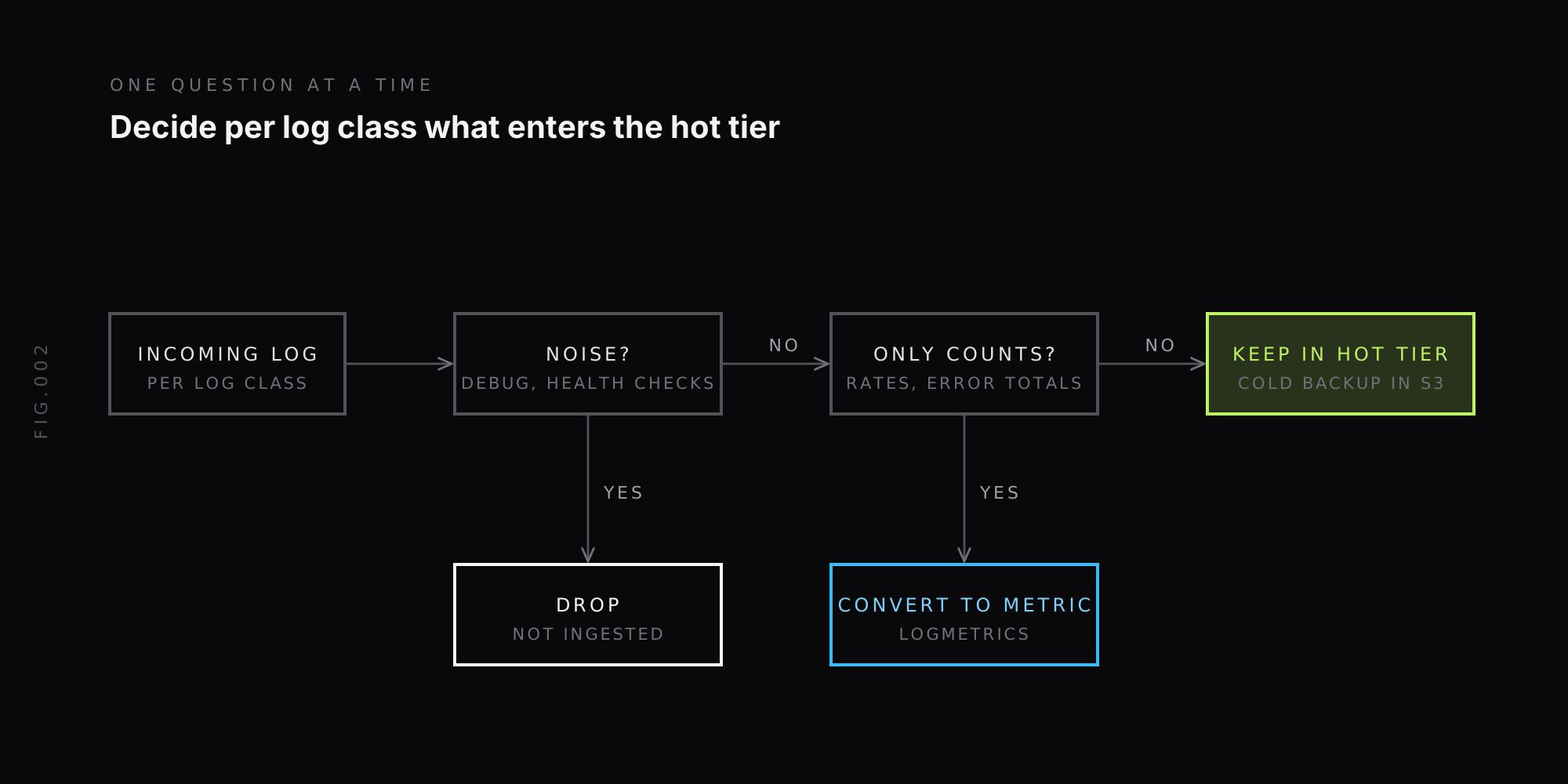
In Last9, the Drop control discards telemetry at ingestion, with no code change or redeploy. For logs you filter on attributes and resource attributes, and filters combine with AND. A rule that drops debug logs from a development environment matches resource.attributes["deployment.environment"] == development and attributes["level"] == debug.
Two properties matter before you save a rule:
- Dropped data cannot be recovered. It is not ingested, so there is nothing to rehydrate later.
- You can preview first. The rule form links to Logs Explorer with your filters applied, so you see what would match before it starts matching.
Rules take one to two minutes to take effect, and deleting a rule resumes ingestion. That makes a drop rule a good tool for known noise and a poor one for anything you might need in a post-incident review.
For repetitive logs where you only need counts, such as error totals per service, convert them to metrics rather than storing every line. Last9’s streaming aggregation page covers LogMetrics, which turns logs into metrics you can alert on.
Hot, warm and cold tiers: log archiving and rehydration
Tiering splits a log’s life into a window where it is fast to search and a longer period where it is cheap to keep. Three tiers is the usual model:
- Hot: recent logs, indexed and fast to query, where you debug live issues.
- Warm: logs needed occasionally, on slower or cheaper storage.
- Cold: long-term archive in object storage, restored on demand.
Last9 documents the hot and cold ends of this. Logs and traces are retained for 14 days by default, with cold storage for backup and on-demand rehydration. The cold tier is your own AWS S3 bucket, which Last9 writes to through an IAM role you create. Last9 applies no sampling to ingested data, so the archive holds the full stream you chose to ingest.
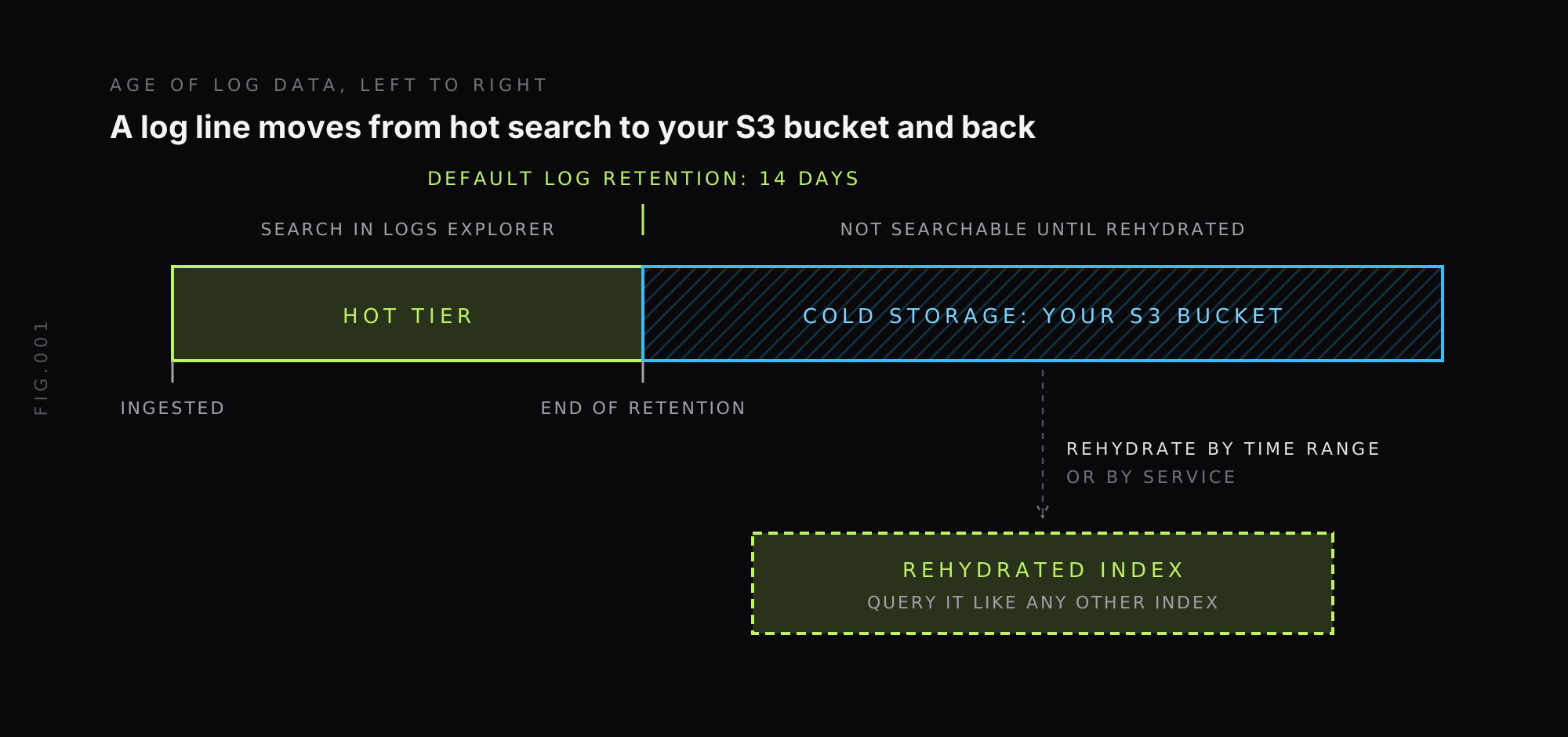
Cold storage can back up all services or only selected ones. With service-level backup on, you can later rehydrate individual services. With it off, backup is at index-level granularity and you cannot restore a single service. The Cold Storage docs list the setup steps, and the same data can be read in place through Athena.
Rehydration restores logs from before your retention window:
- Open Rehydration in the Control Plane and create a new rehydrated index.
- Choose the time range, which must be from before the retention window, and the services if service-level backup is on.
- Name the index, then start the job and wait for it to show as Available.
- Open it in Logs Explorer and query it like any other index.
Rehydrated indexes expire, and you can delete them to free storage. For live debugging, Last9 also rehydrates automatically, up to 10M log lines, when the time range you request is beyond the retention period. The Rehydration guide has the details.
The default retention period can be changed by contacting Last9 support, which is how you would configure a longer searchable window. The Storage overview lists the defaults.
Retention for metrics and traces
Logs are one of three signals, and each wants its own window. Metrics are small, queried for trends and used for SLOs, so they usually live longer than logs. Traces are bulky and mostly valuable during an investigation, so they usually live shorter.
In Last9, metrics data is retained for 90 days by default, with cold storage for backup, and traces share the 14-day default and the same cold backup and rehydration path as logs. Metrics also get automated data tiering by default, including metrics generated from the traces-to-metric and logs-to-metric pipelines.
If you run your own Prometheus, the default is shorter: --storage.tsdb.retention.time defaults to 15d when neither it nor the size flag is set, according to the Prometheus storage docs. Our Prometheus data retention guide covers the flags, sizing and long-term storage options for the metrics side.
How do you set log retention policies? (With examples)
A data retention policy is a short document that answers, for each class of log, how long it is kept, where, and who decides. Write one table, then enforce it in the tools that hold the data.
| Log class | Tier and period | Owner | Enforced by |
|---|---|---|---|
| Debug logs, non-production | Dropped at ingestion | Service team | Drop rule |
| Application logs, production | Hot for the default window, then S3 backup | Service team | Retention setting and cold backup |
| Health checks and probes | Dropped at ingestion | Platform team | Drop rule |
| Security and auth logs | Hot, then S3 for the period your compliance scope sets | Security team | Cold backup and bucket lifecycle rule |
| Audit logs | Meets the rule that applies, for example PCI DSS 10.5.1 | Compliance owner | Cold backup and bucket lifecycle rule |
The periods in a row are yours to fill in. Take them from your own compliance scope, not from this table.
Four parts make the policy enforceable:
- Classify logs by business need. Separate critical logs from non-essential ones, for example authentication records from development debug output.
- Set a period and a reason for each class. Auditors ask for the reasoning, not just the number.
- Enforce it per service. With service-level backup, retention follows the service’s actual needs, so a regulated service can be archived while a noisy internal one is not.
- Expire what has aged out. Add an S3 lifecycle rule to your archive bucket so data is deleted when its period ends, and keep the bucket’s lifecycle longer than any retention you promised.
Finish with a review step. Revisit the table every quarter, or when a new regulation, product or compliance scope appears, because log volume and rules both drift.
Raw logs can be a pain to read. If you’re using Pino, check out our guide on Pino Pretty to format logs for better readability.
Log retention best practices
1. Define a policy per log class
One number for the whole account is always wrong for someone. List the log types you collect, give each a period, a tier and an owner, and write down the reason.
2. Drop before you store
Removing debug output, health checks and probe logs at ingestion cuts volume before it can multiply by the retention window. Preview the rule against live data first, since dropped data is unrecoverable.
3. Tier by age and purpose
Keep a short hot window for live debugging and put everything older in object storage. Do not index a year of data to serve the one query a quarter that needs it.
4. Set retention per service, not per account
Service-level backup lets you archive the services that need it and skip the ones that do not. It also means a rehydration can be limited to the services involved in an incident, which is faster and smaller.
5. Test a rehydration before an audit needs it
An archive you have never restored is an assumption. Rehydrate one old time range each quarter, confirm the data is complete and time how long it takes.
6. Automate rotation, archival and deletion
Use logrotate on Linux hosts, lifecycle rules on your object storage and the retention settings of your log platform, so nobody has to remember to delete things. Our guide to log rotation in Linux covers the host side.
7. Control access and encrypt
Restrict who can read archived logs with IAM policies and encrypt logs in transit and at rest. A long retention window is a long exposure window for any personal data in the logs.
Tools to manage log retention
Most log tools can enforce retention. They differ in how much of the tiering and restore work you run yourself.
- Elasticsearch: index lifecycle management automates rollover, retention and deletion of time-based indices such as logs. You run the cluster and the tiers. See our Last9 vs Elasticsearch comparison for where each fits.
- Grafana Loki: retention is done by the compactor, and by default the
compactor.retention-enabledflag is not set, so logs sent to Loki live forever until you turn it on. See the Loki retention docs and our Last9 vs Grafana comparison. - AWS CloudWatch Logs: each log group has its own retention setting, and you choose how long events are kept.
- Fluentd and Logstash: these shape and forward logs, so they help with the drop and compress levers before storage rather than with retention itself.
- Last9: an OpenTelemetry-native observability platform. For logs it documents drop rules at ingestion, a 14-day default retention, S3 cold storage in your own bucket, and rehydration by time range or service. It applies no sampling to ingested data.
Pick based on who runs the tiers. If you want to operate the storage layer yourself, Elasticsearch ILM and Loki on object storage give you full control. If you want the tiers, archive and restore managed, that is the case for a platform that bundles them.
Managing log retention is easier when logs don’t pile up endlessly. Learn how to automate cleanup with our guide on log rotation in Linux.
FAQ
What is log retention?
Log retention is the length of time logs stay available for search before they are archived or deleted. Retention, archival and deletion are separate steps: retention is the searchable window, archival moves older logs to cheaper storage, and deletion removes them for good. The window is set by compliance rules, debugging needs, security investigations and storage cost.
How long should you keep application logs?
Most teams keep application logs searchable for 14 to 90 days, which covers the time it takes to notice and debug most production issues. That range is a common starting point, not a standard. Keep the window short in the hot tier, and archive older logs to object storage if you may need them for an audit or a slow-burning incident.
What retention period should you use for different log types?
Set retention by log class. Application and debug logs need the shortest window, system and network logs a medium one, and security and audit logs the longest. Regulations set the floor for some classes: PCI DSS requirement 10.5.1 asks for 12 months of audit log history with the most recent three months immediately available, and GDPR sets no fixed period, so you document and justify your own.
How do you keep logs for months without high storage cost?
Keep only a short window in the hot tier and archive the rest to object storage. Drop low-value logs such as debug output and health checks at ingestion, convert repetitive logs to metrics, and back up what remains to cold storage such as an S3 bucket. When an old time range is needed, rehydrate that range into a queryable index instead of keeping all of it searchable.
What is log rehydration?
Log rehydration copies archived logs from cold storage back into a queryable index. In Last9 you pick a time range from before your retention window, optionally limit it to selected services when service-level backup is on, and Last9 builds a rehydrated index you can open in the Log Explorer. It lets you query old logs without paying to keep them hot.
How long should audit logs be retained?
It depends on the rule that applies to you. PCI DSS v4.0 requirement 10.5.1 requires audit log history of at least 12 months, with the most recent three months immediately available for analysis. HIPAA sets no log retention period, though it requires security policy documentation to be kept for 6 years. For anything else, take the period from your own policy or auditor.
What should a data retention policy for logs include?
A data retention policy for logs should list the log classes you collect, the retention period for each, the storage tier they sit in, who owns each class, how access is controlled, when data is deleted and when the policy is reviewed. It should also record the reason for each period, because auditors ask for the justification as well as the number.
And if you ever want to explore the discussion further, our Discord community is open! We have a dedicated channel where you can connect with other developers and discuss your specific use case.


